Lenovo Idea Tab Pro Review: The Best Android Tablet Under ₹30,000?
The Lenovo Idea Tab Pro (TB373FU) arrived in India in March 2025 at ₹27,999, and it immediately became one of the most talked-about mid-range Android tablets in the country. Eleven months and a price revision later, it now sits at around ₹28,999 for the base 8GB RAM / 128GB storage variant, with the 12GB / 256GB version available at ₹30,999. At that price, it comes with a large 12.7-inch 3K display, a Lenovo Tab Pen Plus stylus, and a quad-speaker JBL setup, all in the box. On paper, that is a remarkable amount of hardware for the money. After spending extended time with the tablet across daily usage, gaming sessions, and productivity tasks, here is the full picture.
A quick note for buyers reading this in mid-2026: Lenovo has now launched the Idea Tab Pro Gen 2 in India at ₹39,999 with a Snapdragon 8s Gen 4 chip and a 13-inch 3.5K display. If your budget allows for it, that is the newer and more powerful option. But if ₹28,999 is your ceiling, the original Idea Tab Pro remains a genuinely strong buy – and that is exactly what this review covers.
Specifications
| Display | 12.7-inch IPS LCD, 2944×1840 (3K), 144Hz, 400 nits peak, 16:10 |
| Processor | MediaTek Dimensity 8300-Ultra (4nm) |
| GPU | Mali-G615 MC6 |
| RAM / Storage | 8GB + 128GB / 12GB + 256GB (LPDDR5X, UFS 3.1) |
| Battery | 10,200mAh, 45W fast charging |
| Connectivity | Wi-Fi 6E, Bluetooth 5.3, USB 3.2 Type-C, GPS — No SIM slot |
| Stylus | Lenovo Tab Pen Plus (included) — 4,096 pressure levels, tilt, palm rejection |
| Speakers | Quad JBL speakers, Dolby Atmos |
| OS | Android 16 (launched on Android 14) |
| Dimensions / Weight | 291.8 × 189.1 × 6.9mm / 620g |
| Price in India | ₹28,999 (8GB/128GB) | ₹30,999 (12GB/256GB) |
Design and Build
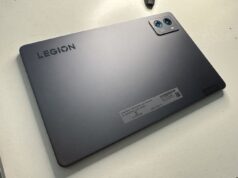
The Idea Tab Pro is a large tablet, and Lenovo does not try to hide it. At 291.8 x 189.1 x 6.9mm and 620 grams, this is not a device you will comfortably hold one-handed for long stretches. It is, however, built with a quality that you would not expect at this price. The chassis is metal throughout, with a smooth matte finish on the rear that resists fingerprints reasonably well. The build feels solid and substantial. There is no flex, no creaking, and no budget-tablet plasticky feeling anywhere.
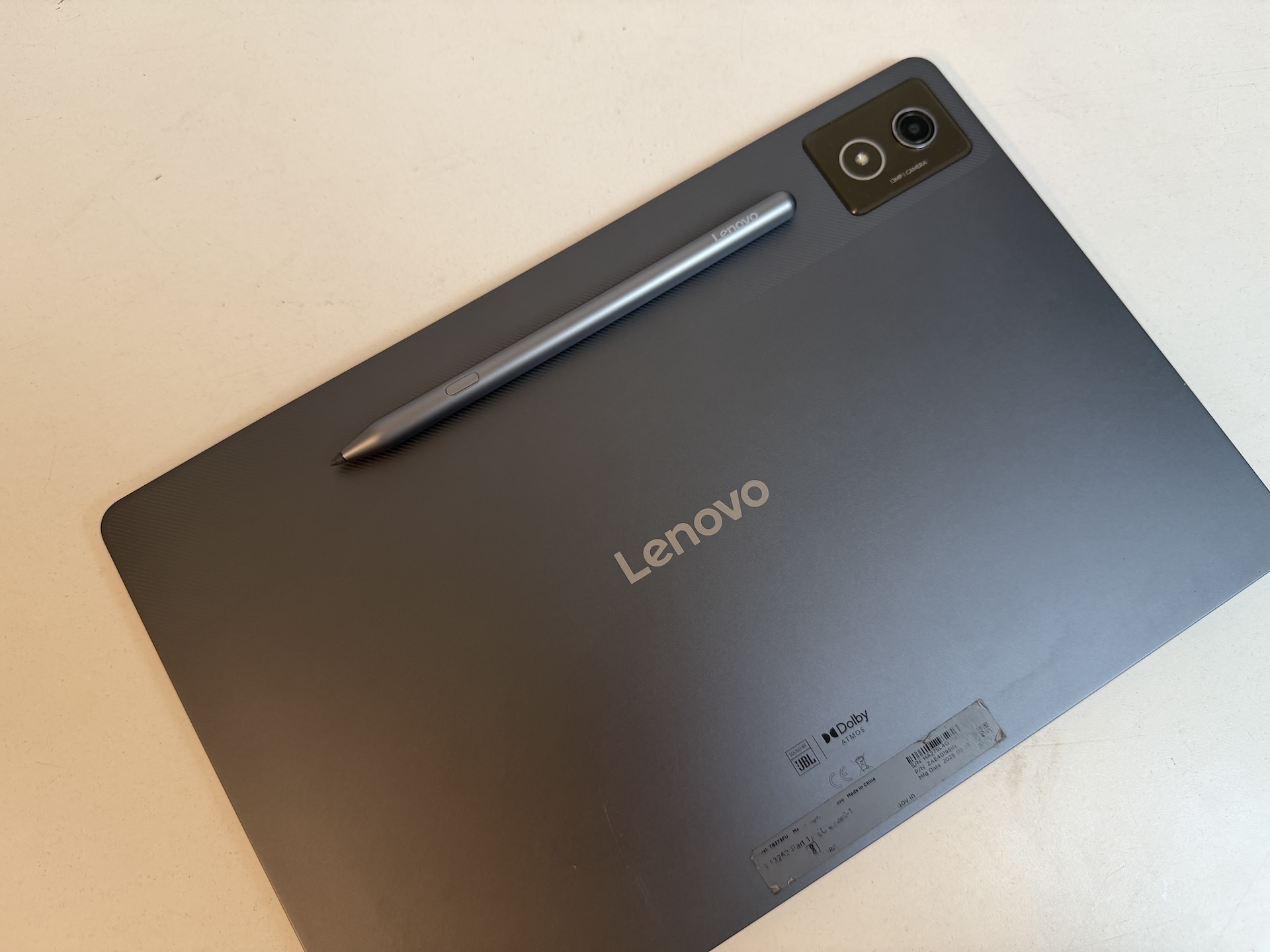
The bezels are on the thicker side at around 8mm, but they are intentional. When you are holding a 12.7-inch tablet in landscape orientation, you need somewhere to rest your thumbs without triggering accidental inputs, and those bezels deliver exactly that. The Tab Pen Plus attaches magnetically to the rear and stays in place reasonably well, though it does not charge wirelessly while attached, you charge it separately via USB-C.
Port selection is practical for this segment: USB 3.2 Type-C, a microSD card slot expandable up to 1TB, and a three-point pogo pin connector at the bottom for the optional keyboard dock sold separately at approximately ₹4,998. There is no 3.5mm headphone jack. On the right edge you will find the power button with an integrated fingerprint sensor. It is fast, reliable, and far more convenient than unlocking by PIN or face recognition every time you pick the tablet up. It ought to be, it has the Lenovo ThinkPad pedigree.
Display

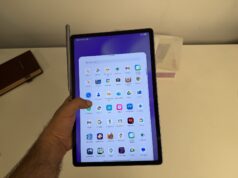
The 12.7-inch IPS LCD panel runs at a resolution of 2944 x 1840 pixels, commonly called 3K, with a 144Hz refresh rate and a 16:10 aspect ratio. For the price, this combination of resolution and refresh rate is genuinely impressive. Sharpness is excellent: text is crisp, fine detail in video is well-rendered, and the high refresh rate makes scrolling and UI navigation feel noticeably smoother than most tablets in this price band.
Where the display shows its budget origins is brightness. Lenovo rates it at 400 nits peak, and real-world use confirms that number. Indoors, in a reasonably lit room, the display looks good: colours are vibrant, contrast is solid for an IPS panel, and wide viewing angles hold up well. But take it outdoors into direct sunlight, or into a bright room near a window, and the screen struggles to compete with ambient light. This is the Idea Tab Pro’s most significant weakness and the one you are most likely to notice day to day.
The Low Blue Light hardware solution reduces eye strain during extended reading or note-taking sessions without the harsh yellow tint of software-based filters. We saw this in the Lenovo Legion Tab and liked it there too. The 16:10 aspect ratio suits both widescreen streaming and document layouts well. Most streaming content results in minimal black bars, while split-screen multitasking benefits from the slightly taller proportions.
| Tablet | Size | Resolution | Refresh Rate | Peak Brightness | HDR |
|---|---|---|---|---|---|
| Lenovo Idea Tab Pro | 12.7″ | 3K (2944×1840) | 144Hz | 400 nits | Limited |
| Redmi Pad 2 Pro | 12.1″ | 2.5K (2560×1600) | 120Hz | 600 nits HBM | Dolby Vision ✓ |
| OnePlus Pad Go 2 | 12.1″ | 2.8K (2800×1980) | 120Hz | 900 nits HBM ✓ | Dolby Vision ✓ |
| Samsung Galaxy Tab A9+ | 11″ | FHD+ (1920×1200) | 90Hz | 464 nits | No |
The Idea Tab Pro has the largest screen, the highest resolution, and the highest refresh rate in this comparison. But it is also the dimmest by a significant margin – every competing tablet is brighter. For primarily indoor use this rarely matters. If outdoor legibility is important, the OnePlus Pad Go 2’s 900-nit panel is the best option in this price band.
Performance


The Idea Tab Pro is powered by the MediaTek Dimensity 8300-Ultra, an octa-core chip built on a 4nm process with four Cortex-A715 performance cores running up to 3.35GHz and four Cortex-A510 efficiency cores at 2.2GHz. Our review unit runs Android 16. Here are the benchmark results from the actual device in hand:
| Benchmark | Score | Notes |
|---|---|---|
| Geekbench 6 Single-Core | 1,359 | Strong single-thread headroom |
| Geekbench 6 Multi-Core | 4,375 | Competitive for the price segment |
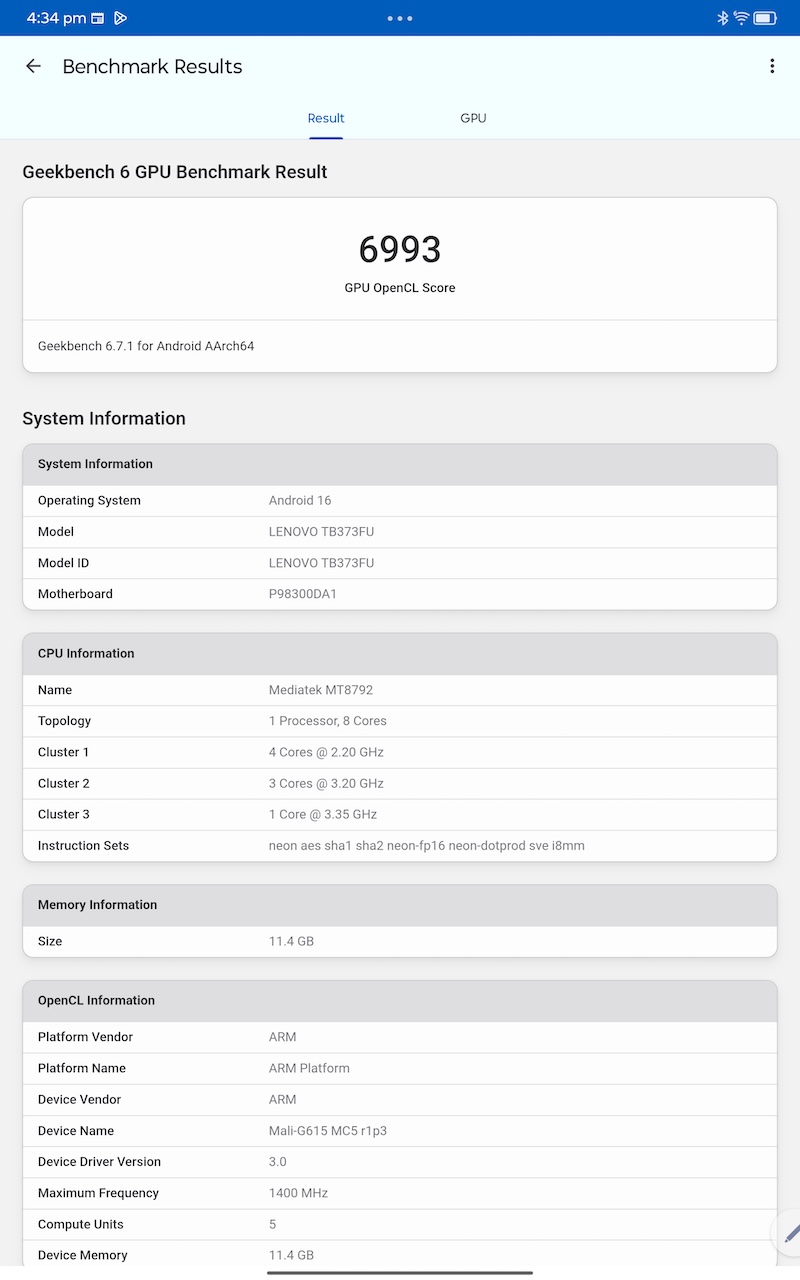
| Geekbench 6 GPU (OpenCL) | 6,993 | Mali-G615 MC5 @ 1400MHz |
| Geekbench AI — Single Precision | 1,536 | TensorFlow Lite, CPU backend |
| Geekbench AI — Quantized | 2,780 | Best AI score of the three modes |
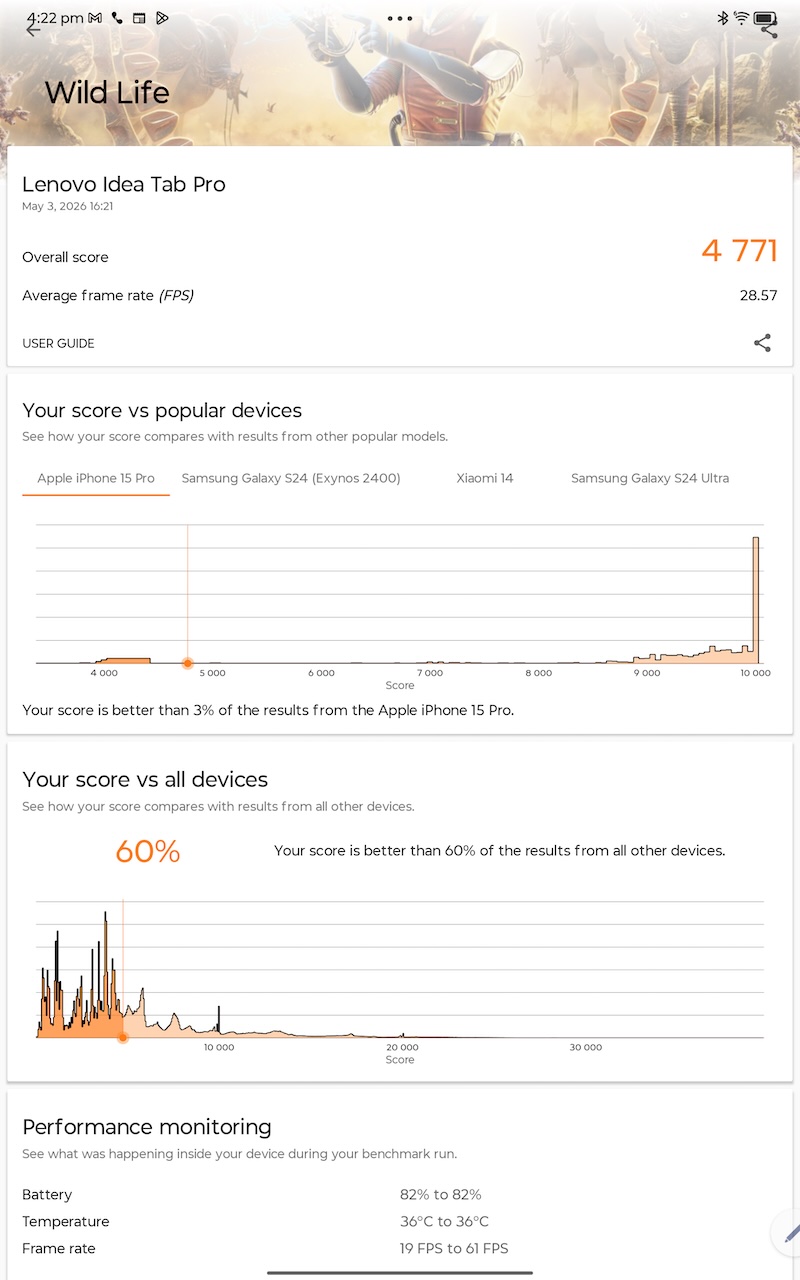
| 3DMark Wild Life | 4,771 | 28.57 avg FPS; 19–61 FPS range |
| CPU Throttling Test | 38% throttle | Sustains ~31,795 MIPS; peak 48,100 MIPS |
The CPU Throttling Test result tells the most important story here. The Dimensity 8300 bursts hard, peaking at 48,100 MIPS, and then settles at around 38% throttle under sustained load, stabilising at roughly 31,795 MIPS. This is a deliberate thermal management choice by Lenovo to keep the chassis cool; the tablet’s surface temperature peaks around 34°C under extended load, which is perfectly comfortable to hold.
The 3DMark Wild Life FPS swinging between 19 and 61 fps during the test is the visual expression of that throttle behaviour: the chip pushes hard at the start of a load, then backs off to a stable sustained level. For day-to-day productivity and media consumption, none of this matters at all. For gaming, it becomes relevant, and we cover that below.
In everyday use, the Idea Tab Pro feels quick and responsive. App launches are fast, multitasking across multiple windows is smooth, and there is none of the lag or stutter associated with mid-range Android tablets of a few years ago. The Dimensity 8300 is simply a good chip for this price.
The Idea Tab Pro’s Dimensity 8300 is the fastest chip in this price band by a meaningful margin in GPU workloads. In CPU single-core, the Redmi Pad 2 Pro’s Snapdragon 7s Gen 4 is slightly slower (1,253 vs 1,359) but more stable — the 7s Gen 4 throttles to only about 5% under sustained load, versus the Dimensity 8300’s 38%. The Redmi’s performance is more consistent over long sessions; the Dimensity 8300 runs faster but backs off harder.
| Tablet | Price | Chipset | GB6 Single | GB6 Multi | CPU Throttle | GPU Tier |
|---|---|---|---|---|---|---|
| Lenovo Idea Tab Pro | ₹28,999 | Dimensity 8300 (4nm) | 1,359 | 4,375 | 38% drop | Mali-G615 MC6 ★★★★ |
| Redmi Pad 2 Pro | ₹24,999 | Snapdragon 7s Gen 4 (4nm) | 1,253 | 3,312 | ~5% drop ✓ | Adreno 810 ★★★ |
| OnePlus Pad Go 2 | ₹26,999 | Dimensity 7300-Ultra (4nm) | ~1,026 | ~2,932 | ~5% drop ✓ | Mali-G615 MC2 ★★ |
| Samsung Galaxy Tab A9+ | ₹22,494 | Snapdragon 695 (6nm) | 908 | 2,072 | Moderate | Adreno 619 ★ |
OnePlus Pad Go 2 scores estimated from Dimensity 7300-Ultra chip data.
On GPU specifically, the Idea Tab Pro’s Mali-G615 MC6 has six compute units versus just two on the OnePlus Pad Go 2’s version of the same chip family, three times the GPU compute at the same price. This is why the Idea Tab Pro’s 3DMark Wild Life score of 4,771 is so far ahead, and why PUBG at 90fps is achievable here but not on competitors in this price band.
Gaming
For PUBG Mobile players, the Idea Tab Pro is a legitimate competitive device. Lenovo has PUBG certification on this tablet, and it shows. At Smooth graphics with the 360Hz touch sampling rate active, PUBG Mobile runs at a stable 90fps once you unlock the frame rate cap in display settings. The 12.7-inch screen is a significant advantage for spotting enemies at range, and the touch response at 360Hz is noticeably faster than most smartphones. For serious PUBG or BGMI players who want a large-screen competitive advantage without spending on a gaming tablet, this is a compelling option. At the HDR preset, you are looking at a consistent 40fps – still playable, though competitive players will want the Smooth + 90fps configuration.
Fortnite is a different story. The Unreal Engine renderer is more demanding, and the Idea Tab Pro’s GPU cannot fully keep up at higher settings. At Epic preset with 100% 3D resolution, expect around 30fps with occasional dips toward 15fps. Fortnite also appears to be capped at 30fps on this device regardless of settings. If Fortnite is your primary game, you will need to compromise on visual quality to get a playable experience. Most other popular Indian titles like BGMI, Call of Duty Mobile, Asphalt, run well. Genshin Impact hits its highest available 40fps cap across all graphics presets, and thermals stay cool throughout.
| Tablet | PUBG / BGMI | Fortnite | Touch Sampling | PUBG Certified |
|---|---|---|---|---|
| Lenovo Idea Tab Pro | 90fps Smooth ✓ | 30fps cap, drops | 360Hz | Yes ✓ |
| Redmi Pad 2 Pro | 40fps Ultra HD | Playable (medium) | 360Hz | Not confirmed |
| OnePlus Pad Go 2 | Smooth (medium-high) | Low settings only | 120Hz | No |
| Samsung Galaxy Tab A9+ | Low-medium settings | Poor | 90Hz | No |
For PUBG Mobile and BGMI specifically, the Idea Tab Pro is the clear winner in this price bracket. No other tablet under ₹30,000 is PUBG certified at 90fps with 360Hz touch sampling. The Redmi Pad 2 Pro delivers 40fps at Ultra HD which is very good for casual players, but the Idea Tab Pro’s higher GPU headroom and touch advantage make it the better choice for competitive gaming.
Speakers and Audio
The audio is one of the genuine highlights of this tablet. The four JBL-tuned speakers with Dolby Atmos processing deliver sound that is loud, clear, and spatially wide, particularly in landscape orientation. The quad-speaker arrangement creates a noticeable stereo separation that many tablets in this price band simply cannot match. Dialogue clarity in movies and shows is excellent, bass is present without being muddy, and at higher volumes the sound stays clean without distortion. If you use your tablet primarily for streaming, the speakers will regularly impress you. Likewise, it is great for home use with family due to this very reason.
Battery Life
The 10,200mAh battery is large, but the LCD display and the Dimensity 8300 mean real-world battery life is decent rather than exceptional. Continuous YouTube playback at peak brightness delivers around 7 hours, which is in line with other LCD tablets at this price point. For moderate daily use like streaming in the evening, some browsing, note-taking, the tablet comfortably lasts a full day and into the next.
Where the Idea Tab Pro does very well is standby time. Leave it in your bag over a long weekend and you will come back to a battery that has barely moved. For intermittent, non-intensive use this translates to real-world multi-day runtime. 45W fast charging is supported, and a full charge from zero takes roughly two hours. A 45W charger is included in the box.
| Tablet | Battery | Fast Charging | Video Playback | SIM Slot |
|---|---|---|---|---|
| Lenovo Idea Tab Pro | 10,200mAh | 45W ✓ | ~7 hours | None ✗ |
| Redmi Pad 2 Pro | 12,000mAh | 33W | ~14 hours | 5G ✓ |
| OnePlus Pad Go 2 | 10,050mAh | 33W | ~15 hours | 5G (₹32,999) ✓ |
| Samsung Galaxy Tab A9+ | 7,040mAh | 15W only | ~9 hours | 5G ✓ |
The Idea Tab Pro’s battery is the weakest point of this comparison. The Redmi and OnePlus both deliver roughly double the video playback endurance. The Idea Tab Pro’s 45W charging is the fastest in the group and partially offsets this, but if you spend long days away from power outlets, neither the Redmi nor the OnePlus can be beaten here.
Stylus – Lenovo Tab Pen Plus
The Lenovo Tab Pen Plus is included in the box and is one of the stronger bundled styluses in this price segment. It supports 4,096 levels of pressure sensitivity, tilt detection, and palm rejection. The palm rejection works reliably, writing while resting your hand naturally on the screen does not produce stray marks. The pen charges via USB-C and has a battery life of up to 35 hours of use. It attaches magnetically to the rear of the tablet, though it does not charge wirelessly while attached.
Lenovo’s Easy Jot feature allows quick annotation directly on the screen from any app with a long-press gesture, which is genuinely useful for students and anyone who takes notes from articles, PDFs, or video content.
Cameras
The cameras are functional but not a selling point. Lenovo figured out that most of the tab’s users will own smartphones that already have advanced camera systems, so the tablet’s camera becomes pretty much redundant. The 13MP rear camera produces acceptable photos for document scanning and casual shots, with visible autosharpening and limited dynamic range. Video tops out at 4K at 30fps. The 8MP front camera is clean enough for video calls and online classes. Most tablet users will find both cameras adequate for their actual use cases and no more.
Software and AI Features
The Idea Tab Pro ships with Android 14 out of the box but has received Android 15 and Android 16 updates. Lenovo’s ZUI 16 overlay is light, with minimal bloatware and a clean interface. Multitasking implementation is among the better ones in Android – split-screen, floating windows, and a desktop mode with the keyboard dock all work as expected. There is a dedicated taskbar at the bottom that makes app switching feel more PC-like than a standard Android tablet experience.
Google Gemini, Circle to Search, and Lenovo’s own AI Notes are all present. Circle to Search in particular becomes part of your workflow quickly on a screen this large. Lenovo’s update commitment is two major Android OS upgrades and security patches through to approximately 2028. Mind you, when setting up the tablet it will install tons of bloatware.
Connectivity
The Idea Tab Pro supports Wi-Fi 6E, an unusual and welcome inclusion at this price point along with Bluetooth 5.3, GPS with GLONASS and Galileo, and USB 3.2 Type-C. One important limitation: there is no SIM card slot. The Idea Tab Pro is a Wi-Fi only device. If you need mobile data connectivity built in, you need a different tablet, like the Lenovo Idea Tab Plus.
How the Idea Tab Pro Compares to Its Rivals
The ₹25,000–₹32,000 Android tablet market in India is genuinely competitive. Three tablets challenge the Idea Tab Pro directly: the Redmi Pad 2 Pro, the OnePlus Pad Go 2, and the Samsung Galaxy Tab A9+. Here is the full picture.
Price-to-Performance: What You Actually Pay
| Tablet | Base Price | Stylus in Box | All-In (with Pen) | OS Updates |
|---|---|---|---|---|
| Lenovo Idea Tab Pro | ₹28,999 | Yes ✓ | ₹28,999 | 2 OS upgrades |
| Redmi Pad 2 Pro (Wi-Fi) | ₹24,999 | No (+₹3,999) | ₹28,998 | 5 OS upgrades ✓ |
| OnePlus Pad Go 2 (Wi-Fi) | ₹26,999 | Launch offer only | ₹30,998 | 3 OS upgrades |
| Samsung Galaxy Tab A9+ | ₹22,494 | No option | ₹22,494 | 4 OS upgrades |
When you account for the stylus in the box, the Idea Tab Pro at ₹28,999 is at effective parity with the Redmi Pad 2 Pro + pen (₹28,998) and cheaper than the OnePlus Pad Go 2 + pen (₹30,998). That context matters significantly.
The Idea Tab Pro wins on GPU performance, display resolution, screen size, refresh rate, fast charging, and Wi-Fi 6E. The Redmi Pad 2 Pro wins on battery life, sustained CPU stability, display brightness, and update longevity. The OnePlus Pad Go 2 wins on display brightness and resolution-per-inch, but loses on GPU for gaming. The Samsung Tab A9+ is the cheapest option, and it shows in nearly every spec.
The Idea Tab Pro is the right choice if you game, use a stylus, want the biggest screen, and primarily stay near Wi-Fi and power outlets. The Redmi Pad 2 Pro is the better all-rounder if longer battery, better update promise, and cellular data matter more than GPU performance.
Should You Buy the Lenovo Idea Tab Pro?
The Idea Tab Pro is one of the most well-rounded Android tablets available in India under ₹30,000. Its combination of large sharp display, capable performance, excellent JBL speakers, included stylus, USB 3.2, Wi-Fi 6E, and solid metal build at ₹28,999 is genuinely difficult to match. For students who want a capable note-taking and media device, for PUBG and BGMI players who want a large-screen competitive advantage, for streaming enthusiasts who want great audio-visual performance, and for anyone who wants a productivity tablet without spending Galaxy Tab money, this delivers.
Its weaknesses are real but limited: the display is dimmer than competitors, battery life is decent but not exceptional, and there is no cellular connectivity. If outdoor use in bright sunlight is important, you will notice the brightness ceiling. If you need a SIM slot, look at the Idea Tab Plus instead.
At ₹28,999 with a stylus in the box, the Lenovo Idea Tab Pro earns its reputation.