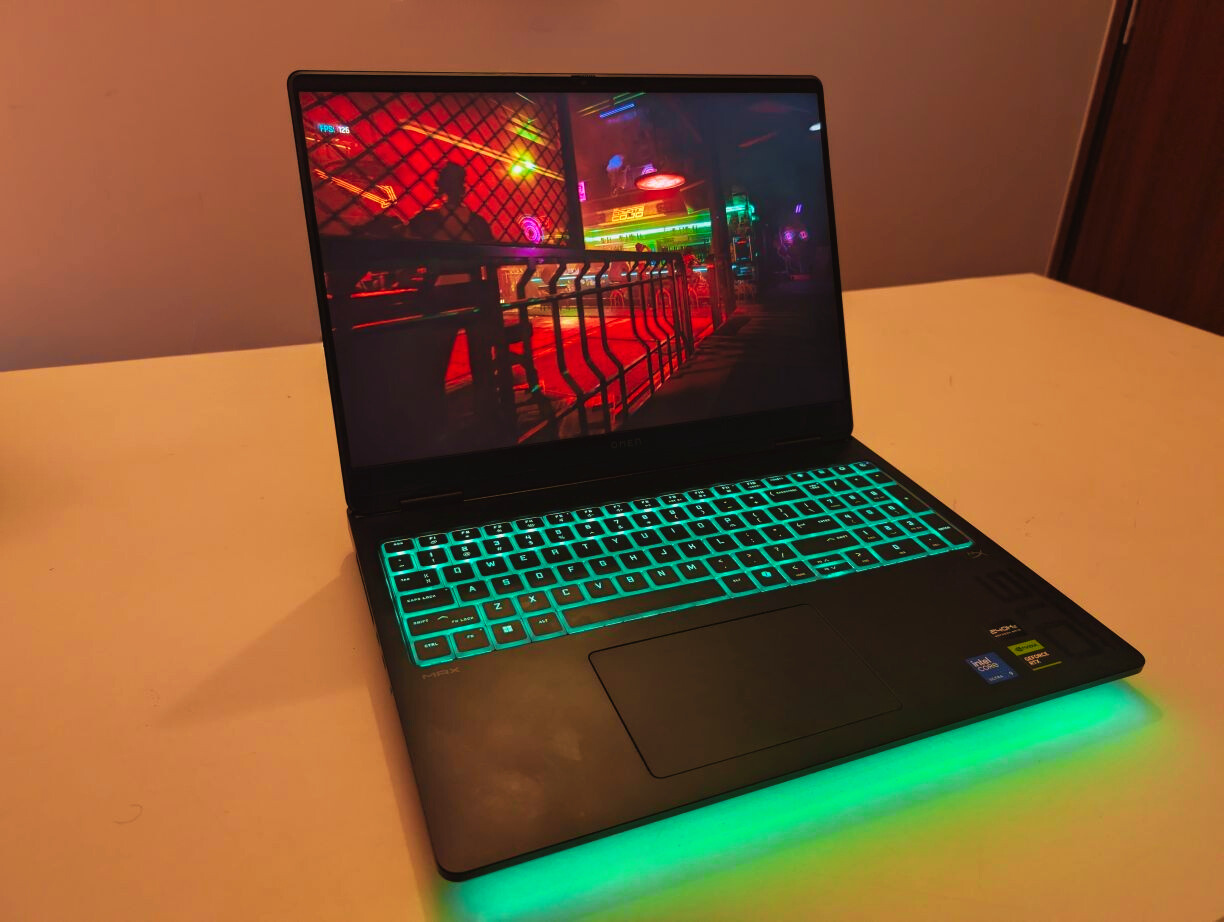
Verdict
The HP Omen Max 16 delivers top-tier gaming and creative performance without compromising thermals, acoustics, or build quality. Its stealthy, mature design makes it stand out in a sea of over-the-top RGB machines. A true powerhouse that performs like a beast but carries itself with quiet confidence.

What’s iLL
- Top-tier performance with the Core Ultra 9 275HX and RTX 5080.
- Mature, stealthy design: No over-the-top gamer bling, just clean, practical aesthetics.
- Excellent thermals: Vapor chamber, hybrid grease, self-cleaning fans.
- Built to last: tactile to hold and carry, abuse friendly construction materials, solid and durable.
- Accurate trackpad and great keyboard: Fantastic typing experience, precise input.
- Omen Gaming Hub is actually of legit use this time.
- Modular and Upgradable: The Omen Max 16 can be configured with a wide choice of selection of components.
What’s Not
- Webcam and Windows Hello: Sub-par IR performance and just okay video quality.
- Arrow keys and nav cluster: Compressed keys and missing Page Up/Down may annoy some users.
- Trackpad smudges: Matte surface attracts grease; regular cleaning needed.
Introduction
The Omen series from HP has long stood as the company’s flagship gaming line—once a dark horse, now a mainstay in the premium gaming segment. With HP’s acquisition of HyperX in 2021, the brand gained a whole new ecosystem of gaming peripherals and expertise, allowing the Omen lineup to evolve into a full-blown competitive platform. Enter the Omen Max series—HP’s answer to ultra-performance gaming laptops that combine brute force with design restraint.
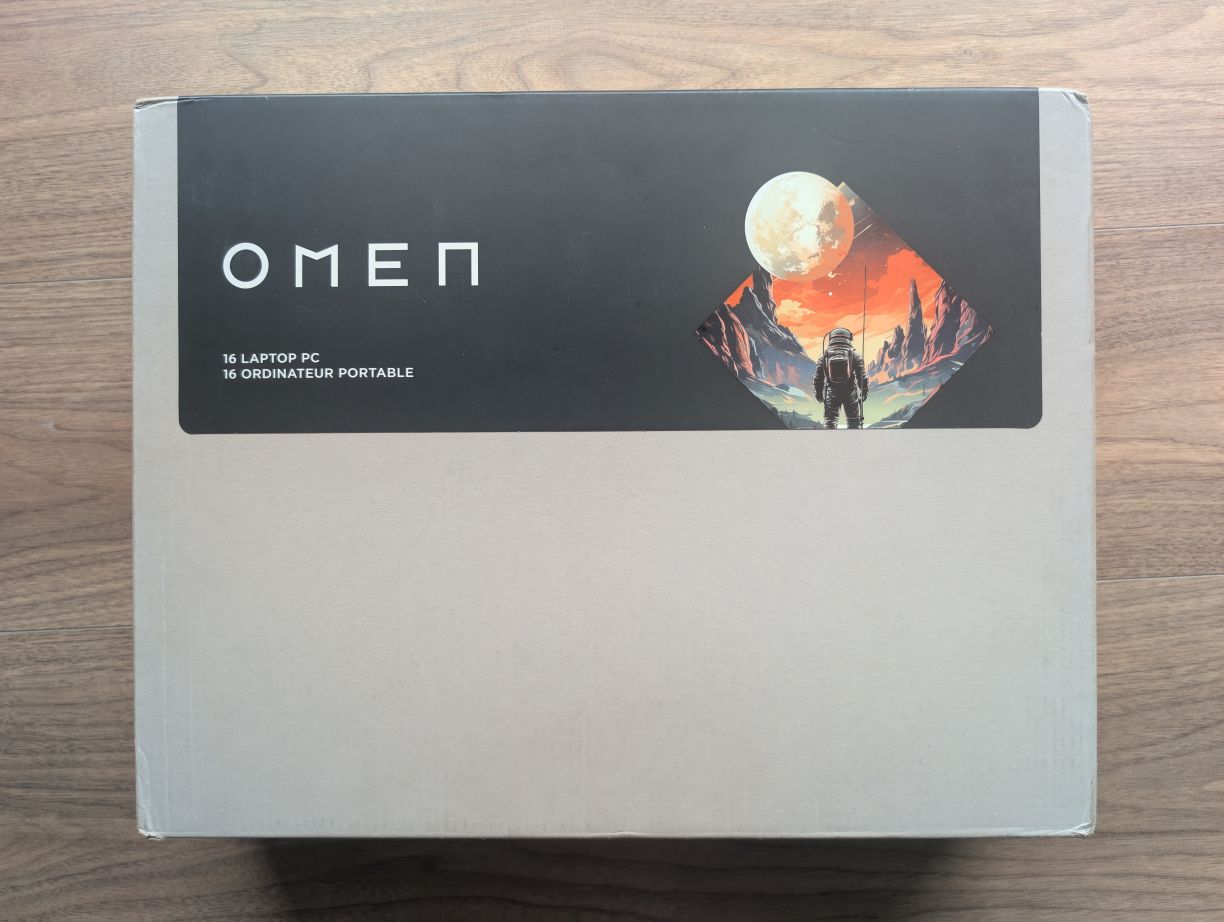
The HP Omen Max series was first unveiled in January at CES 2025, as a more elaborate version of the already present Omen lineup. Charaterized by maxed-out specifications, higher wattages, bigger sizes and bigger form factor, the Omen Max 16 is the only product in this lineup. We at iLL have been reviewing HP Omen laptops since years, and it is more than a pleasure to be tinkering with the Omen Max machine.
Specifications
The Omen Max 16 can be configured with a rather impressive suite of technology and specifications to choose from. From an AMD Ryzen to an Intel Core Ultra CPU, from an IPS to an OLED, from an RTX 5070 all the way to an RTX 5090. Pricing of the Omen Max 16 starts from ₹179,999 for the Ayzen AI 350 CPU and RTX 5070 GPU, all the way up to ₹399,999 for the model with an Intel Core Ultra 9 CPU and RTX 5090 GPU. That is a wide variance in terms of specs within the same form factor. This can only mean good things for the consumer as they are spoilt for choice and can pick and choose as they see fit.
Our review unit specifically is the HP OMEN Max 16-ah0076TX. Here are its specifications:
| CPU | Intel Core Ultra 9 275HX (24-core) |
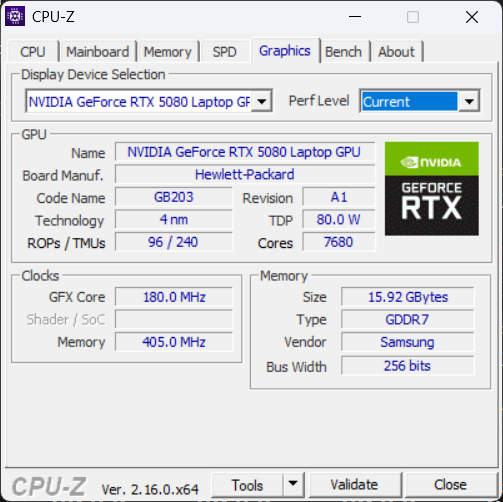
| GPU | NVIDIA GeForce RTX 5080 (16GB GDDR7) |
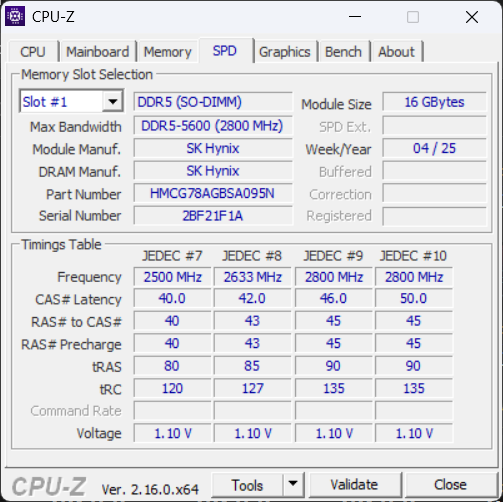
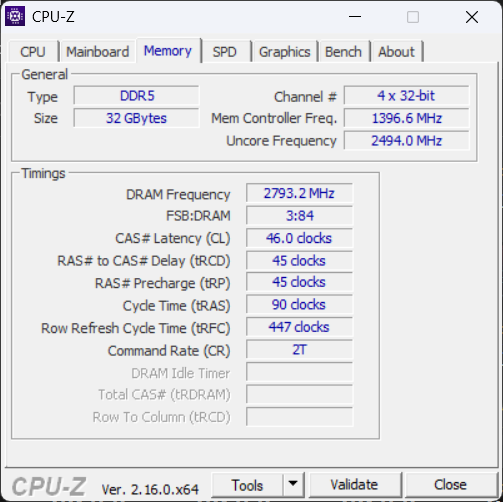
| RAM | 32GB DDR5 5600MHz |
| Storage | 1TB PCIe Gen 5 NVMe SSD |
| Display | 16-inch WQXGA (2560×1600) IPS, 240Hz, 3ms, 100% sRGB, 500 nits |
| Ports | 2x Thunderbolt 4, 2x USB-A 3.2 Gen 2, HDMI 2.1, RJ-45, Audio combo jack |
| Networking | Wi-Fi 7, Bluetooth 5.4 |
| Weight | ~2.7kg |
| OS | Windows 11 |
| MRP | ₹3,09,999/- |
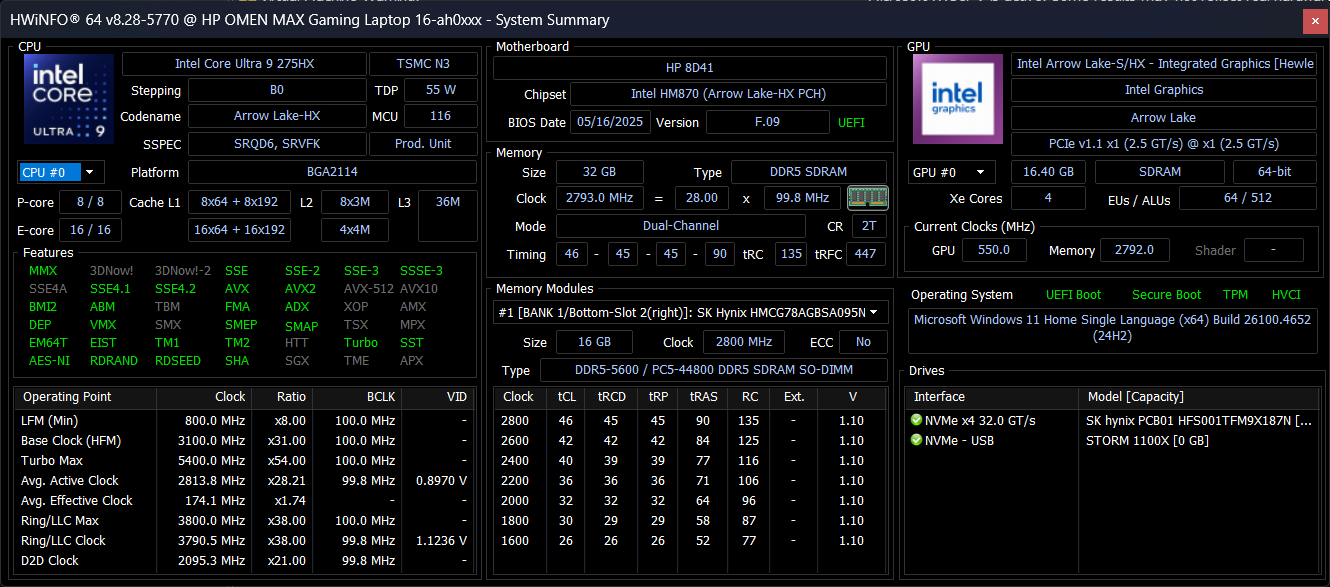
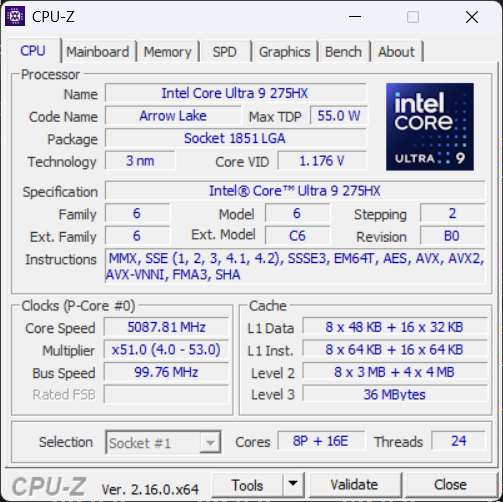
Here are the CPUZ and HWiNFO 64 screenshots. Click on them to open in a new window:
Design
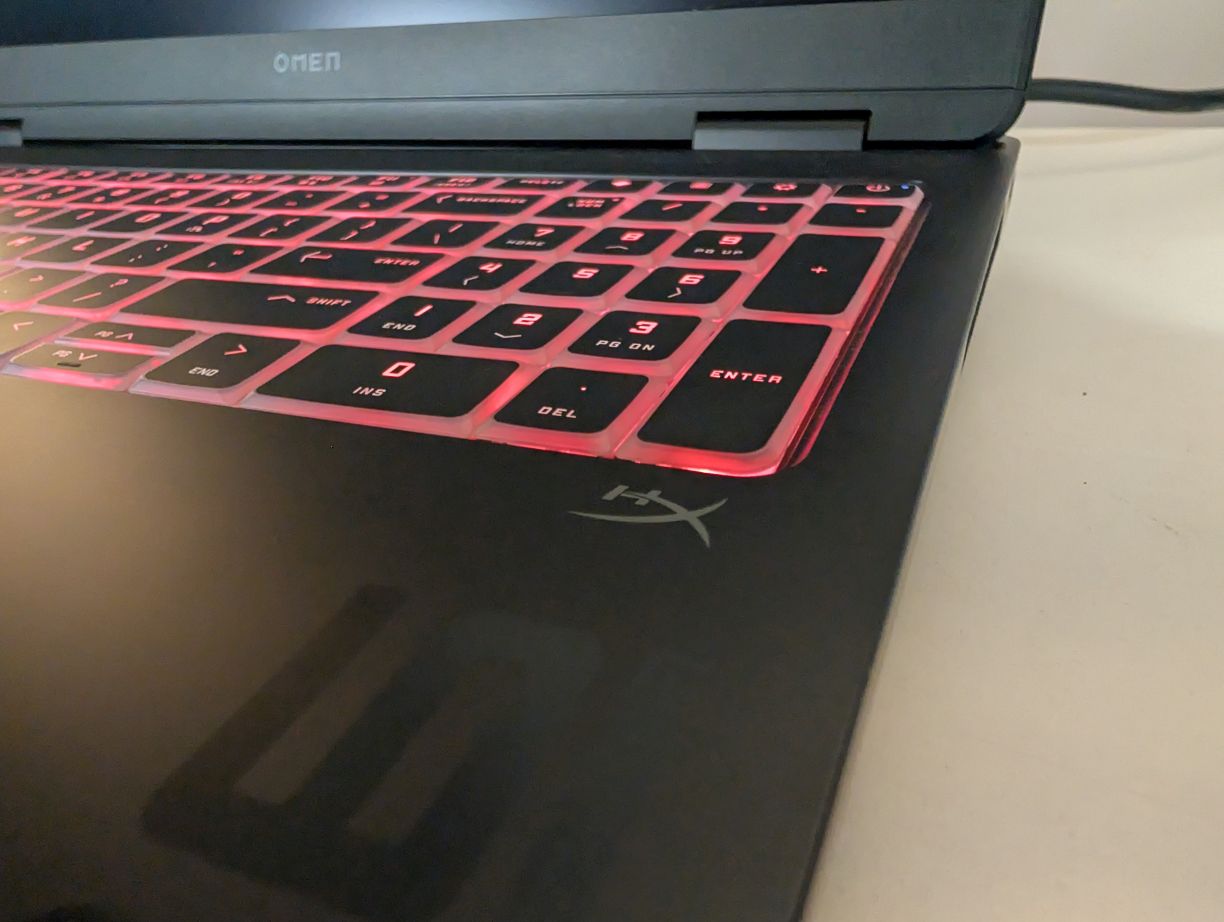
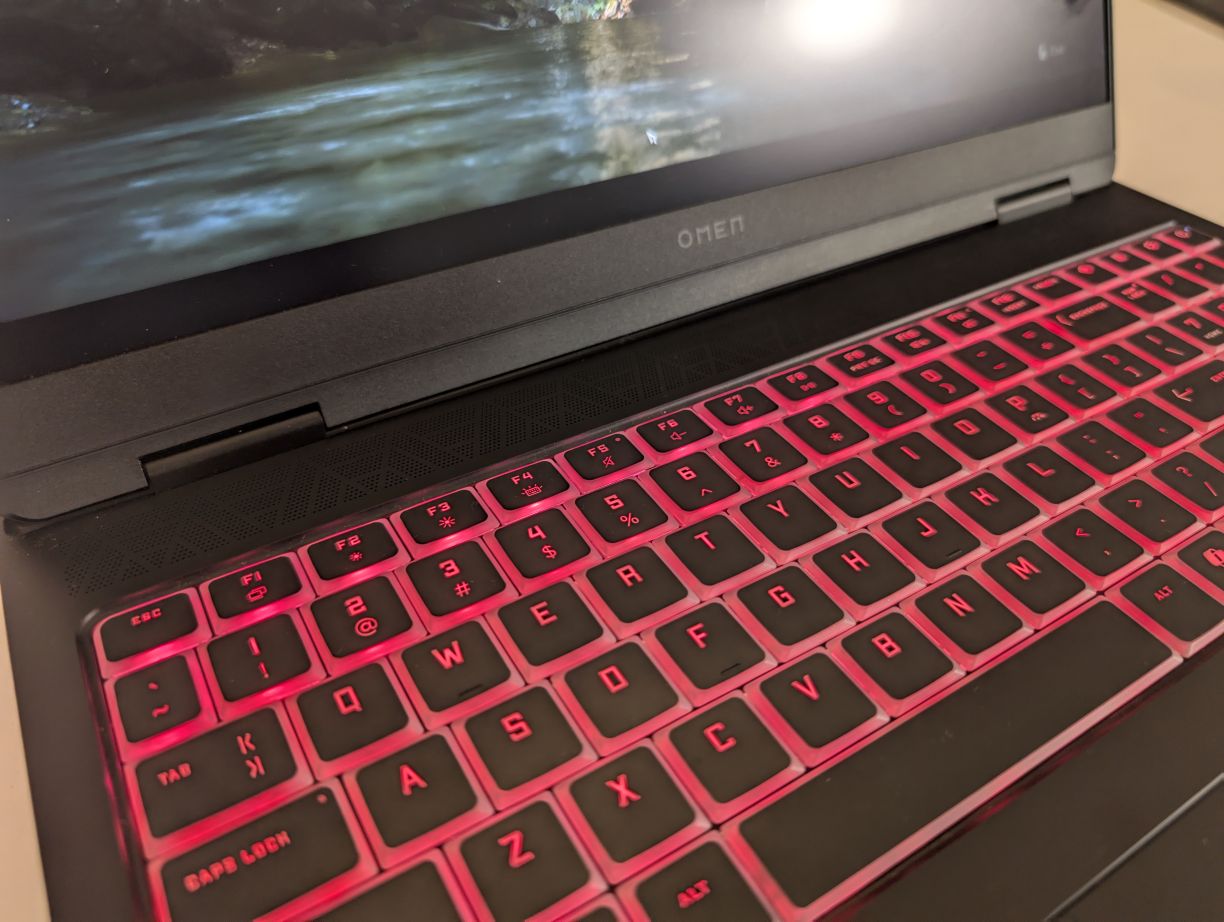
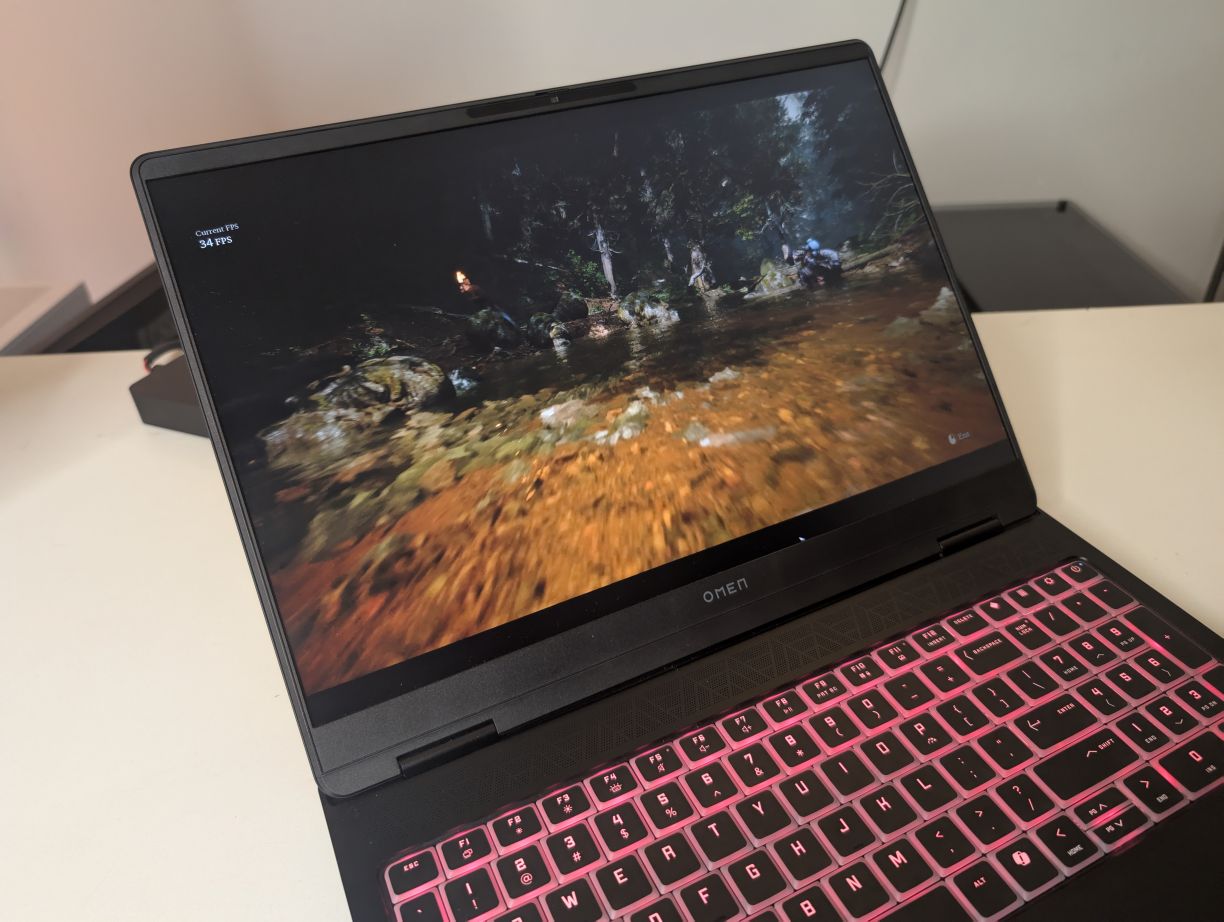
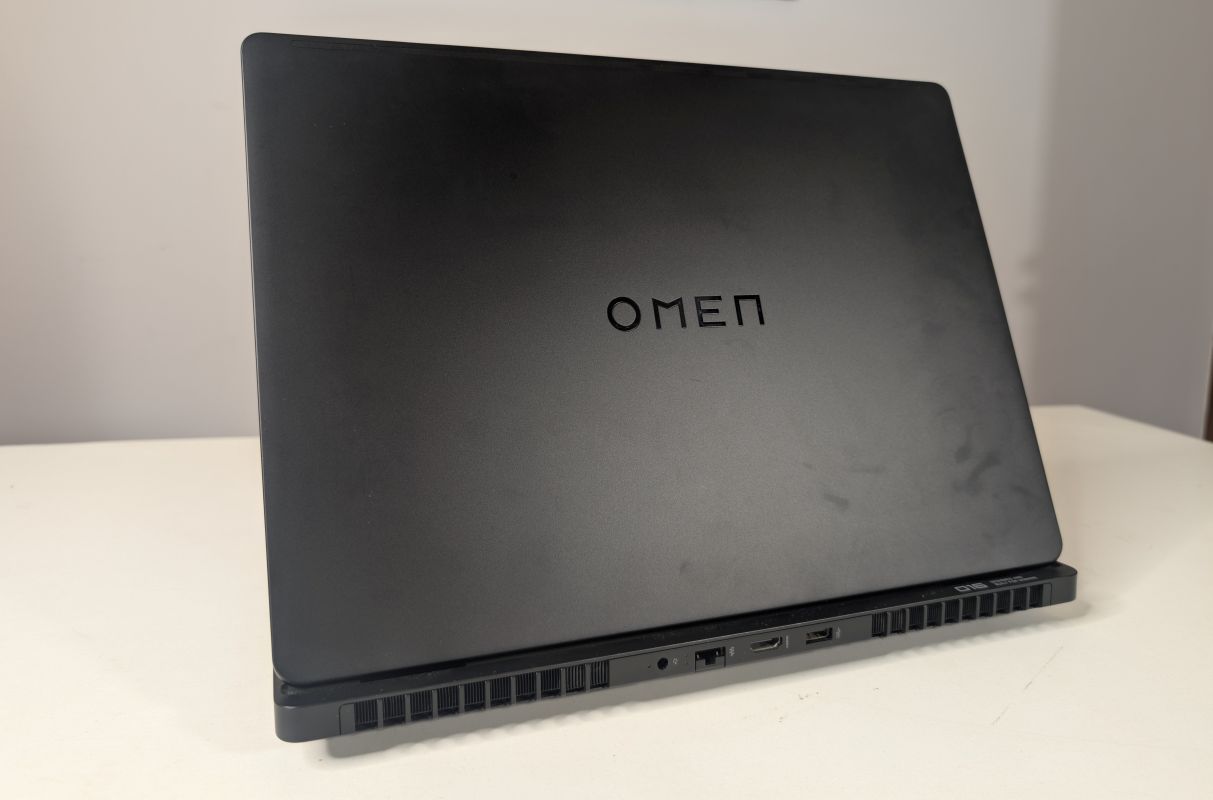
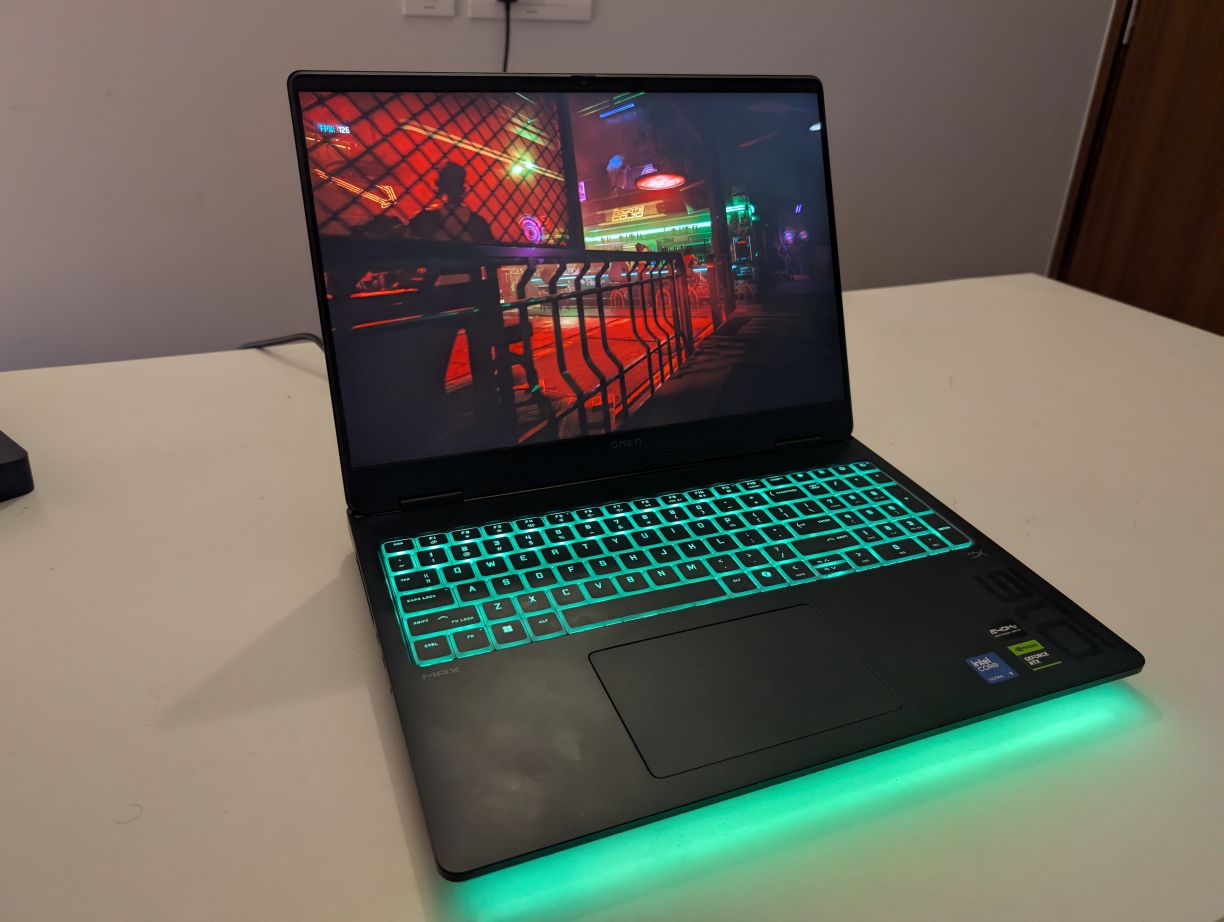
The Omen MAX 16 takes a more mature, utilitarian approach compared to many of its RGB-drenched rivals. The chassis is finished in Shadow Black, with subtle angular cues and a minimal logo treatment. There’s a tasteful RGB underglow strip at the front edge—enough to satisfy gamers, without turning the device into a carnival. On the lid, HP has gone for the “OMEN” branding in all caps, instead of the diamond shape they used in the past.
HP has refined the geometry to be compact for a 16-inch device, though it remains a desk-bound machine more than a travel companion. The keyboard layout is spacious and aligned centrally, flanked by top-facing speaker grills that merge neatly into the design.
The RGB implementation is led by OMEN Light Studio, which allows deep lighting customization across the keyboard and underglow bar.
Overall, the design language is understated, stealth, simple and functional. This makes the Omen MAX 16 feel refreshing when compared to its counterparts with their aggressive styling. If it wasn’t for the LED strip, it would be hard to call this a gaming laptop, so it manages to disguise its nature really well, and we like that.
Build Quality
Crafted from a magnesium-aluminum alloy, the Omen Max 16 feels incredibly solid. There’s minimal flex on the lid or keyboard deck. The hinge is smooth but taut, resisting wobble even when gaming aggressively. The matte finish resists smudges well, but greasy fingers will leave their mark. If fingerprints annoy, there is a white colored version of the same laptop also being sold by HP.
This chassis feels like it could take a beating. Toss it into a backpack, knock it against a desk edge—it holds firm. There is a certain quality about the HP Omen Max 16 that makes it feel it is abuse friendly. Omens in the past have always had this quality, but with the Omen Max 16, HP has taken the meaning of “built to last” to a higher level. At ~2.7kg, it’s on the heavier side, but that’s the price you pay for a vapor chamber, high-TDP components, and proper cooling.
Additionally, HP uses a hybrid metal thermal grease in conjunction with the vapor chamber for sustained thermals. The new fan-cleaning system periodically reverses airflow to push dust out—improving longevity and thermal consistency.
Connectivity
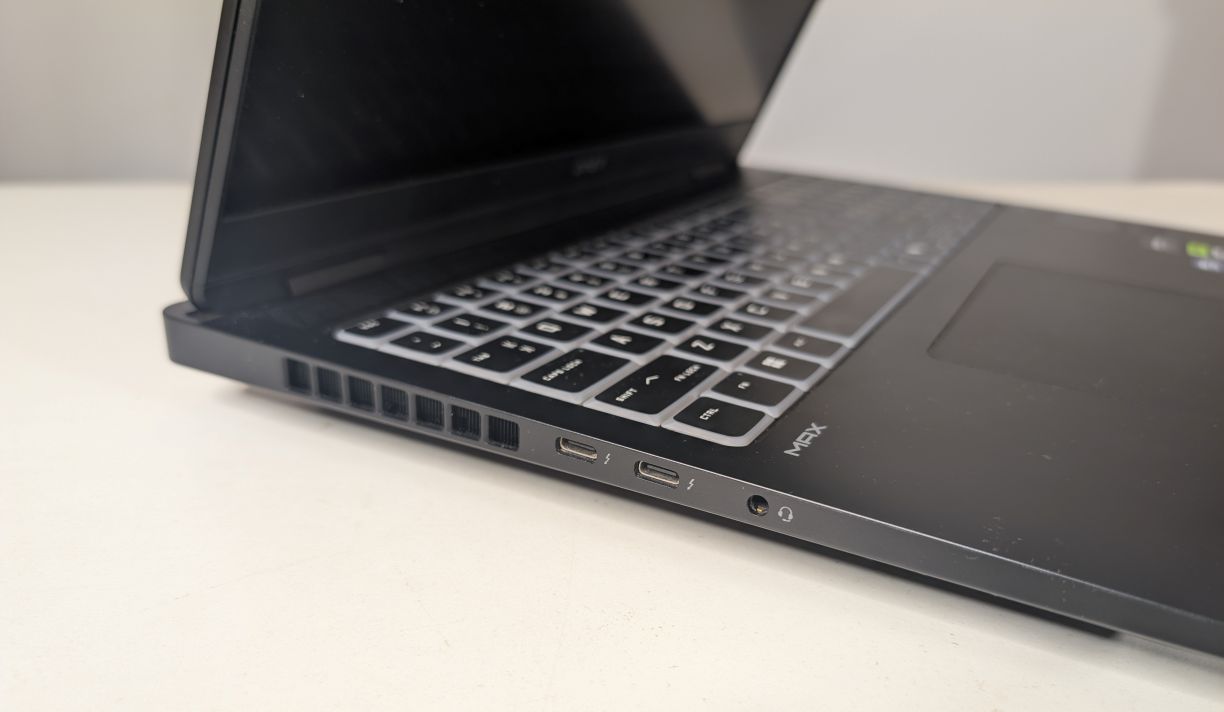
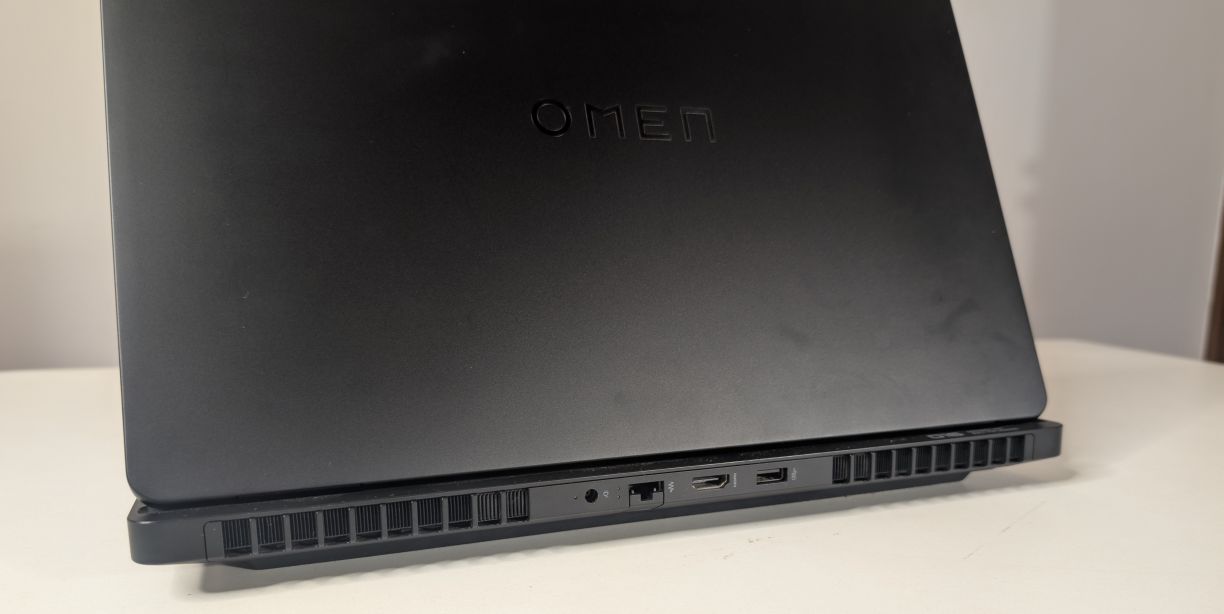
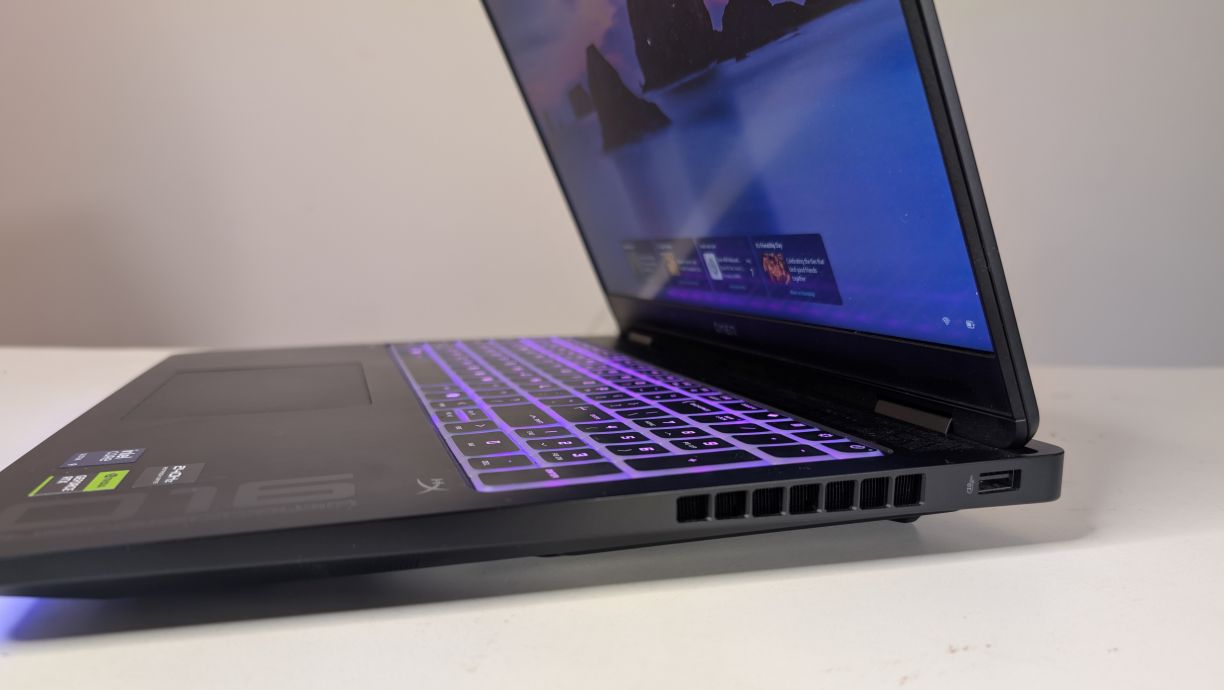
The Omen Max 16 doesn’t skimp on I/O. You get:
- 2x USB Type-A 3.2 Gen 2 10Gbps – one located at the back, and one on the right side
- 2x Thunderbolt 4 (USB-C) — Supports charging, DisplayPort, and high-speed data. Both located on the left side.
- 1x HDMI 2.1 — 4K @ 120Hz support for external displays. Located at the back.
- 1x RJ-45 Ethernet port 2.5Gbps — For lag-free, wired gaming. Located at the back.
- 1x 3.5mm Audio and Microphone combo jack — Located on the left side.
- 1x Power connector — Located at the back.
It also supports Wi-Fi 7 and Bluetooth 5.4, future-proofing your wireless experience. This level of port selection is excellent for a thin-and-light 16-inch gaming chassis and puts it ahead of some competitors that ditch Ethernet or limit Thunderbolt support.
Display
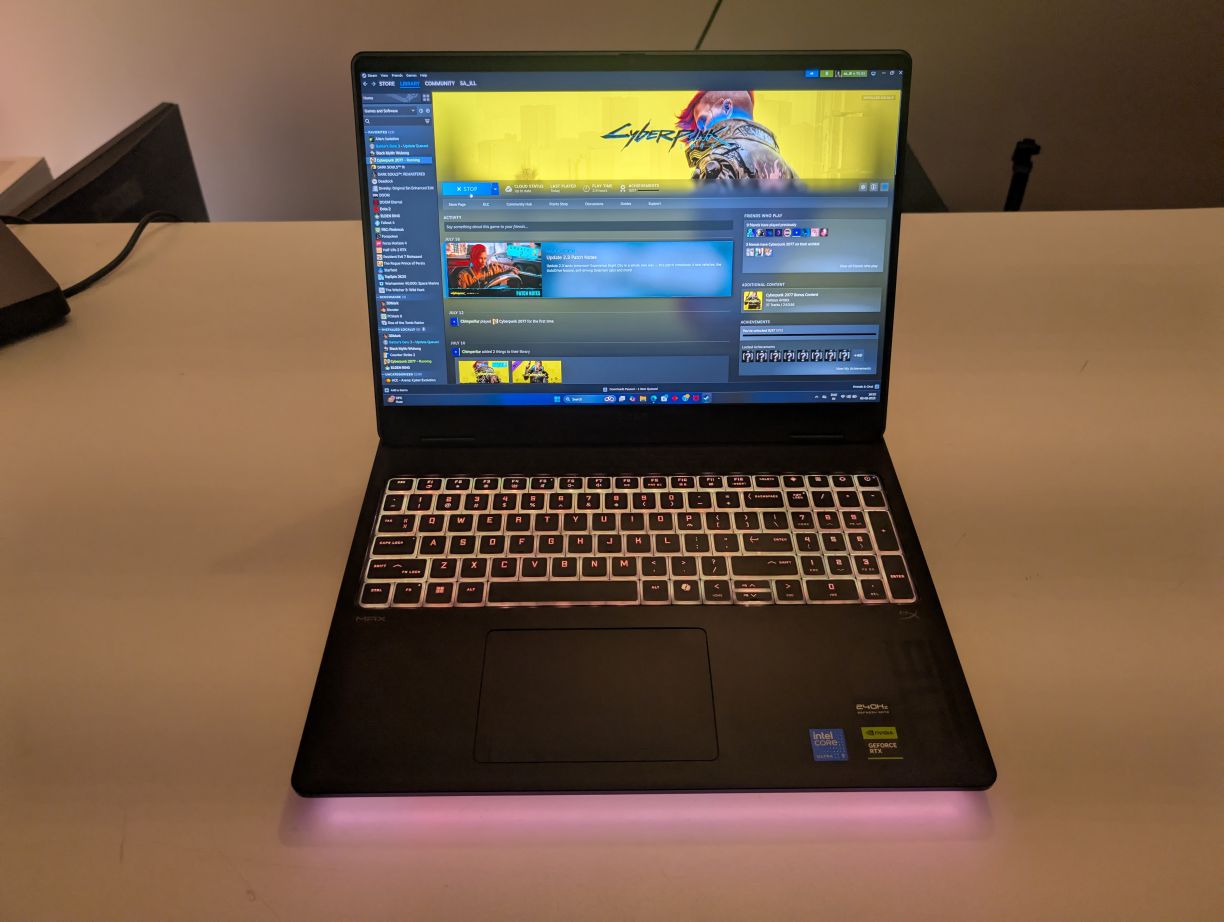
The 16-inch WQXGA IPS panel (2560×1600) offers a sharp 188 PPI, while the lower 1920×1200 variant drops to 141 PPI—noticeable if you’re working with text or photos. HP also offers the same laptop with an OLED display having the same resolution as the WQXGA panel. If you’re into pure blacks and proper HDR, the OLED display is a no-brainer but you have to conscious about the steep OLED pricing.
Color accuracy on our IPS is strong with 100% sRGB and excellent white balance out of the box. Blacks aren’t OLED-deep, but they’re consistent across brightness levels. Peak brightness hits ~500 nits, which is enough for a well-lit room, but under direct sunlight, legibility suffers slightly. Viewing angles are wide with minimal color shift. HDR playback is supported but more “pseudo-HDR”—don’t expect OLED-level contrast.
Motion clarity is a highlight thanks to the 240Hz refresh rate and 3ms response time. For competitive gamers, this is a fluid experience.
Overall, the display is suitable for gaming and productivity. Things look really sharp; the colors look vibrant, and the display feels snappy. Support for HDR 400 means you can enjoy the dynamic range, albeit not at the levels of an OLED display. Still, there is a certain tactility about the IPS panel which an OLED display lacks. We have no complaints about the IPS display whatsoever, we think it is a great choice provided you’re not swayed by the OLED marketing.
Keyboard and Trackpad
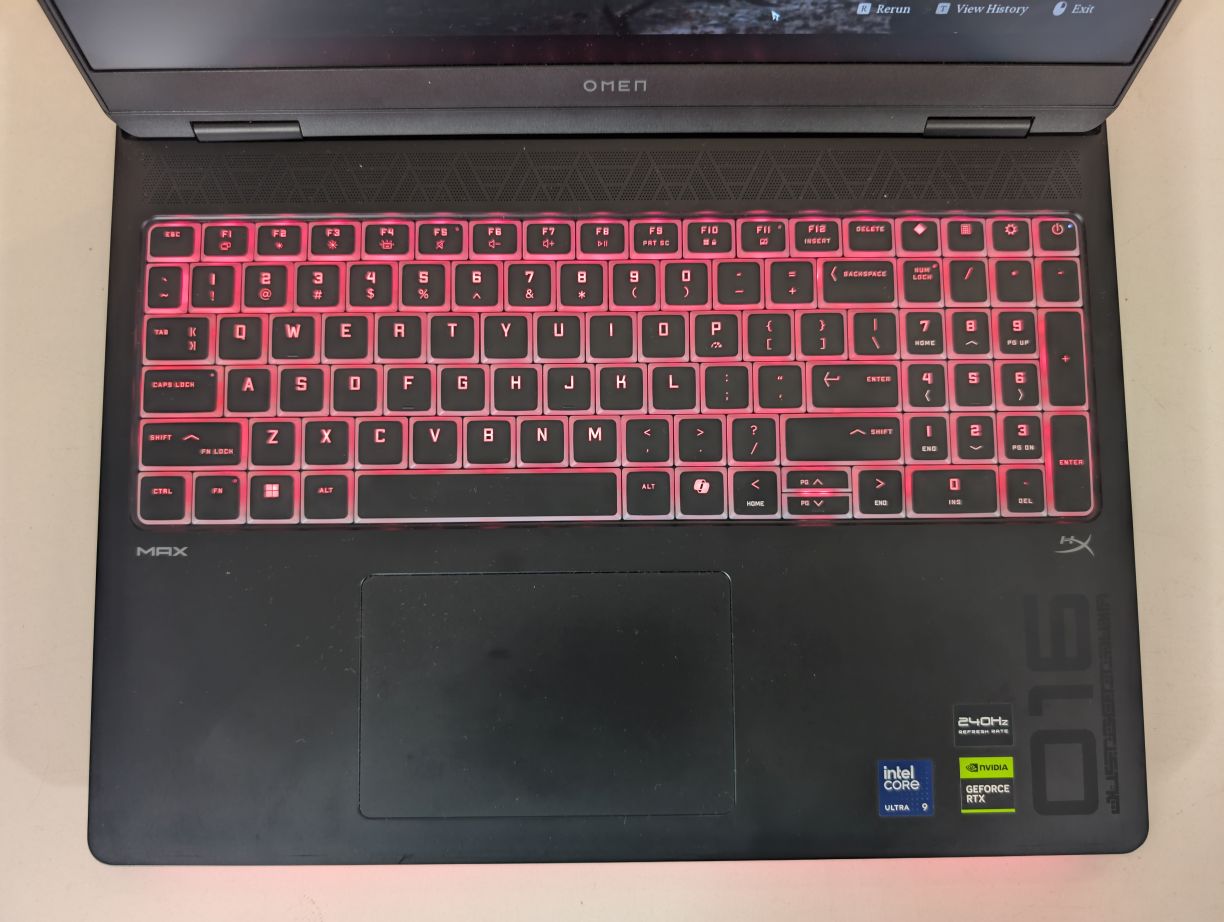
The per-key RGB backlit keyboard features tactile scissor switches with crisp actuation and a balanced travel distance. The layout includes a full-size numpad, a dedicated Omen Hub shortcut, and a CoPilot key for quick AI access. The lighting is tastefully implemented—uniform and subdued, avoiding the flashy overkill many gaming laptops fall into. Light diffusion is smoother and more consistent than what’s typically seen on MSI or ASUS machines.
HP has opted for design uniformity—the WASD keys don’t have distinct keycaps, unlike many competitors that highlight these for gaming. This adds to the minimalist aesthetic, though some hardcore gamers might miss the tactile cue.
We appreciate the inclusion of a numpad, which is increasingly rare in laptops of this form factor. While many competitors drop it for design symmetry or extra cooling vents, HP has stuck to utility—and we’re with them on this. If you work with numbers or game macros, the numpad is a true productivity win.
However, this also results in some compromises. The Page Up and Page Down keys have been removed, and the arrow keys are vertically compressed, which might frustrate users used to full-sized navigation keys. It’s not a deal-breaker, but there’s a learning curve if you’re transitioning from a full-size desktop layout.
The typing experience of the keyboard is brilliant. It is tactile and has just the right amount of pressure resistance and once your fingers’ muscle memory gets acclimatized with the keys, you will be typing away with your best accuracy and speed numbers, easily beyond the 100 wpm range. We felt that the keyboard works very well for type heavy use cases, macros and for gaming.
The trackpad is generously sized and responsive. It uses a traditional mechanical click mechanism rather than a glass or haptic system, so it feels more tactile than premium ultrabooks like the MacBook or Razer Blade. Its matte texture offers a controlled glide, and gesture support is solid, although gamers will still prefer using an external mouse for serious sessions. Having said that, the trackpad by itself is very capable of providing a niggle-free, accurate and precise experience.
HP has decided to give you the best quality mechanical trackpad instead of a mediocre quality optical trackpad, and we’re onboard with that. Unlike many Windows laptops where trackpad use often leads to frustration, the Omen Max 16’s trackpad proves refreshingly precise and hassle-free. That alone speaks volumes about the thought HP has put into its implementation. The trackpad does pick up a lot of smudges from oily fingers though, like most trackpads.
Performance
Rocking a flagship Intel Core Ultra 9 275HX CPU, a beefy Nvidia RTX 5080, a Gen5 NVME SSD and elaborate cooling hardware, the HP Omen Max 16 ah0076TX is poised to top performance charts, and that’s what exactly it does.
Benchmarks
All benchmarks were performed with the Power Setting in the Omen Gaming Hub software set to Unleashed mode, without any manual overclocking. The laptop was connected to the included 330W charger during all the tests.
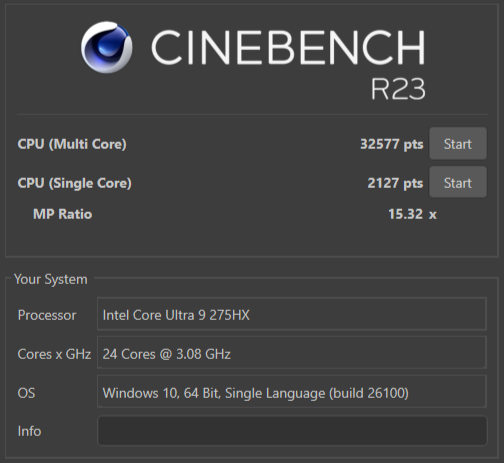
Cinebench R23 Multi-Core Score
Cinebench R23 Single-Core Score
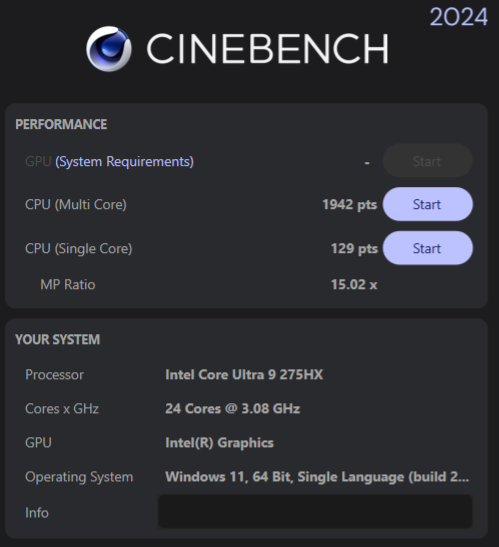
Cinebench R24 Multi-Core Scores
Cinebench R24 Single-Core Scores
The Omen Max 16 scores a very healthy 32577 points in the Cinebench R23 Multi Core test. Compared with laptops using the same processor, it is only beaten by the MSI Titan 18 HX because the Titan has a larger chassis, so better cooling. With the 16-inch size, the Omen Max performs the best, which says a lot about its thermal management. The same story is replicated in the Single Core test. As a matter of fact, the same results are spilled over in the Cinebench R24 Single and Multi-Core test.
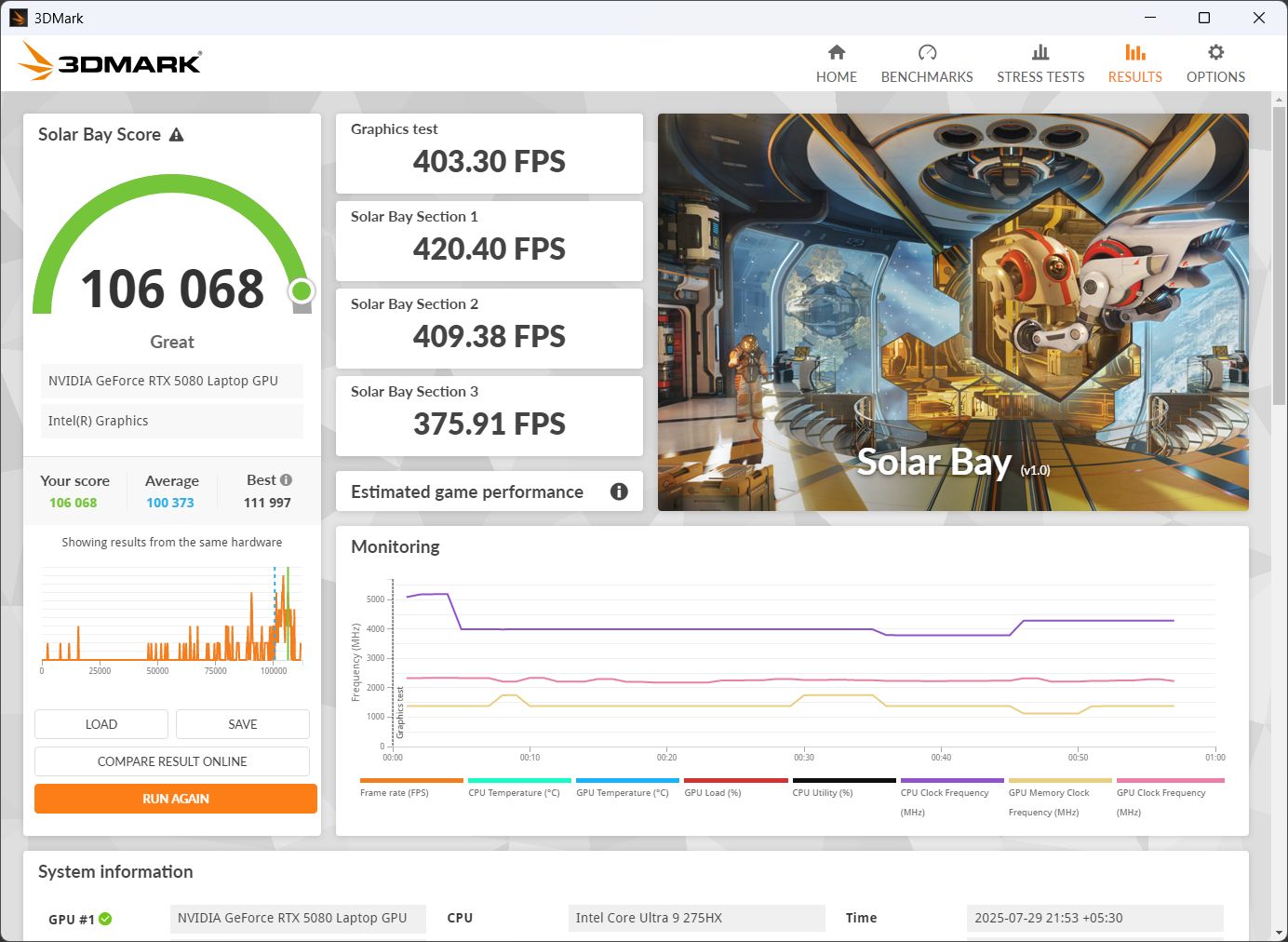
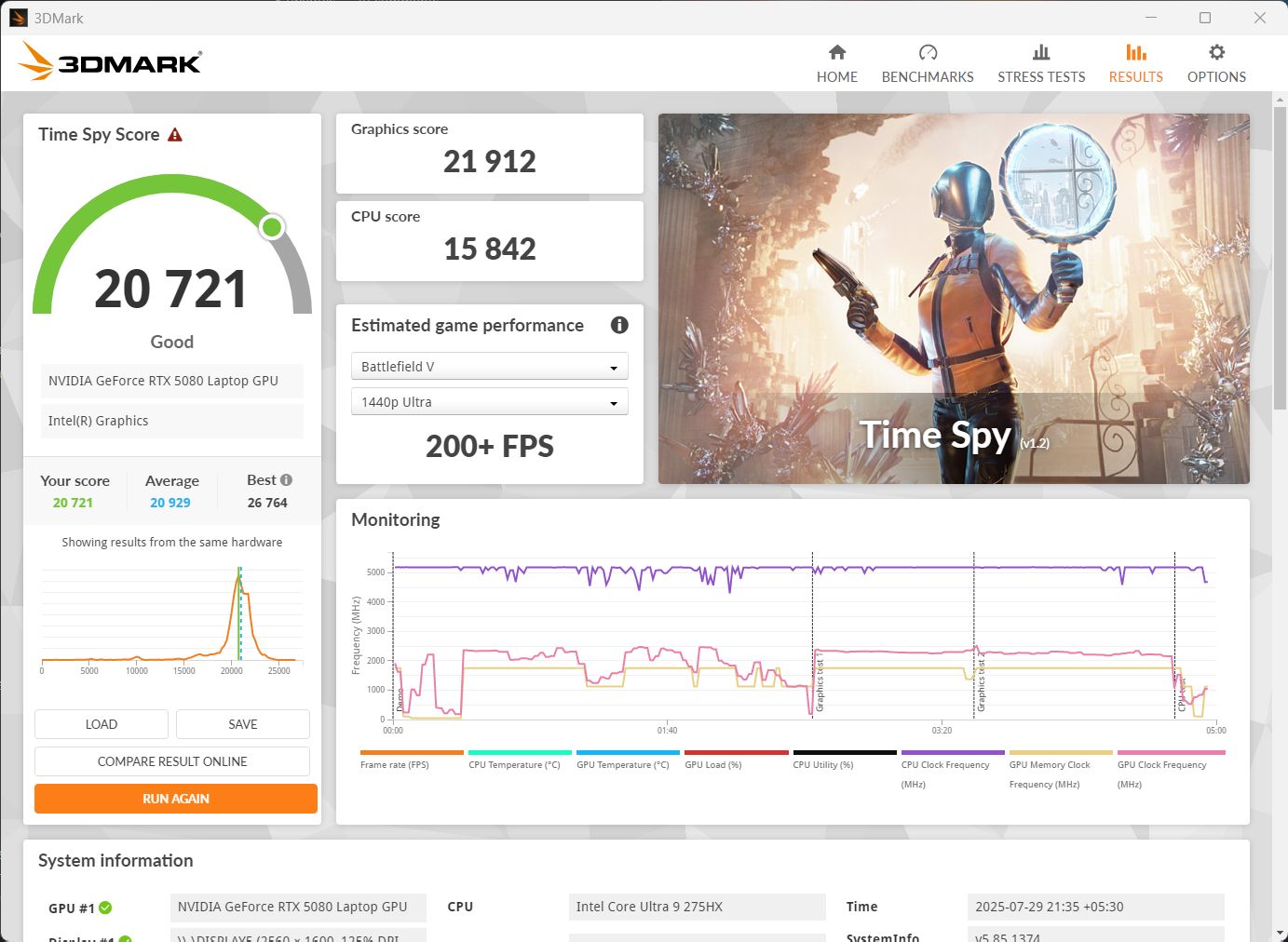
3DMark Time Spy – GPU Score Comparison
The GeForce RTX 5080 performs like a beast in the 3KMark Time Spy test. With a GPU score of 21,912, the RTX 5080 is very well placed to run all the latest games with visual graphics settings maxed out at 100+ frames per second. As mentioned above, all tests were done using the “Unleashed” power profile in Omen Gaming Hub.
Once you remove the charger, the Omen Max 16 tends to throttle down and takes a significant performance. We noticed that even in “Balanced” power profile, the CPU and GPU performance took a significant hit, especially the single core performance of the CPU.
Gaming
Now for the gaming benchmarks. Our methodology for gaming tests is trying different settings and interpolating performance numbers for a reasonable conclusion. Modern day GPU performance evaluation has become slightly more complex, with the advent of frame generation technologies (DLSS, Xe, FSR) and Ray Tracing.
Cyberpunk 2077
2560×1600, No DLSS, NVIDIA DLAA, Maxed Out Settings, Ray Tracing: High
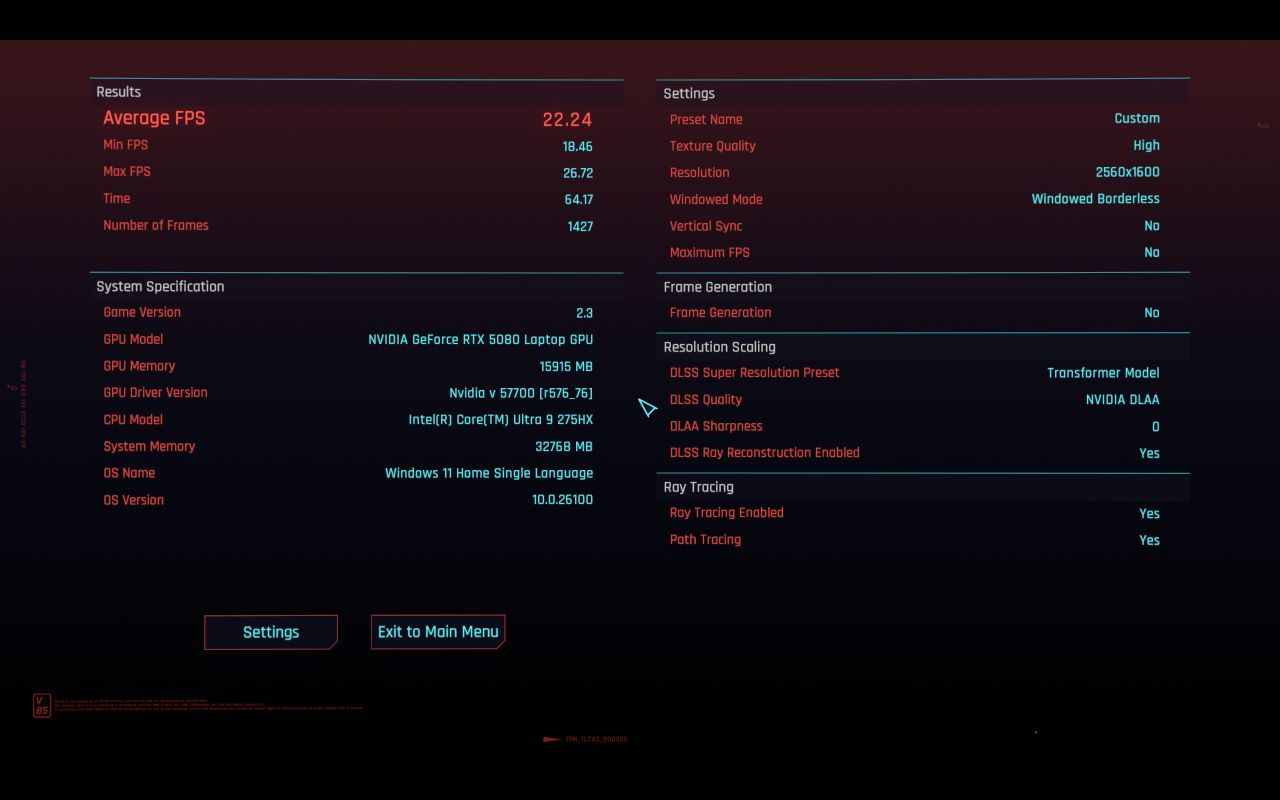
Without using any Nvidia Frame Generation features and all settings maxed out, and with DLAA (Deep Learning Anti-Aliasing) we get a dismal 22.24 average fps in Cyberpunk 2077. The main culprit of this low fps is DLAA, which is known to bring even the best of GPUs to their knees.
2560×1600, 2X Multi Frame Generation, DLSS Quality Auto, Ray Tracing: Overdrive
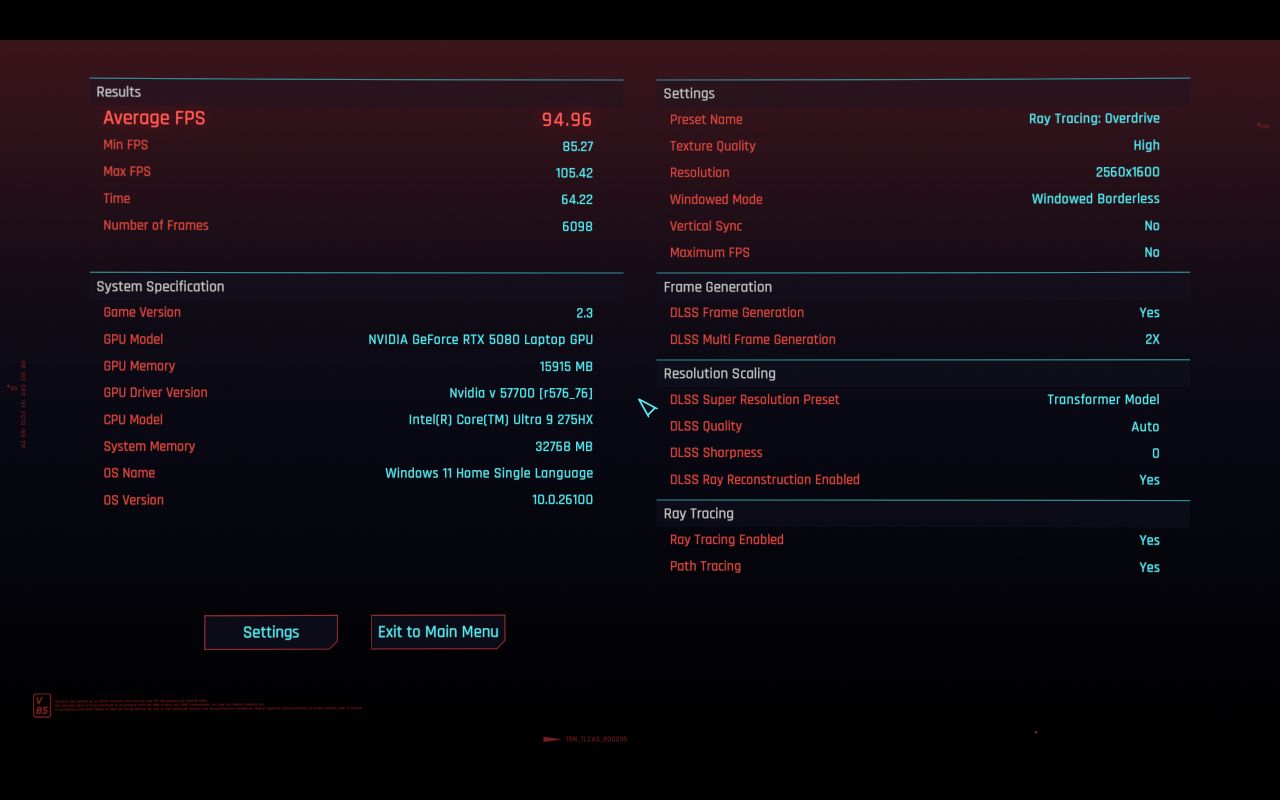
Things radically change once DLAA is disabled and DLSS is used. Even with Ray Tracing on Overdrive, we achieve an average FPS of 95.
2560×1600, 2X Multi Frame Generation, DLSS Quality Auto, DLSS Ray Reconstruction: No, Ray Tracing: Ultra, Path Tracing: Disabled
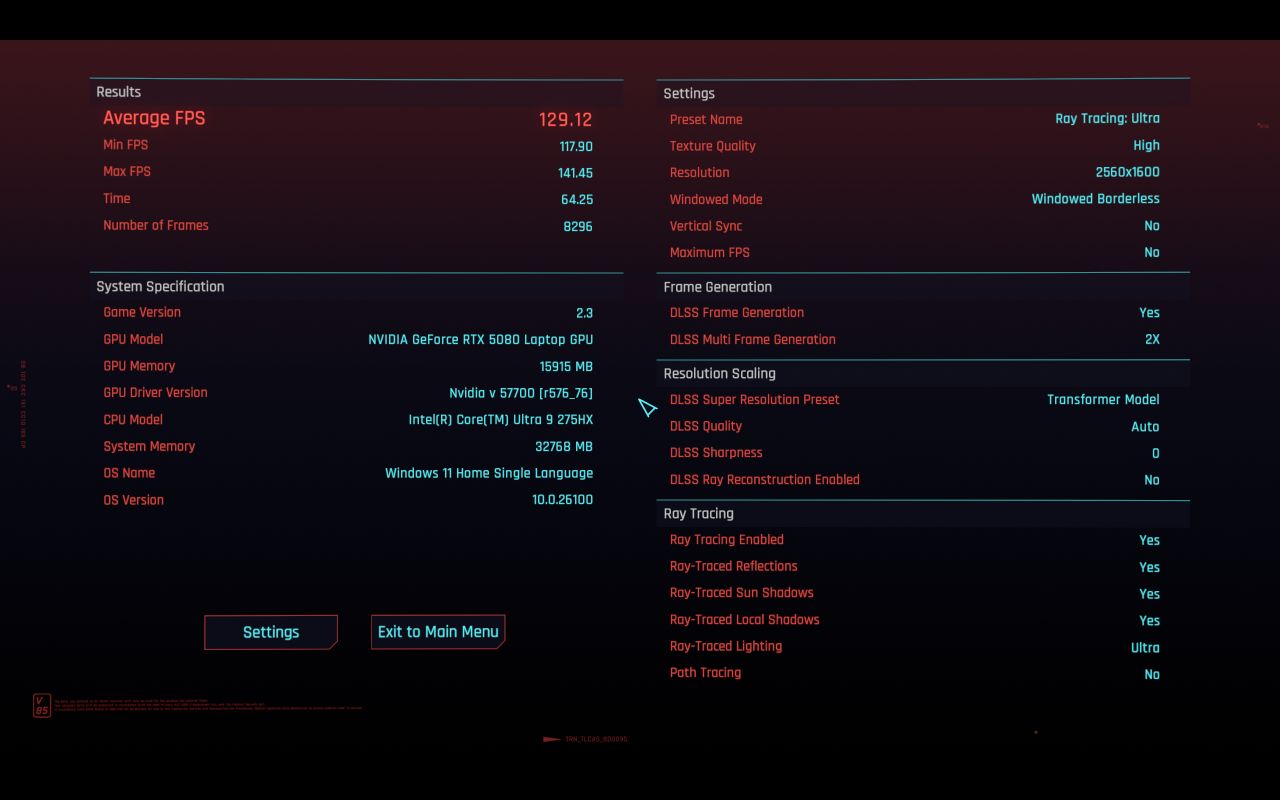
Disabling Ray Reconstruction, Path Tracing and reducing the Ray Tracing from Overdrive to Ultra, the Omen Max 16 scores a healthy 129.12 FPS. Keep in mind that here DLSS is working in full swing, with Frame Generation set to 2X.
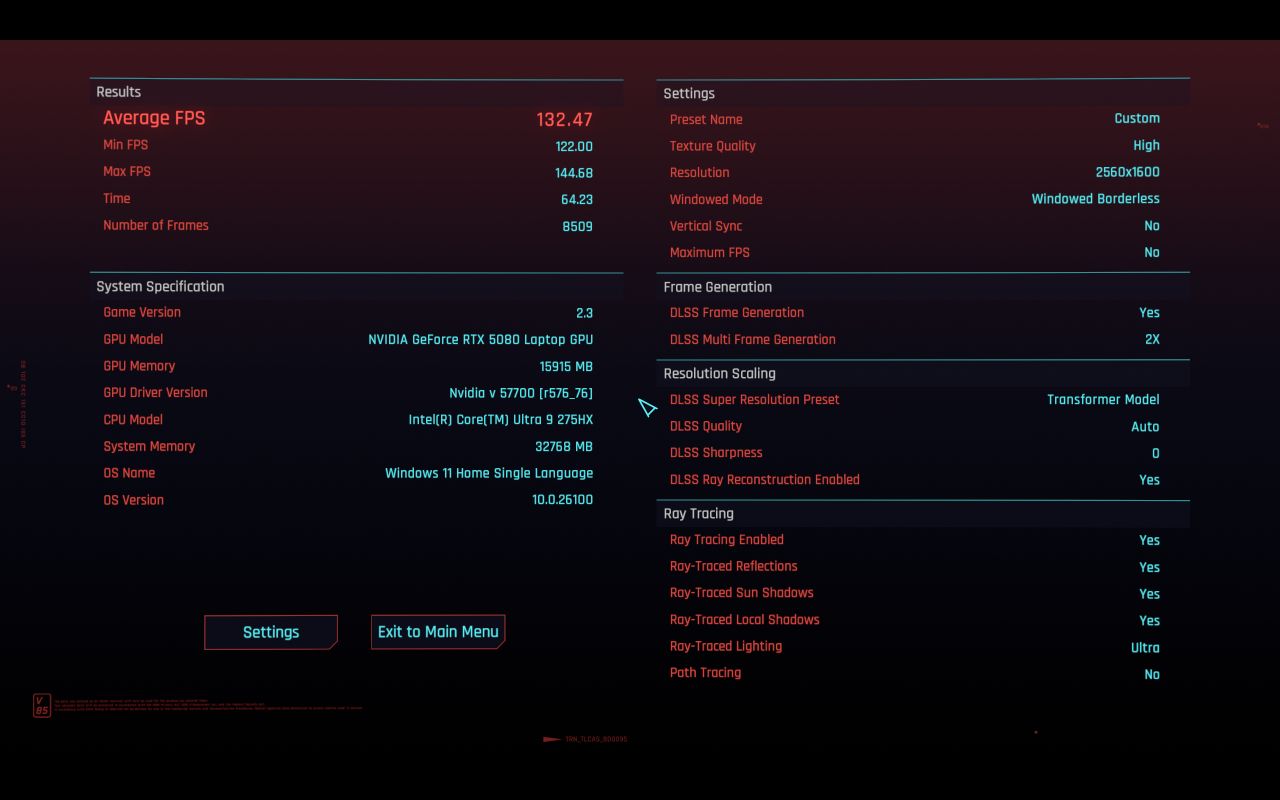
2560×1600, 2X Multi Frame Generation, DLSS Quality Auto, DLSS Ray Reconstruction: Yes, Ray Tracing: Ultra, Path Tracing: Disabled
2560×1600, 2X Multi Frame Generation, NVIDIA DLAA, DLSS Ray Reconstruction: Yes, Ray Tracing: Ultra, Path Tracing: Disabled
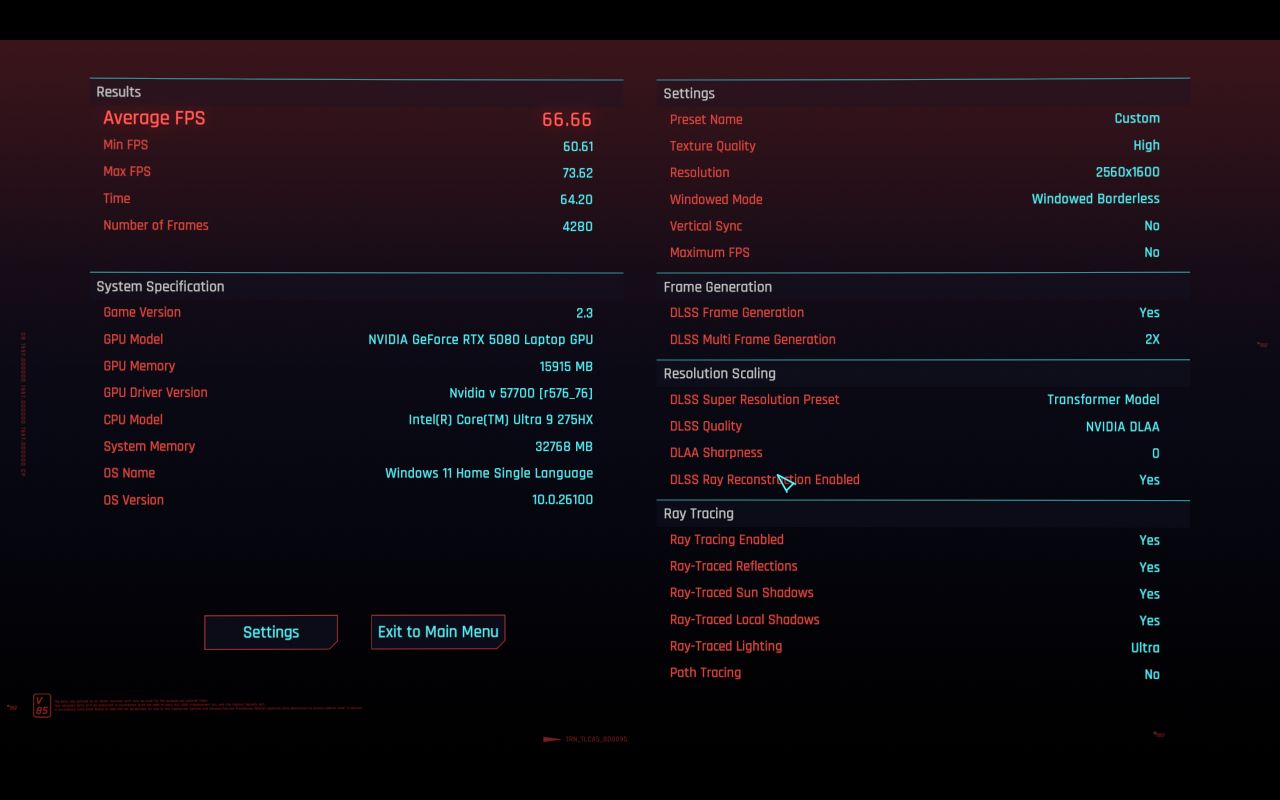
From these tests, it is clear that the Omen Max 16 is pretty well equipped to run Cyberpunk with all its graphical bells and whistles at 120+ FPS.
Black Myth: Wukong
Black Myth: Wukong is one of the most graphically intensive games out there at the moment. Initially the game did not have any official support for DLSS but the developers Game Science added the feature later, much to gamers’ joy as Wukong is an absolutely banger of a game. It’s the kind of a game that brings even the best GPU to their knees at maxed out setting. Ray Tracing in Wukong is a treat to the eyes but is especially responsible for hitting performance.
2560×1600, Cinematic Quality, Ray Tracing High, DLSS, Frame Gen 2X, Super Resolution: 67
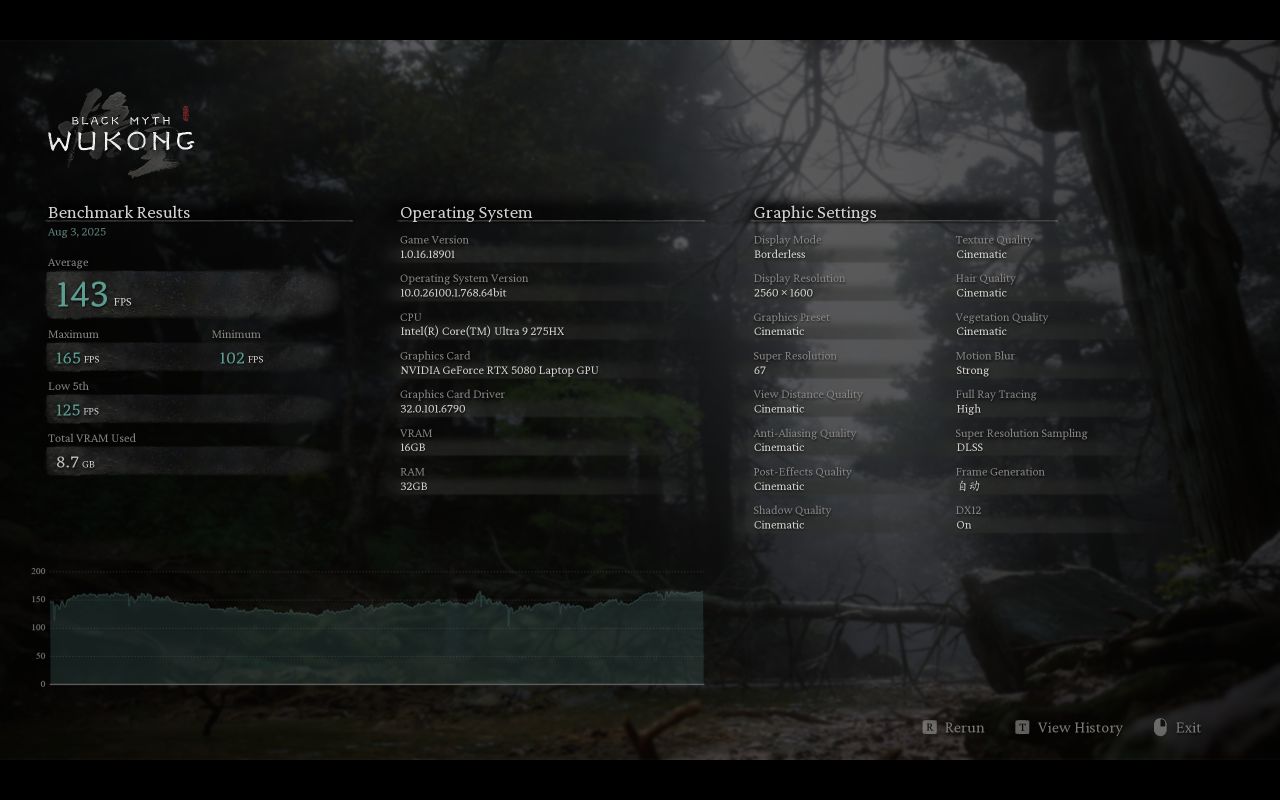
With all settings maxed out and Ray Tracing set to high, along with DLSS enabled, Wukong consistently runs over 143 FPS, with the lowest 5th percentile FPS being 125, which is rather impressive. That means that you can enjoy the game in all its glory on the Omen Max 16.
2560×1600, Cinematic Quality, Ray Tracing High, DLSS Off
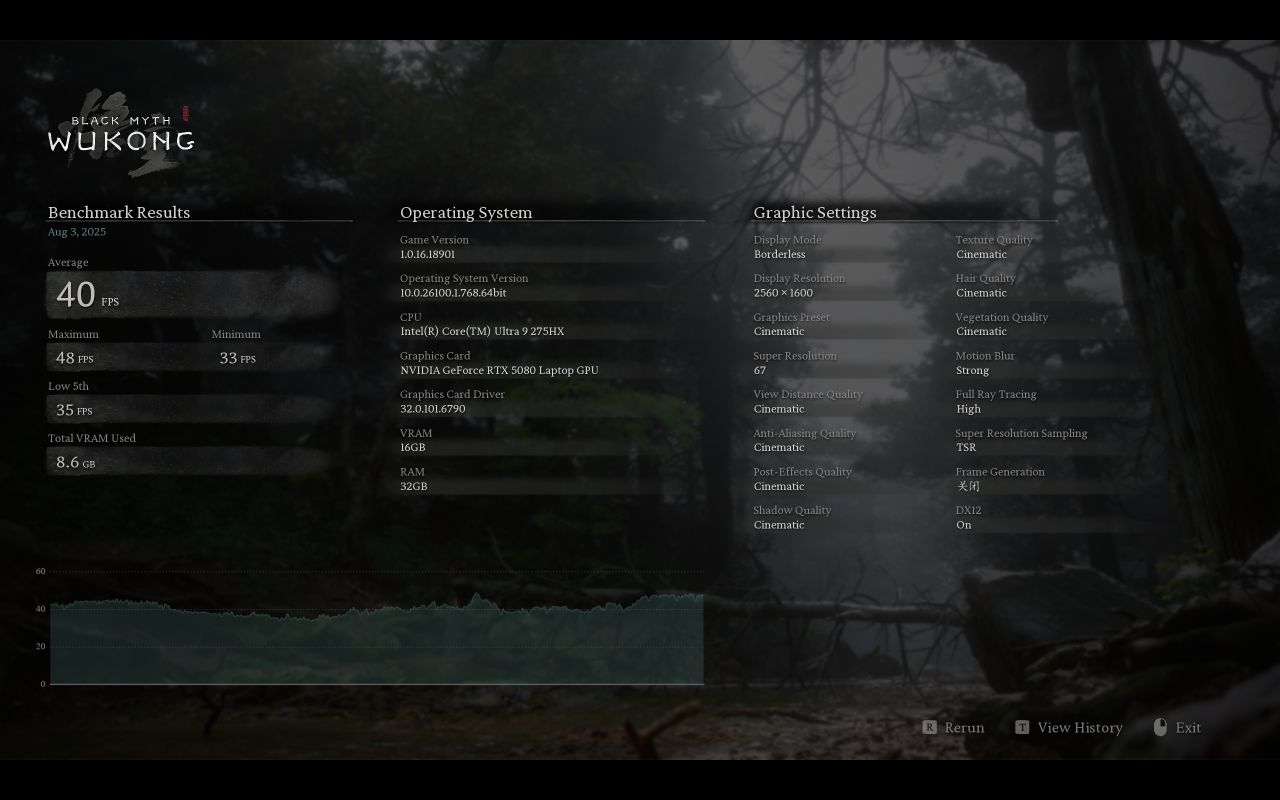
With DLSS off and all settings including ray tracing maxed out, the Omen Max 16 struggles to even reach 60 fps but that is understandable. Even the top GPUs can barely run this game at playable frames without DLSS enabled.
Storage
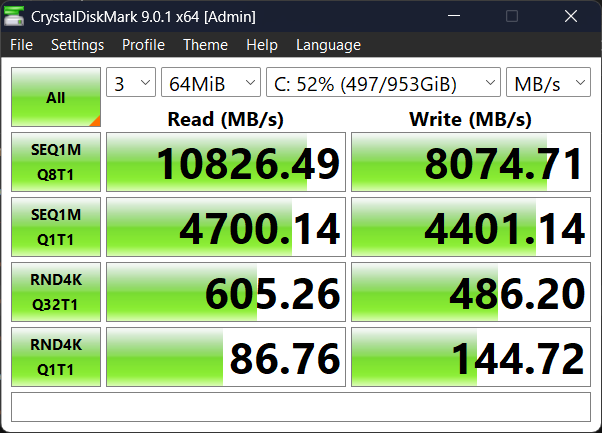
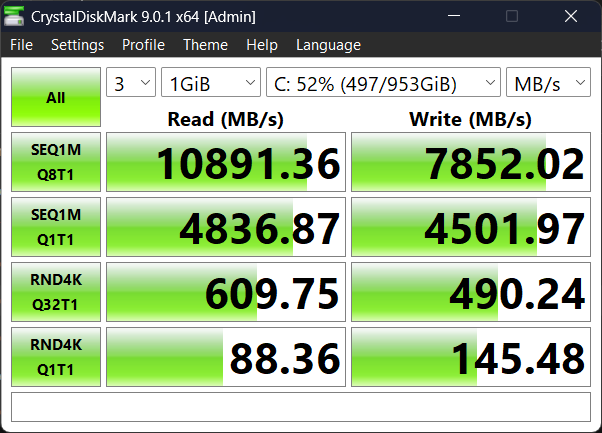
HP Omen Max 16 is one of the few laptops in its class that is offering you Gen 5 NVME SSD storage. Gen 5 drives offer good performance gains over Gen 4 drives, explored in this article. As is with Gen 5 NVME SSDs, we get transfer speeds hitting about 11,000 MB/s. Rest assured, with the Omen Max 16 you are getting cutting edge storage that will hasten any kind of workflow you indulge in.
Heat and Noise
HP’s thermal design on the Omen Max 16 is among the more refined implementations in high-performance gaming laptops today. The laptop utilizes a vapor chamber cooling system, Cryo chamber compound, and a reverse fan dust-ejection mechanism—all working together to handle a combined 250W power envelope (CPU + GPU under full load).
Thermal Performance (Under Load)
Thermal Performance (Max Temps in °C)
Max observed CPU & GPU temperatures under full load. (Lower is Better)
- CPU Package Temp (Cinebench R23 Multi-Core, 10 mins): ~93–97°C
- GPU Temp (3DMark Time Spy Stress Test): ~83–86°C
- Surface Temp (WASD area): ~50–52°C (remains usable)
- Palm Rest Area: 38–40°C (remains usable)
- Rear Exhaust Region: Can peak to 60°C (common for this class)
Despite pushing near-TDP limits, no thermal throttling was observed during testing—even in extended gaming or rendering sessions. HP’s use of hybrid metal thermal grease and intelligent fan curves seems to be paying off.
Fan Noise
- Idle / Light Use: 28–32 dB (whisper quiet)
- Medium Load / Gaming (Balanced Mode): 42–45 dB
- Full Load (Performance or Unleashed Mode): Peaks at 48–50 dB
The fans are audible under heavy load, but not screechy or high-pitched. It’s more of a broadband whoosh—easy to mask with headphones. However, don’t expect the laptop’s loudspeakers to mask the noise of the fans.
You’ll also notice that fan spin-up is gradual—no sudden bursts or distracting whines. HP’s “reverse-blast” system kicks in every few hours to clean the fans, briefly reversing airflow to eject any dust buildup.
The vapor chamber makes a significant difference in keeping sustained workloads stable, especially when gaming and recording simultaneously. Even during summer conditions (ambient temp ~31°C), the Omen Max held performance without throttling — a solid result. The laptop performs optimally in ambient temperatures of ~28°C. HP avoids aggressive CPU boosting that many brands use to spike scores. Instead, the system favors consistent, stable clocks with better long-term thermal behavior. Compared to similarly specced systems like the ROG Strix Scar 16 or Alienware x16, the Omen Max is quieter and cooler under identical loads, especially on the keyboard deck.
Acoustics (dB) – Gaming Load (Lower Is Better)
Fan noise under stress compared to rivals using RTX 5080 GPUs.
Power Consumption
The HP Omen Max has a TPP of 250W, and as mentioned above, is achievable if you’re able to manage temperatures. Being in a cool room helps. The reason why the Omen Max 16 is able to squeeze out the best performance from the Intel Core Ultra 9 275HX and the GeForce RTX 5080 is because of its high TPP.
Power Consumption (Total Power Package)
Webcam and Microphone
The HP Omen Max 16 features a 1080p IR webcam with Windows Hello support. Once again, HP has never really been impressive in this department, and the story carries over to the Omen Max 16. The webcam delivers crisp and detailed output in well-lit environments. In low light, there’s some grain, but HP’s image tuning maintains color balance reasonably well. The dynamic range is acceptable for video calls and game streaming overlays. If you’re on video calls with people who’re on MacBooks, the difference in visual quality will be evident to all participants.
Facial Recognition doesn’t work as reliable or fast as we would have liked. We eventually disabled Windows Hello because the webcam just wasn’t picking up the face with the speed that we’re used to. Sure, it does have IR sensors, they just don’t work as we would have liked. HP needs to improve in this segment as the competition is leaps ahead in terms of webcam technology.

The Omen Max 16 comes with Dual-array mics to deliver clean voice capture with strong noise rejection. HP’s AI noise reduction algorithm (via OMEN Audio Control) does a decent job cutting out keyboard clatter and ambient room noise during calls or streams. Not broadcast-level, but excellent for in-game chat, Zoom, or Discord. One can clearly make out the lack of fidelity and sonic range of the microphone unit; another area where HP really needs to improve.
Battery Life
Battery life has always been the Achilles Heel in Omen machines, but the Omen Max 16 has given this characteristic a much needed second wind. We were able to achieve around 7 hours of battery life during video playback with 50% brightness. That is rather impressive for a machine of this spec. The RTX 5080’s power consumption on low usage is very impressive. There is an Omen Max 16 version with an RTX 5090, which gives 5 hours of battery life during video playback. That is a significant drop in battery life, so in retrospect, you are much better of with the RTX 5080 version rather than the 5090.
It is also worthy to note that our review unit has come with an IPS display. Switching this to OLED will significantly hit the battery performance.
Verdict
The HP Omen Max 16 isn’t just a spec monster—it’s a finely engineered powerhouse that translates raw specs into meaningful, real-world performance. While many gaming laptops throw everything at the wall—heat, noise, RGB vomit—HP has taken a far more thoughtful approach. The Omen Max 16 performs right up there with the best, while staying cooler, quieter, and more composed. And the cherry on top? A tank-like, tactile chassis that feels ready to endure years of real-life abuse without flinching.
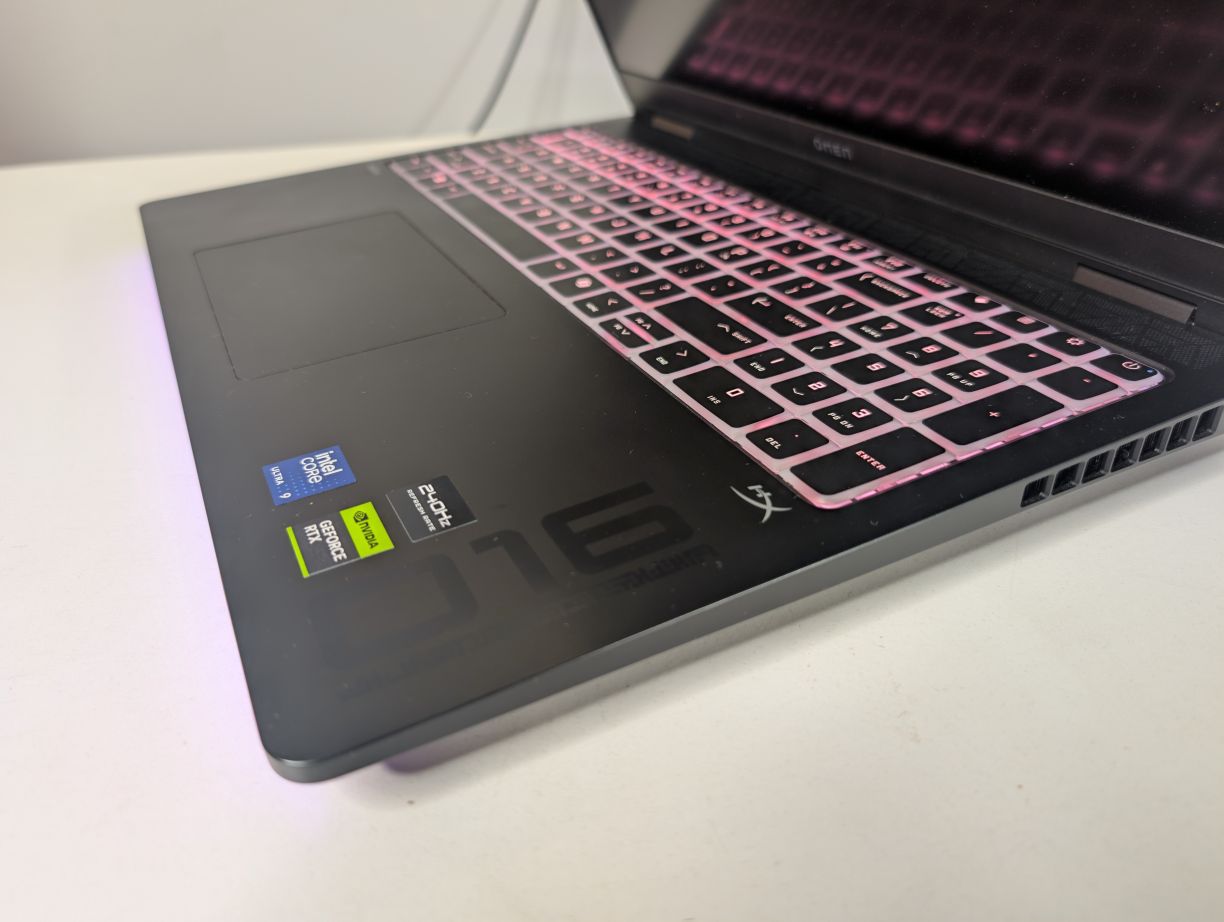
If you’re a gamer who wants top-tier performance, or a creator who needs sustained CPU and GPU power without thermal throttling, this machine delivers. What’s more, the Omen Max 16 slips effortlessly between boardroom, dorm room, classroom, and battlestation. We dare say this: you might just end up choosing it for the design alone. In a market full of brash, shouty laptops, this is the only one flexing massive internals with quiet confidence—and that makes it a standout.
As much as we didn’t expect to say this… hats off, HP. Just know what you’re getting into: the webcam and Windows Hello are weak spots, and at nearly 2.7kg, it’s not featherweight, no machine of this class is seldom. But if you can live with those quirks, this is easily the best Omen HP’s ever made.
This isn’t just a gaming laptop—it’s HP’s mic drop in the gaming arms race.