iLLGaming Gold Award

4.5 / 5 | Reviewed by Saahil Arora
The ASUS TUF Gaming A14 FA401EA is a laptop with no exact rival. In a 1.48 kg chassis, ASUS has packed a chip that outperforms discrete GPU laptops in CPU benchmarks, enables local AI workloads at a depth no other laptop at this weight can match, and still delivers over 7 hours of real-world battery life. The price of Rs. 1,79,990 is genuinely steep for pure gaming. But for AI developers, creators, and anyone who wants a future-proof machine that disappears into a backpack, nothing else in the market does what this does.
What’s iLL
- +Ryzen AI MAX+ 392 – desktop-class multi-thread CPU in a sub-1.5 kg chassis
- +Up to 24 GB assignable GPU VRAM via Armoury Crate – more than an RTX 5080 laptop, from an integrated GPU
- +Genuinely silent under light load – 0dB Ambient Cooling cuts fans off completely during productivity use
- +MIL-STD-810H build quality – aluminum lid and base, grippy tactile plastic deck that works in its favour
- +Windows Hello is flawless – IR camera unlocks instantly even in low light
- +Only 1.48 kg – lighter than the ROG Zephyrus G14 with a discrete GPU
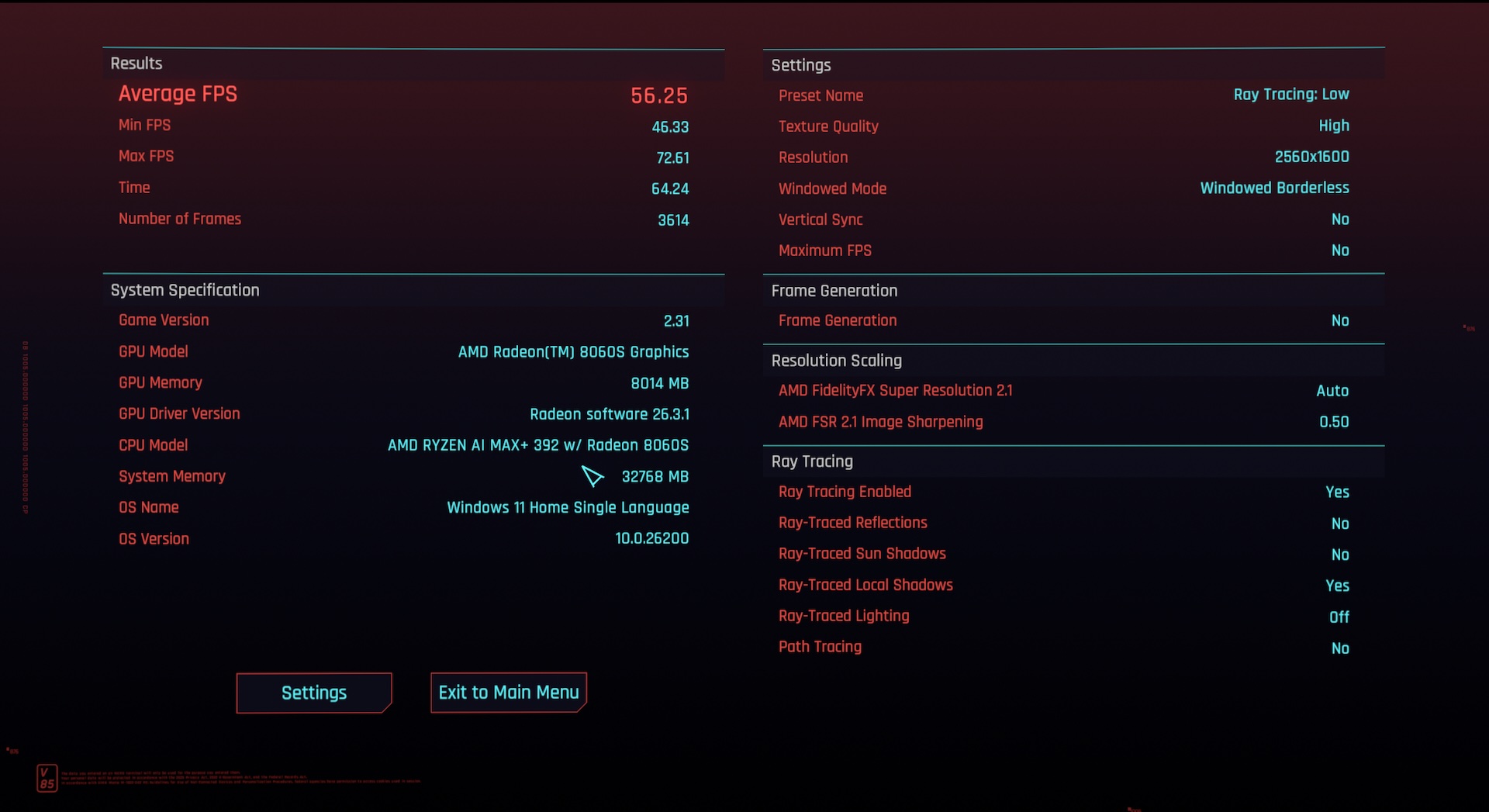
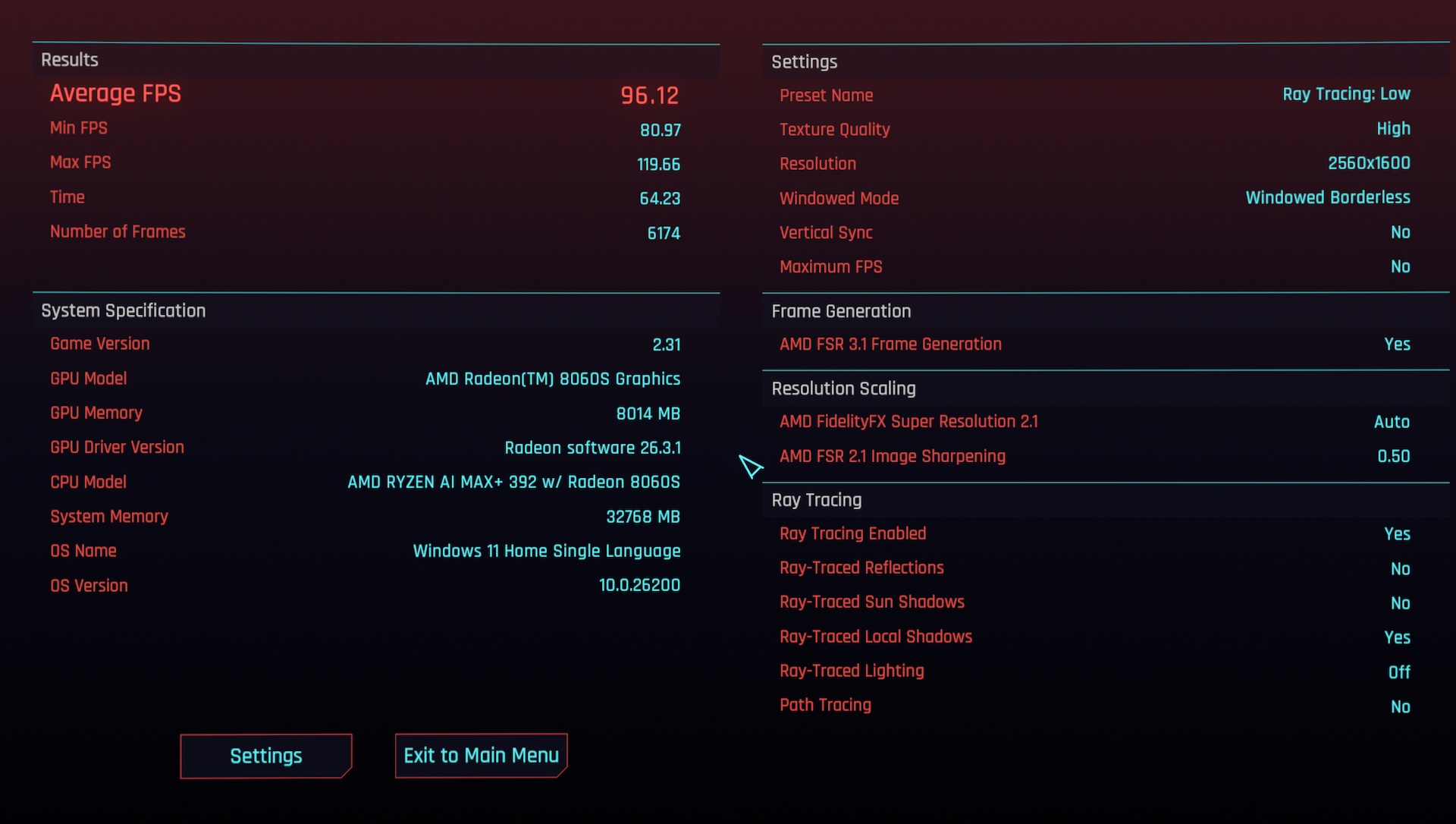
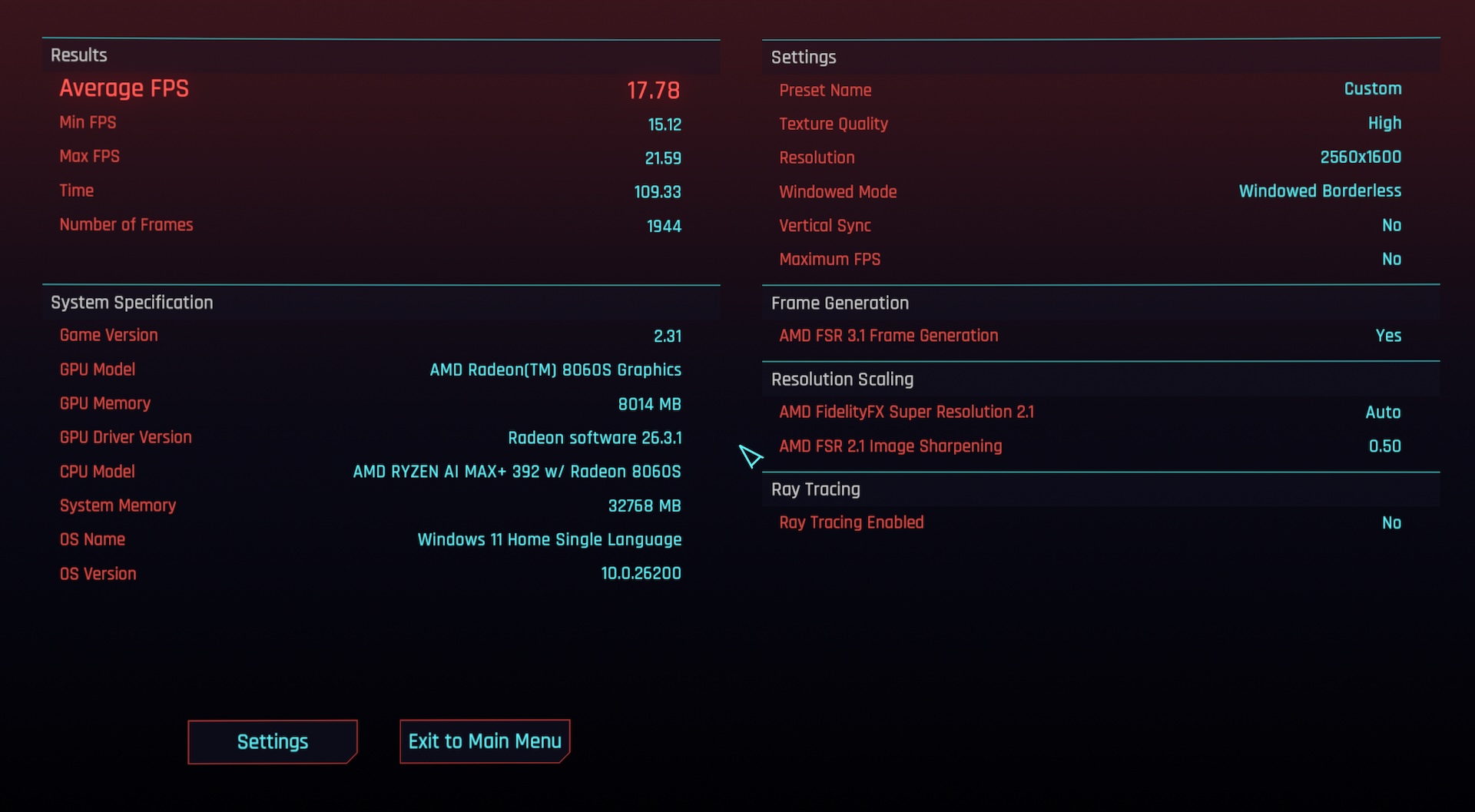
- +FSR 3.1 Frame Generation transforms gaming – 56 fps becomes 96 fps in Cyberpunk 2077 at native 2560×1600
- +Dual M.2 slots + removable Wi-Fi card – rare serviceability for a 14-inch machine
- +Glass-topped 240Hz trackpad – accurate, smooth, best on any Windows gaming laptop we have tested
What’s Not
- –Price – Rs. 1,79,990 for integrated GPU gaming is difficult to justify against discrete GPU rivals at the same money
- –RAM is soldered – 32 GB or 64 GB at purchase, no upgrade path; choose 64 GB if buying long-term
- –Thermals at max CPU load – hits 95 degrees C under Cinebench sustained; thermally capped in this chassis
- –Keyboard bounce – slightly bouncier than ideal; four asymmetric top-row shortcut keys bother symmetry lovers
- –Trackpad click pressure – firmer than usual; might take a couple of days to adjust
- –No Ethernet port – a miss at this price
- –Webcam is average – soft image, washes out in backlit environments
- –Firmware still needs refinement
- –Previous-gen A14 with RTX 4060/5060 is better pure gaming value – at Rs. 1 to 1.3 lakh those machines game harder per rupee
Introduction
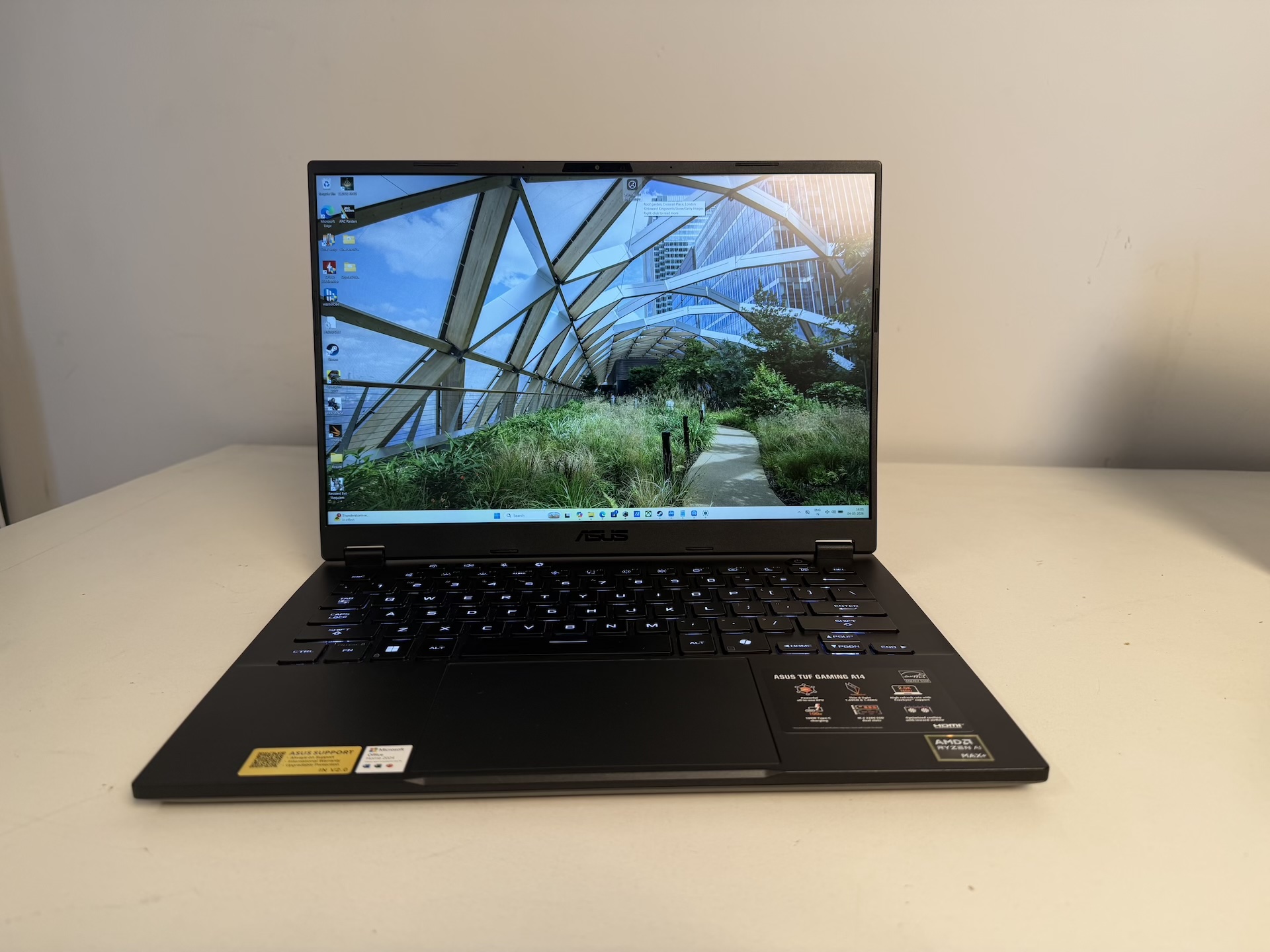
Gaming laptops have followed the same formula for decades. CPU here, discrete GPU there, both fighting for power and heat in a chassis that never feels big enough. The bigger the GPU you want, the bigger, heavier, louder the machine. The TUF A14 series has always been an exception – punchy performance in a slim 14-inch frame. The 2024 model with an RTX 4060 was a personal favourite. The 2025 model with an RTX 5060 was a solid update at a slightly painful price bump.
The 2026 model breaks the formula entirely.
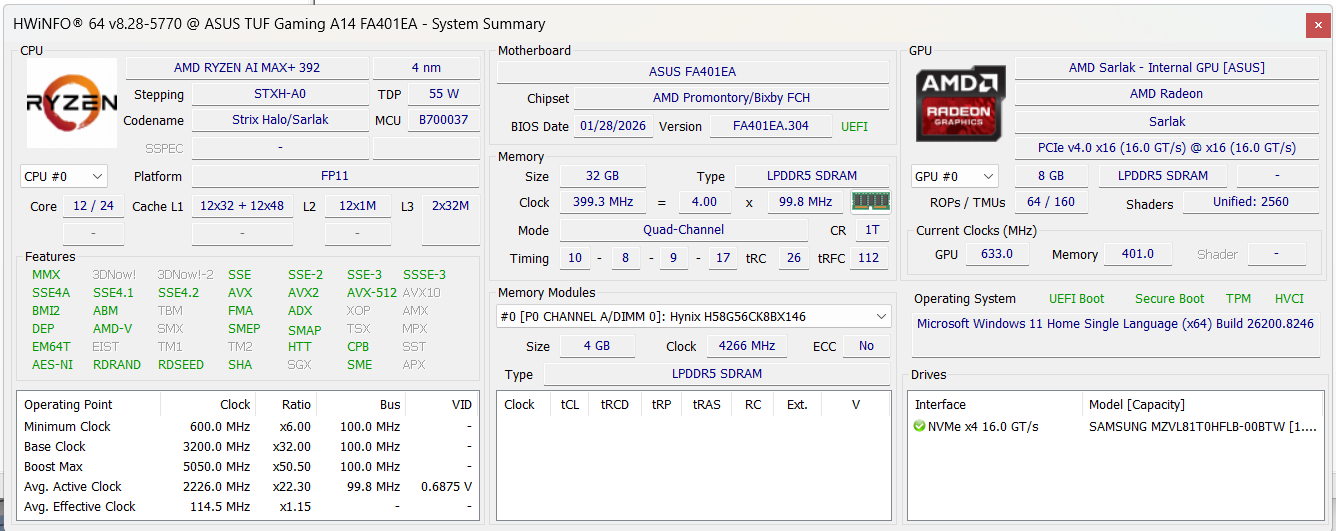
The ASUS TUF Gaming A14 FA401EA drops discrete graphics completely, replacing it with AMD’s Ryzen AI MAX+ 392 – a single chip integrating 12 Zen 5 CPU cores, 40 compute units of RDNA 3.5 GPU, and a 50 TOPS NPU, all sharing a unified quad-channel LPDDR5X memory pool. No VRAM limit divorced from system RAM. One chip. One bus. 1.48 kg.
We spent a month with the review unit. Benchmarked it extensively, gamed on it, and ran real-world productivity sessions. Here is our honest account.
Specifications
| Model | ASUS TUF Gaming A14 FA401EA |
| Processor | AMD Ryzen AI MAX+ 392 – 12 cores / 24 threads, Zen 5, 3.2 GHz base / 5.0 GHz boost, 80MB cache |
| GPU | AMD Radeon 8060S – 40 CU RDNA 3.5, integrated, unified memory (up to 24 GB assignable as VRAM) |
| NPU | AMD XDNA 2 – 50 TOPS (Copilot+ PC certified) |
| RAM | 32 GB LPDDR5X-8533 soldered quad-channel, shared with GPU |
| Storage | 1 TB PCIe Gen 4 NVMe SSD (Samsung MZVL81T0HFLB) + 1 empty M.2 slot |
| Display | 14-inch 2560×1600 WQXGA, IPS-level, 165Hz, 3ms, 100% sRGB, Anti-glare, AMD FreeSync |
| Webcam | 1080p FHD IR Camera with Windows Hello |
| Audio | Stereo speakers, Dolby Atmos, AI noise-cancelling array microphone |
| Battery | 73 Wh, fast charge 0-50% in 30 minutes |
| Ports | 1x USB4 40Gbps (DP + PD), 1x USB 3.2 Gen 2 Type-C (DP), 2x USB-A 3.2 Gen 2, HDMI 2.1, microSD UHS-II, 3.5mm |
| Wireless | Wi-Fi 6E, Bluetooth 5.3 (Wi-Fi card user-removable) |
| Weight | 1.48 kg |
| OS bundled | Windows 11 Home + MS Office 2024 + M365 Basic (1 year) |
| India MRP | Rs. 1,79,990 (32 GB) | Rs. 2,09,990 (64 GB) |


Design and Build Quality
The TUF Gaming A14 is not trying to impress you with looks. No RGB strip, no aggressive gamer vents, no chrome. Dark, flat, purposeful.
The materials deserve precision: the lid is aluminum, the bottom panel is aluminum with geometric diamond-cut ventilation cutouts, and the chassis body and keyboard deck are plastic. This is a feature, not a compromise. The matte plastic deck is grippy and tactile in a way that cold, fingerprint-prone metal decks are not. It absorbs bag-abuse without denting. It does not conduct chassis heat to your palms the way a full-metal machine does. The aluminum lid and base provide rigidity where it actually matters.
The MIL-STD-810H certification covers drops, vibration, humidity, and temperature extremes. We were rough with this machine for two weeks. It did not complain once.
At 1.48 kg, this is lighter than the ROG Zephyrus G14 with a discrete GPU (1.5 kg), lighter than the Lenovo Yoga Pro 7 14IAH10 at 1.55 kg, and dramatically lighter than comparable performers packing dedicated GPUs. It is just 200 grams heavier than the MacBook Air 15. The 180-degree hinge is firm and wobble-free. Hot air exits from the rear full-width heatsink away from your hands and desk surface.
Keyboard and Trackpad
The keyboard gets the job done – and it will get the job done well. The 1.7mm key travel, although higher than its counterparts, is satisfying. Overstroke technology triggers actuation higher in the keypress for faster gaming inputs. Each key is rated for 20 million presses. The uniform Mini LED backlight runs across three brightness levels with clean containment – very little bleed between keys, giving the keyboard a tight, refined look that is better than most gaming laptops at this price.
That said, the keys have a bouncier character than we would ideally prefer. Not wrong, just different from the crisper, more linear feel of, say the Lenovo Yoga Pro 7’s keyboard. You will get used to it. For productivity typing and gaming it is perfectly capable.
One layout quirk worth flagging: there are four dedicated shortcut keys above the top function row – volume down, volume up, mic mute, and the Armoury Crate launcher. These keys are narrower than the function row, creating a visual asymmetry. If symmetrical keyboard design matters to you, this will bother you. The Copilot key is also present on the bottom row – most people will remap it within 48 hours.
The trackpad is a genuine highlight. ASUS uses a glass-topped surface with a 240Hz polling rate, sampling finger position 240 times per second. It’s impact on battery life is questionable as a higher poll rate keeps the CPU cores busy, but well, it’s mostly marketing at this point. Cursor tracking is accurate, smooth, and precise. Multi-finger gestures register cleanly without misfires. It is one of the best trackpads on any Windows gaming laptop we have tested, with “one of the best” being the key phrase.
The one caveat: the physical click requires slightly more deliberate pressure than we would ideally want – noticeably firmer than a MacBook Force Touch or the Lenovo Yoga’s trackpad. Not a dealbreaker, and it becomes second nature after a few days. But expect a brief adjustment period if you are coming from a MacBook or premium Lenovo.
Display
The inevitable question at Rs. 1.8 lakh: why no OLED? It is fair. The ROG Zephyrus G14 has one. Most laptops at this price have one.
Our honest take: we prefer IPS on a laptop for daily work, and this panel reinforced that over a month. OLEDs burn in over time. OLEDs implement Automatic Brightness Limiting that dims the panel in high-APL content. Text looks more harsh on OLED, and you’ll constantly be switching between light and dark mode if you’re using your OLED laptop for work and entertainment. This display – 100% sRGB, anti-glare, 165Hz, 3ms, AMD FreeSync – is consistent, well-rounded, and genuinely enjoyable to work and game on. It’s HDR implementation is solid too.
The 2560×1600 resolution at 14 inches delivers 215 PPI. Here is what matters most for gaming decisions:
Pixel Density at Different Resolutions – 14-inch 16:10 Panel (Higher = Sharper)
| Yoga Pro 7 – 3000×1876 OLED native | 244 PPI | |
| MacBook Air M5 (13.6-inch) | 227 PPI | |
| TUF A14 – 2560×1600 native | 215 PPI | |
| TUF A14 – 1920×1200 in-game (FHD+) | 162 PPI | |
| Typical 15.6-inch 1080p gaming laptop | 141 PPI |
Even at 1080p in-game on the TUF A14, you are rendering at 162 PPI – sharper than most gaming laptops at their native 1080p. Drop the resolution for better GPU performance; the display holds up fine.
Webcam and Microphone


The 1080p FHD IR camera is a mixed result. The good news: Windows Hello facial recognition works flawlessly. It unlocks the machine instantly, even in low light, without hesitation. This is one feature that is a miss even in some premium laptops. On a daily driver, fast and reliable biometric login genuinely matters, and the TUF Gaming A14 scores a win here.
The image quality is less impressive. The sensor delivers acceptable sharpness in well-lit conditions but colour can appear washed out. The bigger weakness is backlit environments – a bright window or lamp behind you causes significant underexposure. For standard Teams and Zoom calls in a well-lit room it is adequate. No privacy shutter – a minor but noted omission at this price.
The audio setup is more solid: a dual built-in array microphone with Dolby Atmos AI noise cancellation. Voice pickup is clear at normal speaking distance and the noise cancellation does real work on background noise. For video calls and Discord it is reliable. The stereo speakers produce adequate volume for personal listening; bass is limited due to downward-firing placement, but they are usable for gaming sessions without headphones – we played Pragmata on speakers and remained immersed in the game. There is good clarity and definition, even a decent amount of soundstage. Rest assured you will be able to enjoy content without headphones.
The Chip: AMD Ryzen AI MAX+ 392 and Unified Memory
The Ryzen AI MAX+ 392 is a unified architecture chip: CPU, GPU, and NPU on one die, all sharing a single pool of quad-channel LPDDR5X memory. This is fundamentally different from a traditional laptop where the GPU has a fixed pool of GDDR6 VRAM that cannot be shared with the CPU. This architecture draws more parallels to Apple’s M-silicon unified structure, than to traditional Intel/AMD chips. We are seeing this architecture being adopted more and more, and is clearly the trend to look out for.
The 50 TOPS AMD XDNA 2 NPU enables Copilot+ PC features and, more importantly, accelerates local AI inference. Models like Llama 3 8B, Mistral 7B, Phi-3 Mini, and Gemma 3 run on this machine locally, without cloud costs or latency. No other laptop at Rs. 1.8 lakh gives you anything close to this level of on-device AI capability.
For AI developers, ML researchers, and anyone building or experimenting with local language models: this is the laptop to buy. Nothing else at this price and weight comes close.
Armoury Crate
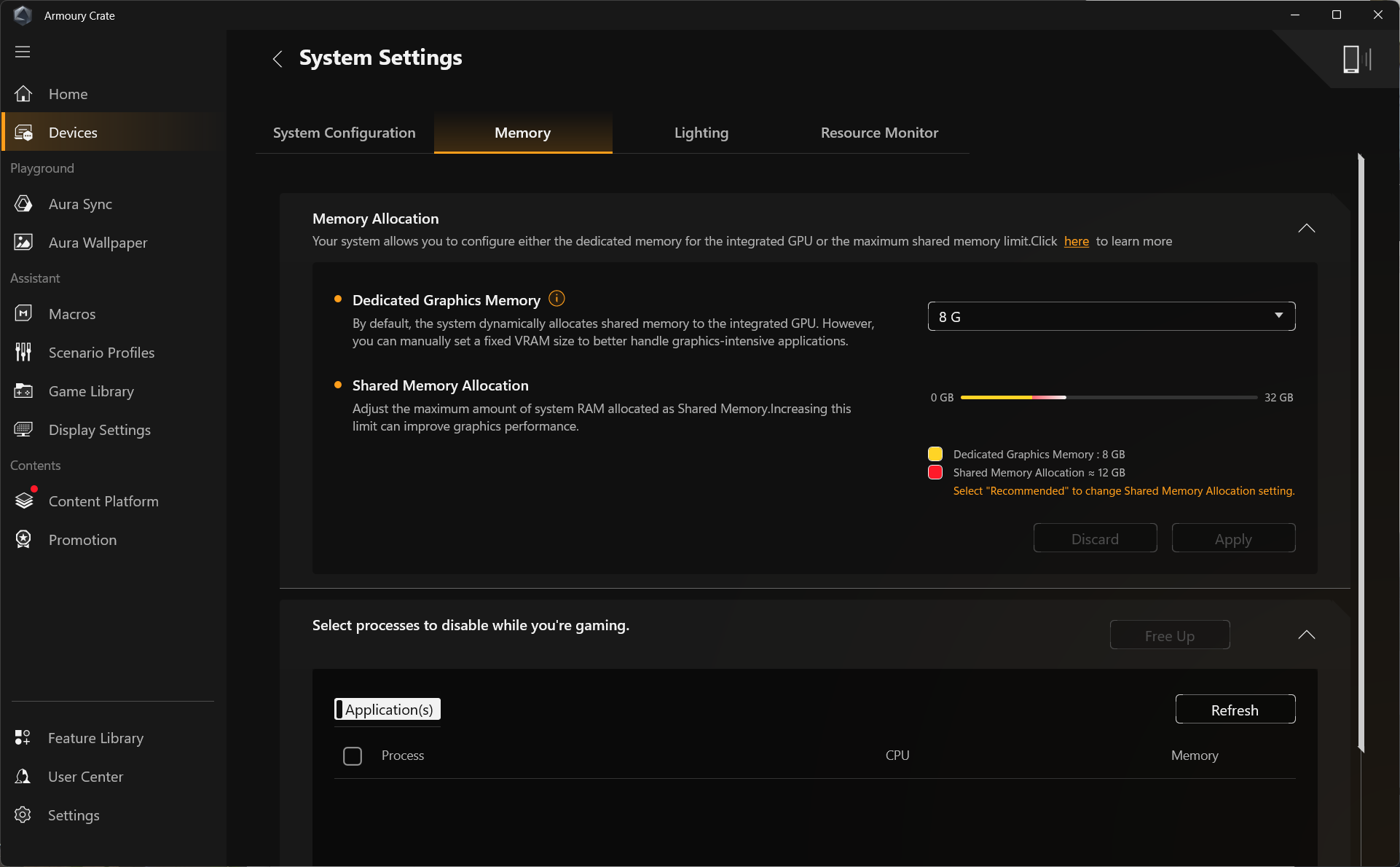
Armoury Crate is mostly bloatware. The useful parts are the GPU memory allocation slider (the most important feature in the app), the performance profiles (Silent, Balanced, Performance, Manual), and the keyboard backlight control with three brightness levels, breathing and strobing effects. Everything else – game launcher, wallpaper manager, Aura Sync ecosystem – you will likely never open after the first week.
Geekbench AI Performance
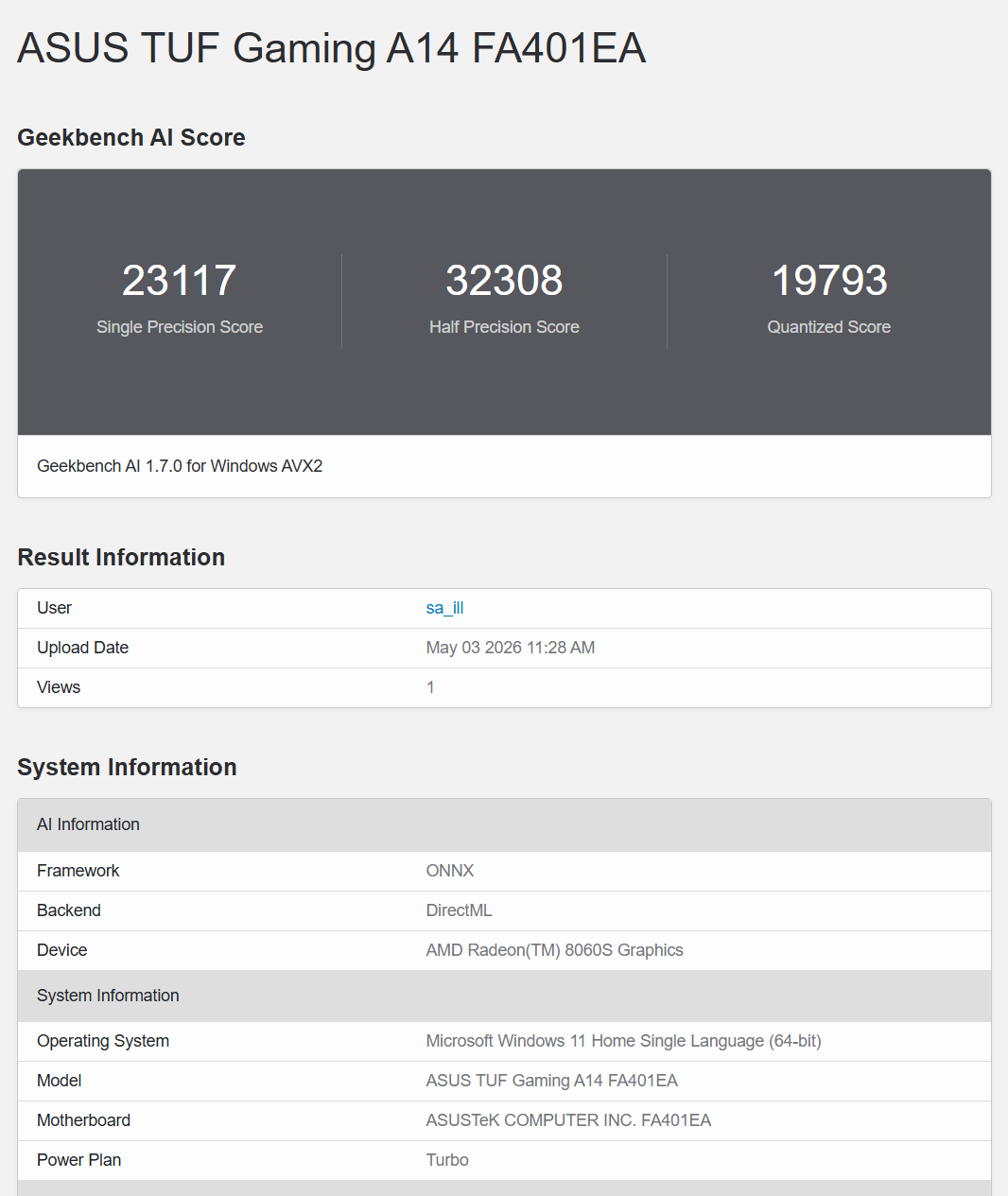
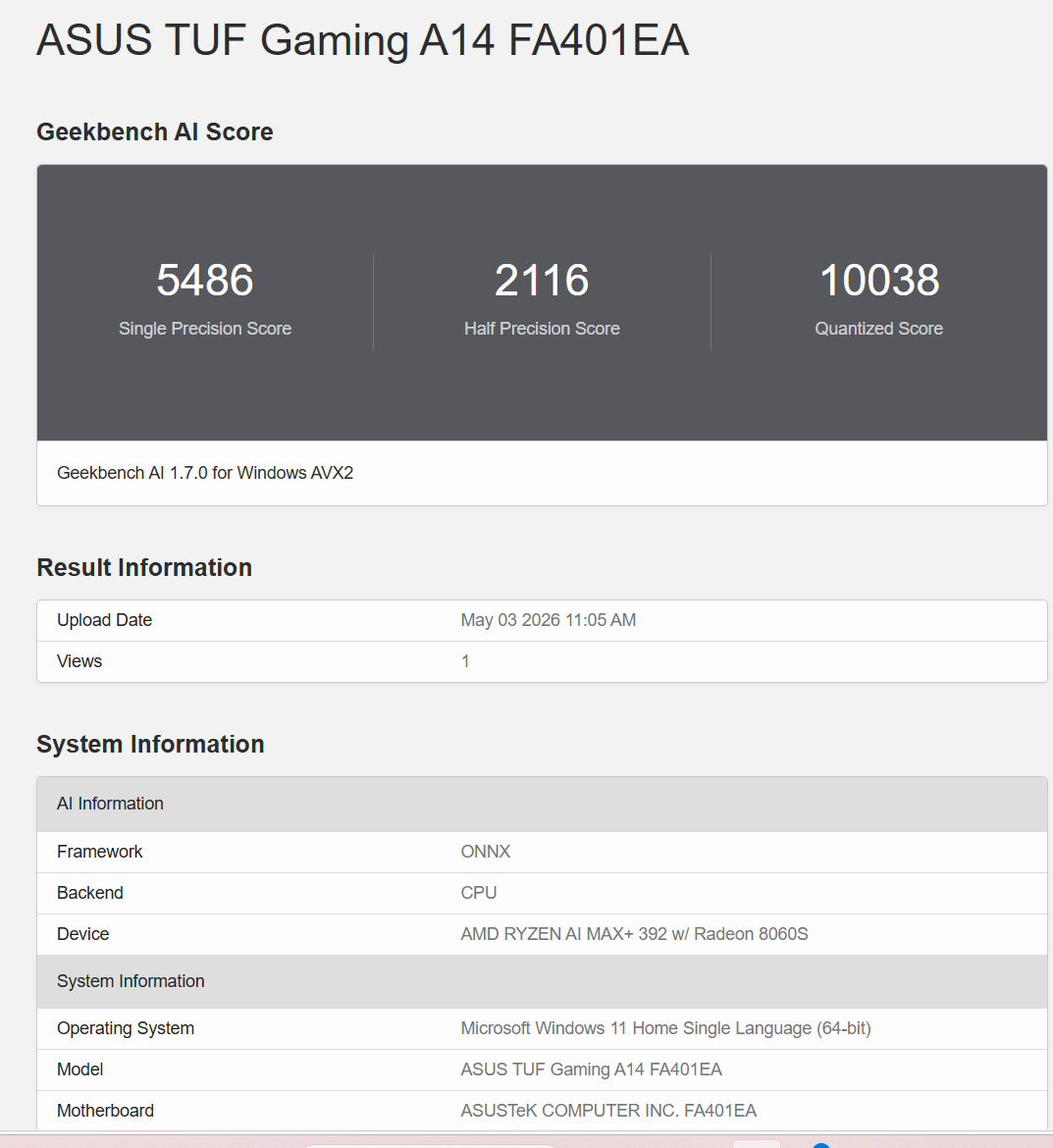
We ran Geekbench AI on the TUF A14 twice using the ONNX framework – once on the CPU backend and once on the GPU backend (DirectML), which uses the Radeon 8060S with full access to the unified memory pool. This gives us a complete picture of AI compute across both silicon assets in the chip.
Full Results: CPU vs GPU
| Precision | What it tests | CPU (ONNX) | GPU (DirectML) | Multiplier |
|---|---|---|---|---|
| Single Precision (FP32) | Full-accuracy inference, professional workflows | 5,486 | 23,117 | 4.2x |
| Half Precision (FP16) | Image AI, diffusion models, fast inference | 2,116 | 32,308 | 15.3x |
| Quantized (INT8) | Local LLM inference, most practical workload | 10,038 | 19,793 | 2.0x |
The GPU numbers are the headline. The half precision jump from 2,116 to 32,308 is a 15x improvement – the Radeon 8060S’s RDNA 3.5 FP16 compute units doing exactly what they are designed for. Image generation, diffusion models, and many LLM inference engines that support FP16 will use this GPU path and see dramatically faster results than any CPU-only machine.
The single precision jump of 4.2x and quantized jump of 2x are equally meaningful. These represent the GPU taking over AI inference tasks that would otherwise bottleneck on CPU cores alone.
A note on framework context: Apple devices run Geekbench AI via Core ML with Neural Engine access. The comparison below uses ONNX scores across Windows platforms for like-for-like comparison. Apple Core ML Neural Engine scores are included for reference but represent dedicated NPU hardware on a different software stack.
Geekbench AI – Half Precision (FP16), ONNX – CPU vs GPU vs Competition (Higher is Better)
| TUF A14 – Radeon 8060S GPU, DirectML | 32,308 | |
| Apple M4 – Core ML Neural Engine (different framework) | ~24,500 | |
| RTX 5060 Laptop GPU – DirectML (est. from published data) | ~22,000 | |
| Lenovo Yoga Pro 7 – Arc 140T GPU, DirectML | ~8,000 | |
| TUF A14 – Ryzen AI MAX+ 392 CPU, ONNX | 2,116 |
Source: iLLGaming own testing on TUF A14 and Yoga Pro 7. RTX 5060 DirectML estimate from publicly available Geekbench AI data. Apple M4 Core ML Neural Engine score shown for context only – different hardware path and framework. The Radeon 8060S GPU scores higher than an RTX 5060 laptop in FP16 inference on this test – a remarkable result for an integrated GPU, directly attributable to the wider memory bandwidth of the unified architecture.
Geekbench AI – Quantized (INT8), ONNX – CPU vs GPU vs Competition (Higher is Better)
| Apple M4 Pro – Core ML Neural Engine (different framework) | ~51,700 | |
| TUF A14 – Radeon 8060S GPU, DirectML | 19,793 | |
| TUF A14 – Ryzen AI MAX+ 392 CPU, ONNX | 10,038 | |
| Lenovo Yoga Pro 7 – Core Ultra 9 285H CPU, ONNX (est.) | ~5,600 | |
| Snapdragon X Elite – ONNX CPU | ~4,200 |
Source: iLLGaming own testing. The GPU path (19,793) is 2x faster than the CPU path (10,038) for quantized INT8 inference – meaning LLM workloads run faster on the Radeon 8060S than on the CPU cores alone. Even the CPU-only score of 10,038 is nearly double a Core Ultra 9 285H system. Apple M4 Pro Neural Engine shown for reference only – different hardware and software path. AMD has not yet exposed the XDNA 2 NPU backend via ONNX Runtime; the GPU is therefore the primary AI accelerator on this platform for Windows applications.
Performance Benchmarks
All benchmarks were conducted with the laptop plugged in and Armoury Crate set to Performance mode. Thermal data was logged throughout via HWiNFO64.
CPU Performance
Cinebench 2026 – Multi-Thread Score (Higher is Better)
| Intel Core Ultra 9 285K – Desktop 125W | 9,132 | |
| Apple M4 Max – MacBook Pro 16 | 7,829 | |
| ROG Flow Z13 – Ryzen AI MAX+ 395 (16C) | ~6,600 | |
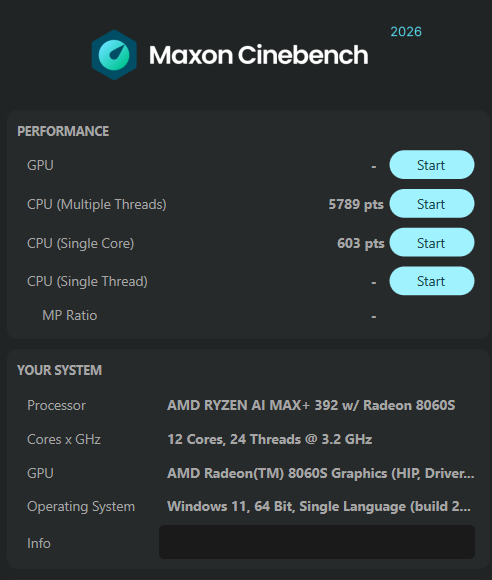
| ASUS TUF A14 – Ryzen AI MAX+ 392 | 5,789 | |
| HP Omen Max 16 – Core Ultra 9 275HX | ~5,200 | |
| Lenovo Yoga Pro 7 – Core Ultra 9 285H | 4,693 | |
| Snapdragon X Elite 12C Laptop | 3,717 | |
| Intel Core Ultra 7 255H Laptop | 2,861 |
Source: iLLGaming own testing. The Ryzen AI MAX+ 392 ranks #5 globally in Cinebench 2026 multi-thread at time of review. It beats the Yoga Pro 7’s Core Ultra 9 285H by 23% despite having fewer total cores. HP Omen Max 16 figure from iLLGaming’s own review.
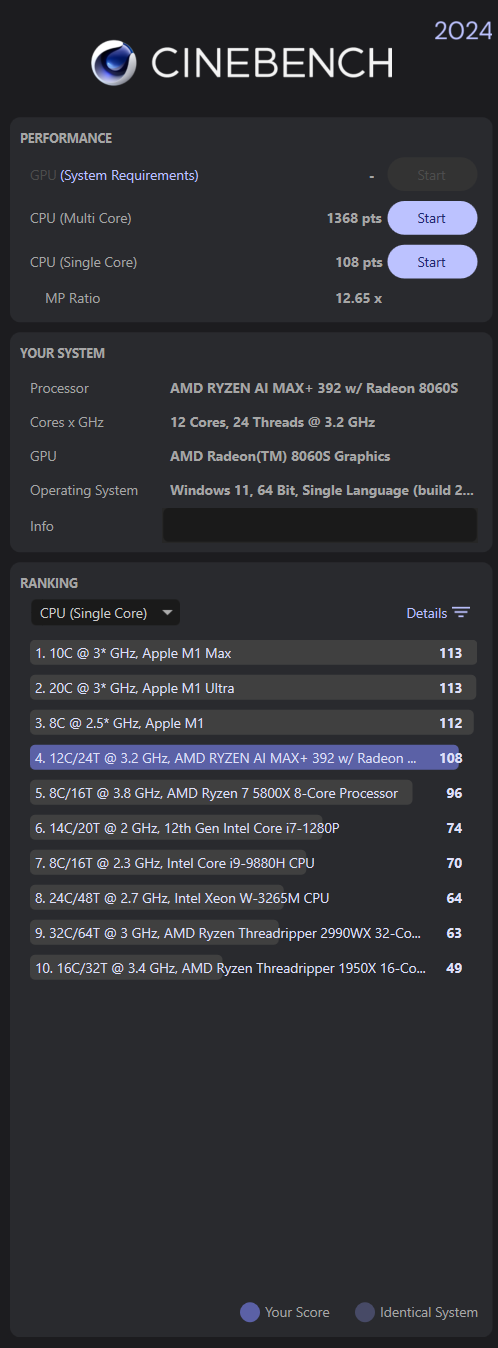
Cinebench 2024 (R24) – Single-Thread Score (Higher is Better)
| Apple M1 Max / M1 Ultra | 113 | |
| ASUS TUF A14 – Ryzen AI MAX+ 392 | 108 | |
| AMD Ryzen 7 5800X – Desktop | 96 | |
| Lenovo Yoga Pro 7 – Core Ultra 9 285H | ~82 | |
| Intel Core i7-1280P (12th Gen laptop) | 74 |
Source: iLLGaming own testing. TUF A14 ranks #4 globally in Cinebench R24 single-thread – behind only Apple M1 Max, M1 Ultra, and M1. Remarkable for a Windows laptop chip.
GPU Performance
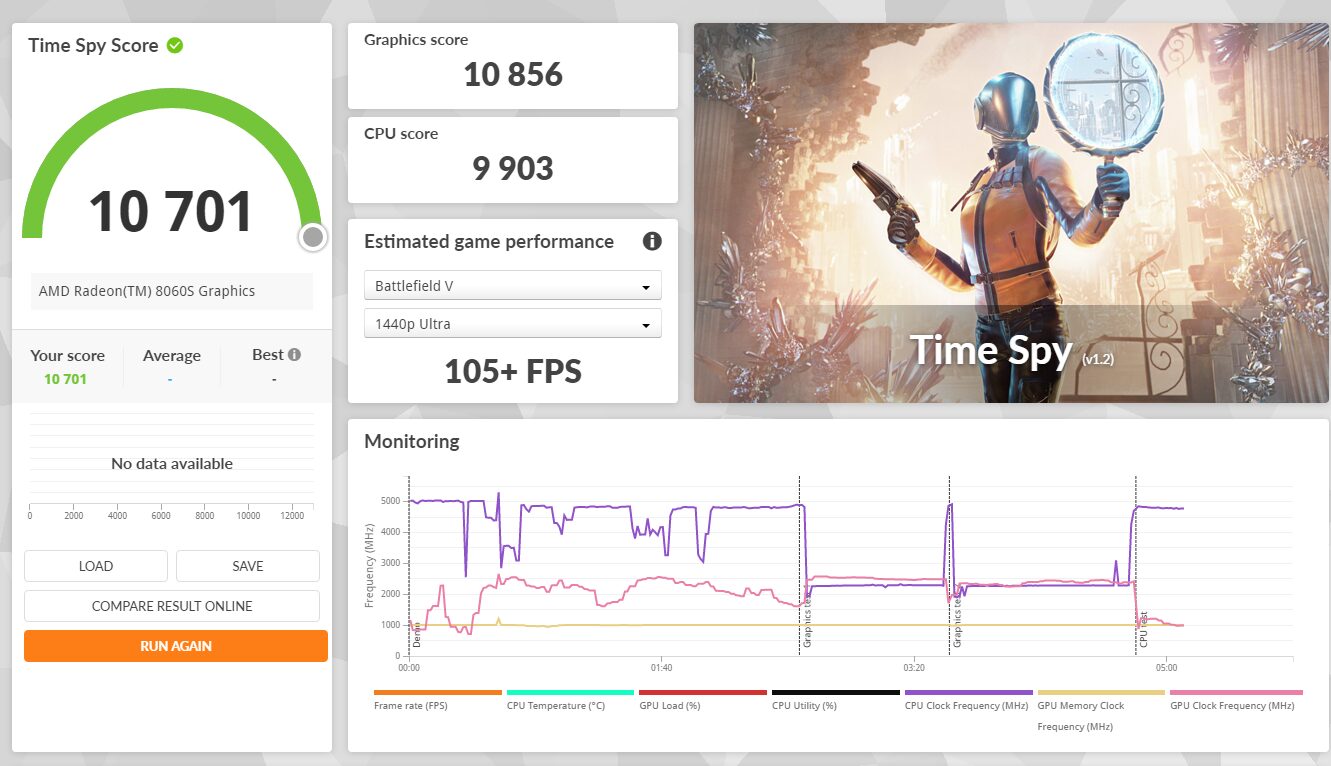
3DMark Time Spy – Overall Score (Higher is Better)
| HP Omen Max 16 – RTX 5080 (our review) | 21,912 | |
| RTX 5060 Laptop – 115W avg | ~15,800 | |
| RTX 4060 Laptop – 140W TGP | ~13,600 | |
| ASUS TUF A14 – Radeon 8060S | 10,701 | |
| RTX 4060 Laptop – 55W low TGP | ~8,800 | |
| Lenovo Yoga Pro 7 – Intel Arc 140T | ~5,900 |
Source: iLLGaming own testing on both the TUF A14 and Yoga Pro 7. The Radeon 8060S is approximately 81% faster than the Arc 140T in Time Spy – a significant gap between two integrated solutions tested side by side.
Gaming: Cyberpunk 2077
Tested at native 2560×1600, High textures, Ray Tracing Low preset with Ray-Traced Local Shadows enabled, using the in-game benchmark. AMD Radeon Software 26.3.1.
Cyberpunk 2077 – Average FPS at 2560×1600, RT Low Preset (Higher is Better)
| HP Omen Max 16 – RTX 5080, DLSS FG 2x | 129 fps | |
| TUF A14 – Radeon 8060S, FSR 3.1 FG ON | 96 fps | |
| RTX 5060 Laptop – native, no FG (est.) | ~75 fps | |
| TUF A14 – Radeon 8060S, No Frame Generation | 56 fps | |
| Yoga Pro 7 – Arc 140T at 1600p RT Low | ~25 fps |
Source: iLLGaming own benchmark sessions on both machines. FSR 3.1 Frame Generation nearly doubles delivered framerate. The Arc 140T in the Yoga Pro 7 cannot run Cyberpunk at native 1600p with RT – we dropped to 1080p medium settings for playable frames on that machine.
Full 3DMark Results
| Benchmark | Score | Graphics |
|---|---|---|
| 3DMark Time Spy (DX12) | 10,701 | Graphics 10,856 | CPU 9,903 |
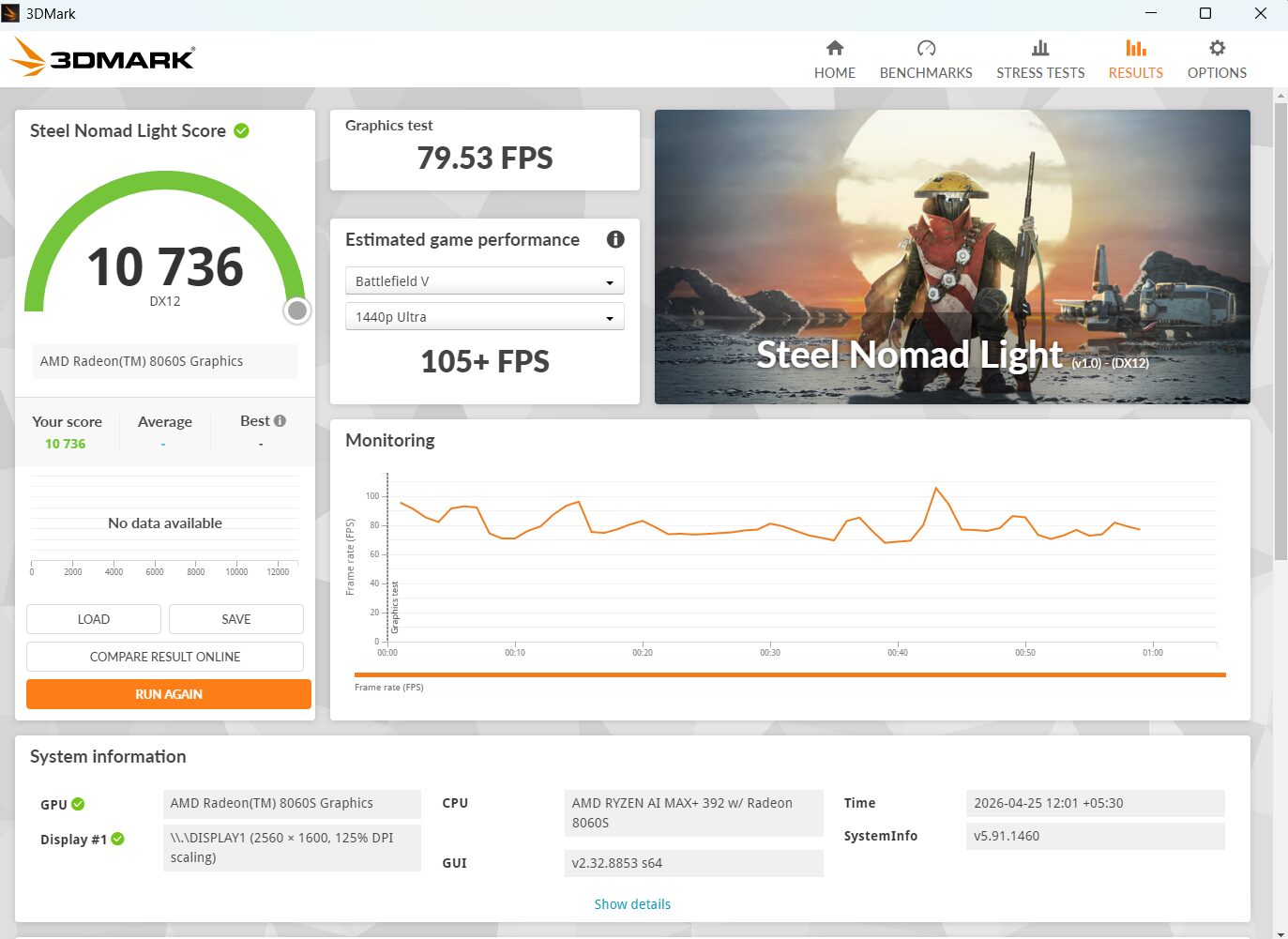
| 3DMark Steel Nomad Light | 10,736 | 79.53 FPS |
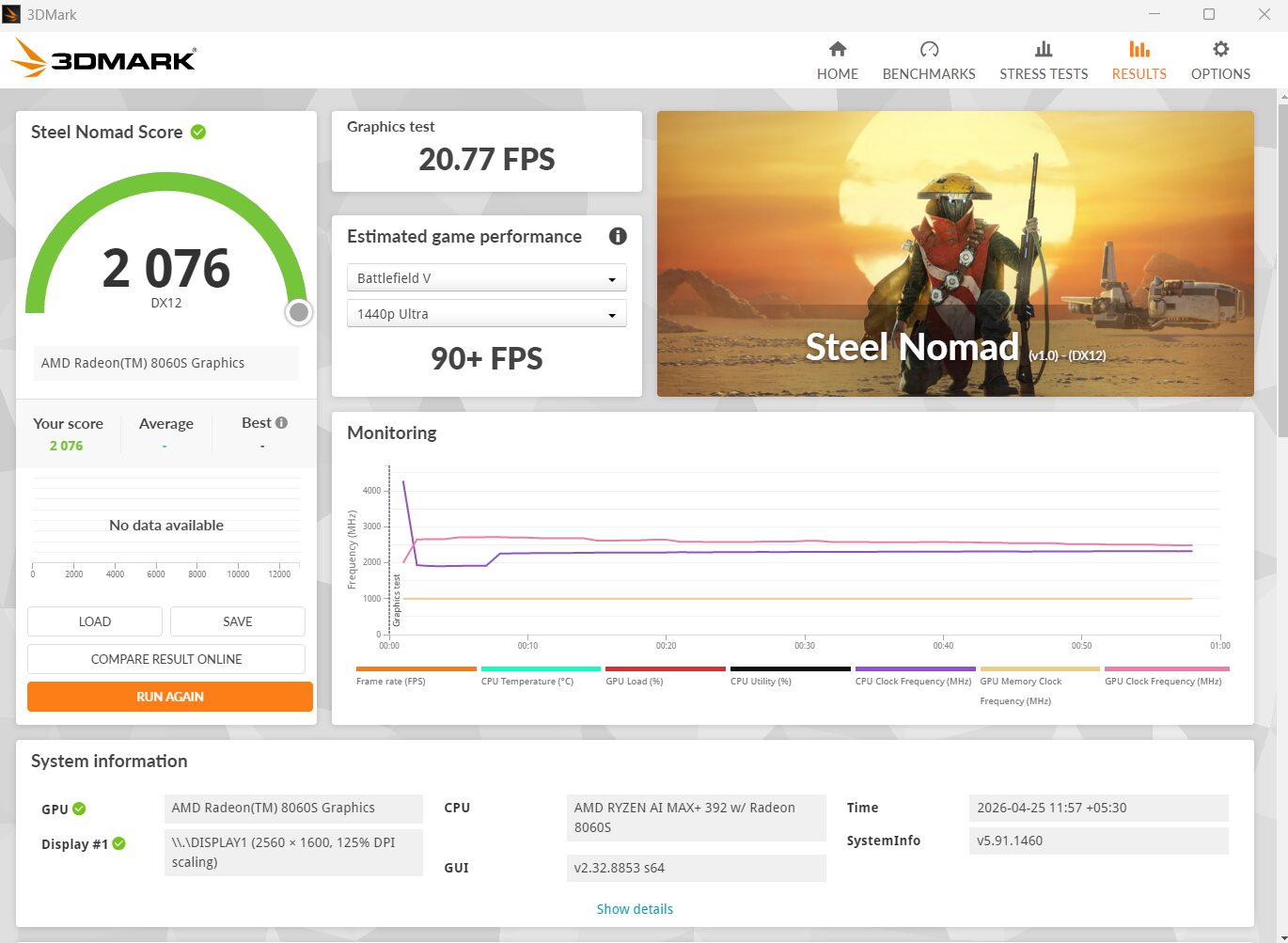
| 3DMark Steel Nomad (heavy DX12) | 2,076 | 20.77 FPS |
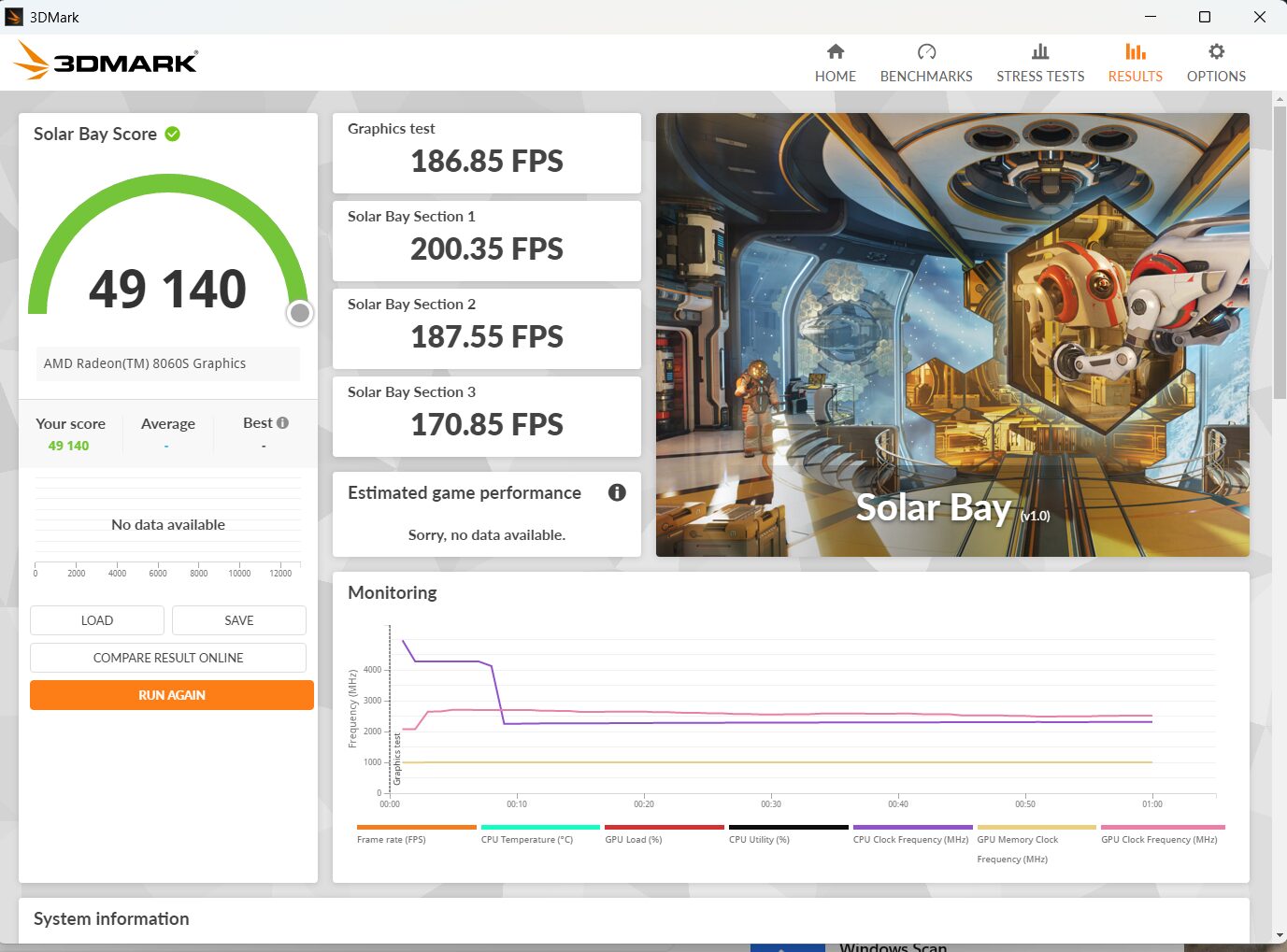
| 3DMark Solar Bay (ray tracing) | 49,140 | 186.85 FPS average |
CrossMark
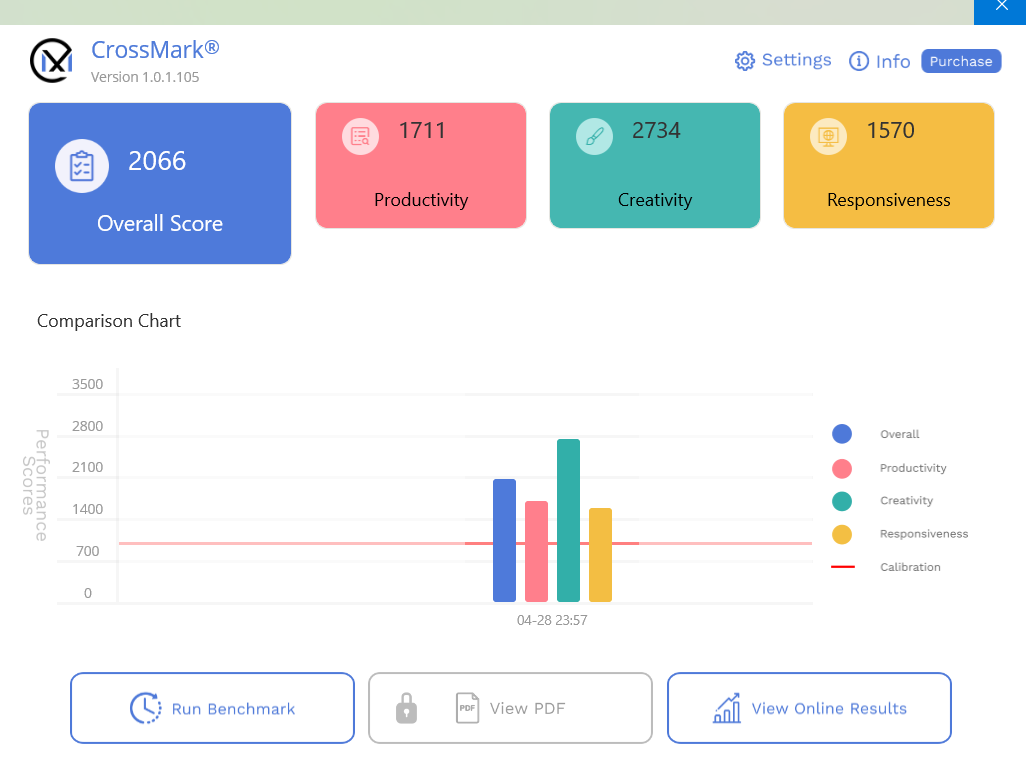
CrossMark – Overall Score (Higher is Better)
| ASUS TUF A14 – Ryzen AI MAX+ 392 | 2,066 | |
| Lenovo Yoga Pro 7 – Core Ultra 9 285H | ~1,700 | |
| MacBook Air M4 | ~1,550 | |
| Typical Core Ultra 7 255H laptop | ~1,300 |
TUF A14 CrossMark breakdown: Productivity 1,711 | Creativity 2,734 | Responsiveness 1,570. The Creativity score leads because those workloads benefit most from the combined CPU-GPU throughput. Yoga Pro 7 score from iLLGaming own testing.
Thermals and Noise
Under sustained CPU-only load (Cinebench multithread), the chip hits 95 degrees C – AMD’s Tctl maximum for this processor – and holds it there without throttling. The fans reach 6,100 RPM. It is loud. That is the physics of a 115W chip in a 14-inch chassis. It is not throttling down like some competing implementations; it runs hot but stable.
Under gaming, the shared power budget changes the thermal picture. In Cyberpunk 2077, the CPU averaged 82 degrees C and the GPU averaged 76 degrees C – well below the ceiling, stable, no throttling. The Lenovo Yoga Pro 7’s Core Ultra 9 285H averaged 96 degrees C during our Cyberpunk session – hotter than the TUF A14 – despite being a nominally lower-power machine. The unified architecture’s ability to distribute TDP dynamically between CPU and GPU is a genuine advantage.
Under light loads: completely silent. The 0dB Ambient Cooling mode cuts fans off entirely during browsing, writing, and video playback. The contrast between full-load and idle behaviour is striking.
Peak CPU Temperature Under Load – Degrees C (Lower is Better)
| Yoga Pro 7 – Cinebench sustained (hit TjMAX, throttled) | 104 C | |
| HP Omen Max 16 – Cinebench sustained | ~97 C | |
| TUF A14 – Cinebench sustained (stable, no throttle) | 95.5 C | |
| Yoga Pro 7 – Cyberpunk gaming average | 96 C avg | |
| TUF A14 – Cyberpunk gaming average | 82 C avg | |
| TUF A14 – Idle / light load | ~44 C |
Source: iLLGaming own HWiNFO64 logging on both machines. The Yoga Pro 7 hit TjMAX and throttled under Cinebench; the TUF A14 held its ceiling steadily without dropping clocks. Under gaming the TUF A14 ran 14 degrees cooler on average than the Yoga Pro 7 – a direct benefit of the unified power budget.
Fan Noise Under Gaming Load – dB Approximate (Lower is Better)
| ROG Flow Z13 – Full Turbo mode | ~50 dB | |
| HP Omen Max 16 – Gaming load | 48-50 dB | |
| Lenovo Yoga Pro 7 – Gaming load | 45-47 dB | |
| TUF A14 – Gaming load, Performance mode | 44-46 dB | |
| TUF A14 – Idle, Silent mode (fans off) | 0 dB | |
| MacBook Air M4/M5 – Always fanless | 0 dB |
The TUF A14’s fans produce a broadband whoosh rather than a high-pitched whine, which blends into game audio better than expected. We gamed through a full Pragmata session without headphones – the fan was audible in quiet moments but game immersion held throughout.
Battery Life
The 73 Wh battery paired with the chip’s genuine efficiency at low loads delivers results that are strong for a machine with this much processing power. In Silent mode our HWiNFO logging showed CPU package power at 13-25W during light use – projecting to 7-8 hours of real-world mixed productivity. Multiple hours of writing, browsing, and video playback on a single charge is a realistic daily expectation. Fast charge brings the battery from zero to 50% in 30 minutes.
Real-World Battery Life – Mixed Use (Hours, Higher is Better)
| MacBook Air M5 (13-inch) | 15+ hrs | |
| MacBook Air M4 (15-inch) | ~14 hrs | |
| MacBook Air M4 (13-inch, mixed real-world) | ~10 hrs | |
| ASUS TUF A14 – Silent profile (our testing) | 7-8 hrs | |
| Lenovo Yoga Pro 7 – Core Ultra 9 285H | 6-7 hrs | |
| HP Omen Max 16 – RTX 5080 (our review) | ~7 hrs | |
| Typical RTX 5060 gaming laptop | 3-4 hrs |
Source: iLLGaming own testing and power monitoring via HWiNFO64. The MacBook Air leads due to architectural advantages (fanless, ARM, tight OS-hardware integration) that Windows laptops cannot match. The gap between the TUF A14 and a typical discrete-GPU gaming laptop is significant – this chip genuinely sips power under light loads. Battery designed capacity: 73,000 mWh. Our review unit: 70,848 mWh full charge (97% health).
Upgradability
RAM is soldered. This must be decided at purchase. If you are planning to keep this laptop for three or more years, buy the 64 GB version. The GPU VRAM allocation in Armoury Crate goes up to 24 GB, and with 64 GB you still have 40 GB left for the OS and applications. On the 32 GB model, assigning 24 GB to the GPU leaves only 8 GB for system use – tight for heavy AI or creative workflows running simultaneously.
Two M.2 slots give you storage expansion: one is occupied by the factory SSD, one is empty. The Wi-Fi card is user-removable. ASUS has been thoughtful about serviceability where the design permitted it.
Who Should Buy the ASUS TUF Gaming A14 FA401EA?
Pure gaming on a budget: look at the previous-gen TUF A14 with RTX 4060 or RTX 5060 at Rs. 1 to 1.3 lakh. Those machines game harder per rupee, DLSS 4 Multi Frame Generation is ahead of FSR 3.1 in quality, and you can buy two of them for the price of the 64 GB version of this machine.
AI workloads, creative performance, long-term ownership: this is the laptop. 1.48 kg, up to 24 GB of GPU-accessible memory, Cinebench 2026 scores that beat most discrete-GPU gaming laptops, and enough gaming headroom to run current AAA titles comfortably with FSR Frame Generation. The 64 GB version at Rs. 2,09,990 is the configuration to choose if you plan to keep it for several years.
Verdict

The ASUS TUF Gaming A14 FA401EA represents something genuinely new in mainstream laptops. AMD’s Ryzen AI MAX+ 392 breaks the CPU-plus-discrete-GPU formula that has defined this category for two decades. The ability to assign up to 24 GB of GPU VRAM – more than an RTX 5080 – from a machine that weighs 1.48 kg and runs silently during productivity work is a headline that deserves to be at the top of every conversation about this laptop.
The trade-offs are real: the price is high for pure gaming, the webcam is average, the keyboard feel will divide opinion, and the previous-gen RTX models remain better value for pure frames-per-rupee buyers. But for the buyer who wants a machine that does something no other laptop at this weight and price can do – one that punches above its weight in CPU benchmarks, enables serious local AI work, and still fits in a backpack – the TUF A14 FA401EA earns its recommendation without reservation.
Review unit provided by ASUS India. Tested on Windows 11 Home, AMD Radeon Software 26.3.1. Benchmarks: Cinebench R24, Cinebench 2026, 3DMark v2.32, CrossMark 1.0.1.105. All thermal and power data logged via HWiNFO64 CSV exports. Gaming benchmarks: Cyberpunk 2077 v2.31, Pragmata. All comparison data from iLLGaming’s own review unit testing.