Estimated reading time: 6 minutes
Most gaming setups today are a patchwork. A desktop from one brand, a monitor from another, a keyboard you bought because Reddit told you to, a mouse that was on discount, and RGB that behaves like a toddler on Holi. We all call these “ecosystems,” but let’s be honest, they’re not. They’re collections of good parts that refuse to talk to each other.
Recently, ASUS sent me their full lineup: a TUF T500 desktop, ROG PG259 monitor, ROG Azoth keyboard, ROG Keris 2 Ace mouse, and ROG Pelta headset. Not for a review. Not to rate each product (even though I have to admit it was tempting). But to see what happens when you put together a single-brand ecosystem in a world where most people mix and match. And when it comes to gaming peripherals, ROG being the most omnipresent of them all, that I suppose we can all agree on. And the experience surprised me, not because everything was “better,” but because everything behaved coherently.
If you’re into building PCs with many different components from different brands, you know exactly the pain you feel when you put your PC on standby but that RAM RGB is going bonkers with 100% brightness. Thats why the magic word: ecosystem.
The Case for an Ecosystem: Coherence Over Specs
An ecosystem isn’t about performance numbers. It’s about devices understanding each other’s contexts. The instant I powered on the TUF T500 desktop, I was greeted with subtle, clinical lighting from the cabinet, monitor, keyboard, mouse and headset, all coordinated! The joy of seeing that coordination with just the push of a button. The entire desk came alive in sync. Not in a flashy RGB way, but in a “these things were designed to coordinate” way. That’s the first benefit: Consistency.
One software, one lighting behaviour, one place for settings.
You realise how much time you waste juggling five different configuration apps only when you don’t have to juggle them anymore. Apart from the time, having all those apps launch at startup significantly decreases the startup speed, eats up RAM, increases power consumption, and gives more annoying notifications, and STILL doesn’t work as intended.
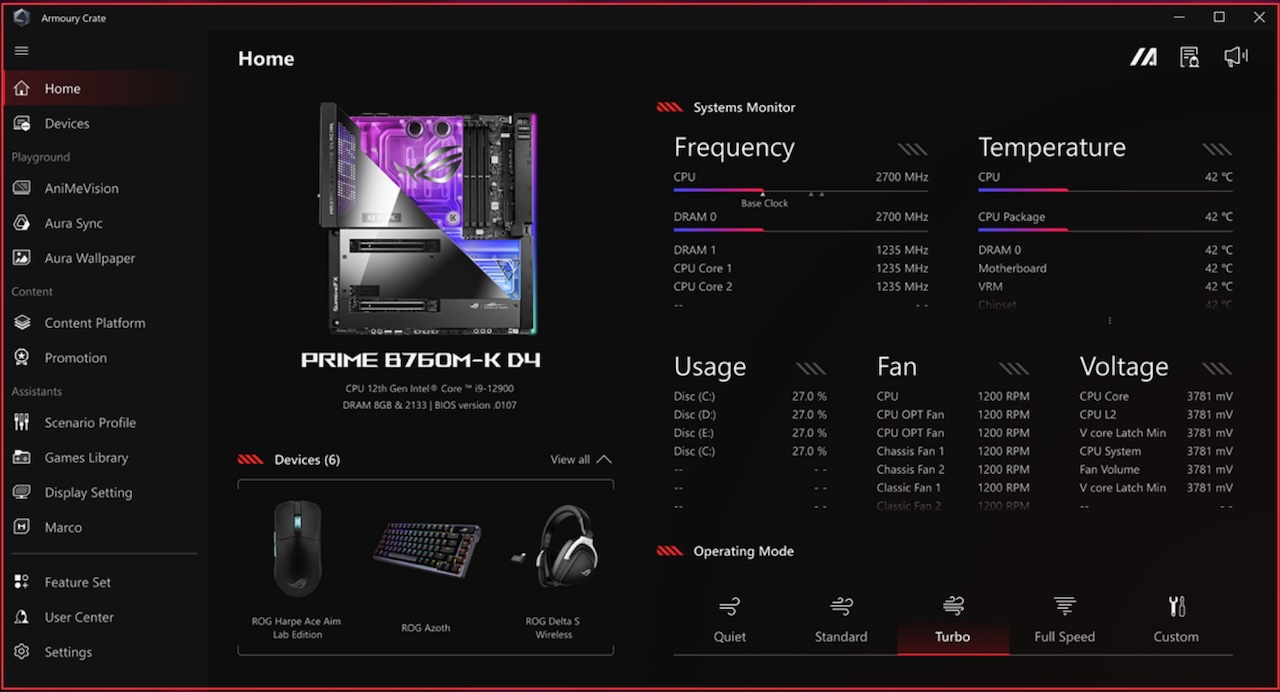
Armoury Crate: Not Perfect, But Central
Let me begin this section by saying this, no ecosystem software is flawless. Armoury Crate has its share of quirks, and I’ve seen it misbehave on some systems in the past. But when it does work smoothly, the benefit is obvious:
- monitor modes
- keyboard profiles
- mouse DPI
- headset EQ
- system performance
All controlled from one place.
It doesn’t feel magical. It feels efficient, and efficiency is what most gamers underestimate. 2025 was the year of efficiency, if you want to draw parallels with CPU and GPU launches during this time period. Even the TUF 500 desktop is all about efficiency: a desktop chassis with laptop internals.
Lighting as Communication, Not Decoration
RGB syncing isn’t new. It’s practically a meme. But here’s something I didn’t expect:
When the ecosystem’s lighting is unified, it becomes informational. When the CPU ramps up, colours shift. When switching profiles, everything reflects it.
When launching a game, the desk subtly transitions into that game’s preset.
It’s not about aesthetics; it’s about feedback. I see it more as aesthetics being the side-effect rather than the main event, but that’s just me. It reminded me that good ecosystems turn noise into signals.
Inputs That Feel Like They Belong Together

The Azoth keyboard and Keris 2 Ace mouse don’t make each other “better”. That’s not how ecosystems work. What they do is remove friction. One interface for macros. One place to adjust sensitivity. One behaviour profile across devices. You can mix a Logitech keyboard with a Razer mouse with a Corsair headset. Nothing wrong with that. But every brand will ask you to speak its own language.
In a single ecosystem, all devices use the same grammar.
Audio Syncing Makes More Difference Than I Expected
The Pelta headset isn’t trying to outshine audiophile gear (gaming headsets seldom do, that’s why I rarely recommend them). But within the ecosystem, it benefits from something the others won’t get:
Automatic alignment with game profiles.
Different EQ, mic modes, and spatial presets load per title without manual tweaking.
It’s small, but meaningful ecosystems excel at removing micro-chores. Playing Arc Raiders, Dota 2 and Battlefield 6 is my daily jam currently, and my mic modes are different for all games. I don’t need to adjust the settings before every launch, and swap when I launch a different game. It’s all taken care of by Armoury Crate.
Monitor Integration is Good, RGB Pointless
The PG259 integrates deeper than I thought. Game-specific display presets sync with the system. Performance profiles adjust display behaviour. Lighting matches the rest of the desk. Although my opinion on monitor RGB being useless still stands. You can absolutely use this monitor with any PC—no problem. But inside the ecosystem, it stops feeling like a standalone item. It becomes part of the desk’s overall rhythm. But the fact will never change, you’re sitting facing the monitor but the RGB lighting sits at the back of the monitor, so it serves YOU no purpose. It’s only helping you flex, while you’re gaming, to somebody else in your room sitting opposite to you, which is going to be a rare occurance.
The Real Benefit: Peace of Mind
People often think ecosystems are about being “locked in.” But in practice, they’re about reducing noise. Fewer apps. Fewer conflicts. Lesser power consumption. Fewer surprises. More predictability.
If you’re someone who mixes brands for the best individual part, nothing wrong with that. I’ve done it for years. But there is a certain peace when everything on your desk is aligned, coordinated, and managed from one place.
The ROG ecosystem showed me that benefit clearly – not because everything became faster, but because everything became simpler.
So Is an Ecosystem Worth It?
Depends on who you are. If you want the absolute best individual keyboard, the best monitor, the best mouse—mixing brands may still give you the optimal combination.
But if you want a setup that:
- configures itself consistently
- speaks one language
- reduces the cognitive load of gaming and productivity
- looks unified without effort
- and behaves like a single system
Then yes, an ecosystem offers a different kind of value. ROG just happened to be the one I tested.
The takeaway isn’t “ROG is superior.” It’s that a well-designed ecosystem changes how you interact with your setup. And once you experience that cohesion, it’s hard not to appreciate the calm it brings to your desk.