

Everyone covering DLSS 4.5 right now is running the same benchmark, pulling the same numbers, and writing the same article. Better image quality, second-gen transformer model, less ghosting, sharper Performance mode. All true. But there is one specific configuration that changes how you think about frame rates entirely, and most people haven’t tried it because Dynamic Multi Frame Generation only became available today, March 31st, through the NVIDIA App beta.
I tested it in Cyberpunk 2077 on an RTX 5090 paired with a Ryzen 9800X3D. Here is what happened.
Start With the Ugly Number
Before anything else, you need to understand what Cyberpunk 2077 at 4K with Path Tracing actually costs you. Everything maxed. No DLSS. No frame generation. Just the GPU doing the work.
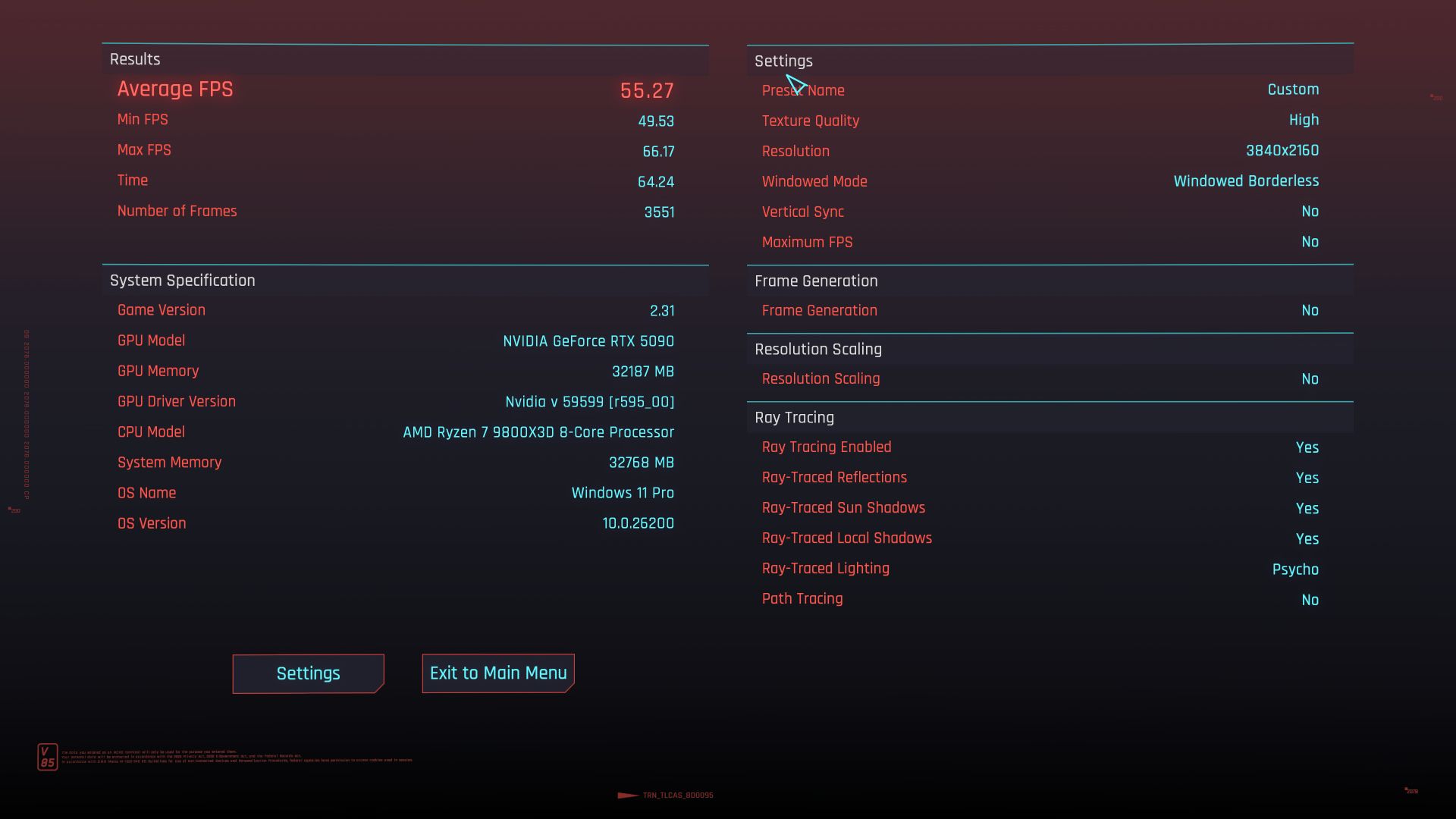
The RTX 5090 averaged 55.25 fps.
That number will anchor everything that follows. The most powerful consumer GPU NVIDIA has ever shipped, paired with the best gaming CPU AMD makes right now, cannot hold 60 fps in Cyberpunk at 4K with Path Tracing fully on. For context, Tom’s Hardware measured the RTX 5090 at around 59 fps in the same scenario at launch. Our 55.25 result is at the strong end of that range, and the 9800X3D’s gaming-optimised L3 cache likely helps keep that number from dropping further in CPU-sensitive scenes.
This is not a criticism of the card. Path Tracing in Cyberpunk is the most computationally expensive rendering technique available in any game right now. It is not ray tracing with a few extra effects — it is a complete physical simulation of how light moves through Night City, calculated per frame, in real time. When I wrote about NVIDIA’s CES 2026 presentation back in January, the central argument was that performance is no longer a simple thing. Frames are now synthesised, managed, and negotiated against your display. The 55 fps native result is exactly why that argument exists. The fact that any consumer GPU gets 55 fps doing this is genuinely impressive. But 55 fps is still 55 fps, and Cyberpunk deserves better.
The fact that any consumer GPU gets 55 fps doing this is genuinely impressive. But 55 fps is still 55 fps, and Cyberpunk deserves better.
What Dynamic Multi Frame Generation Actually Does
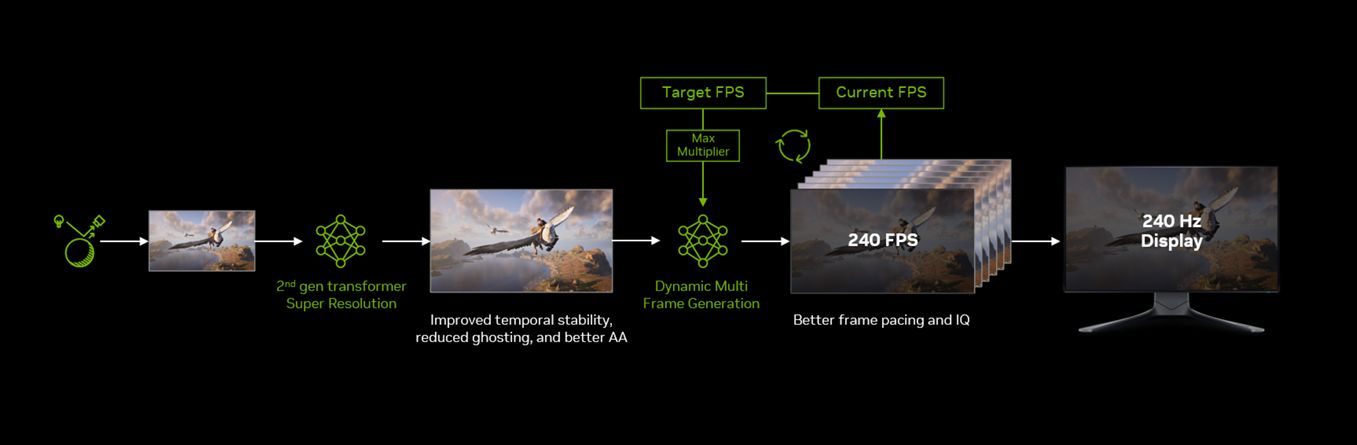
DLSS 4.5 Dynamic Multi Frame Generation is new as of today. This is not the static 4X or 6X mode that most reviewers have been testing. Those required you to lock a multiplier and live with whatever frame rate resulted. Dynamic MFG works differently: you set a target frame rate in the NVIDIA App, and the system continuously adjusts the multiplier on the fly, cycling between 2X, 3X, 4X, and up to 6X, to hit that target as scene complexity fluctuates.
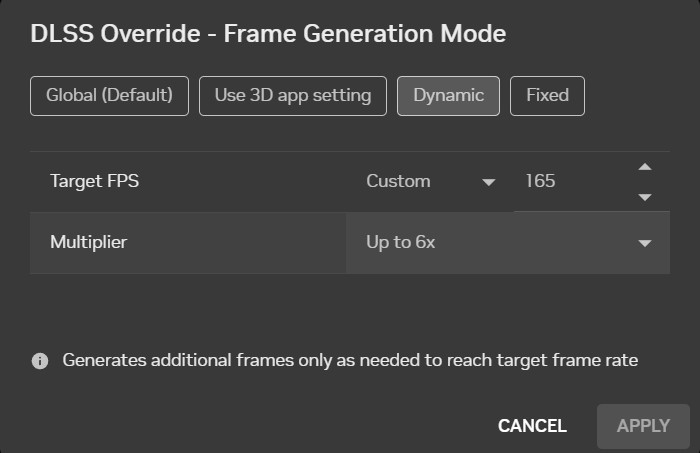
In the NVIDIA App override, the setup is straightforward: DLSS override set to Dynamic, desired FPS set to your target, Frame Generation set to Up to 6X. With my 165Hz display, I set the target to 165 fps, DLSS Quality mode, Ray Reconstruction on, Path Tracing on.
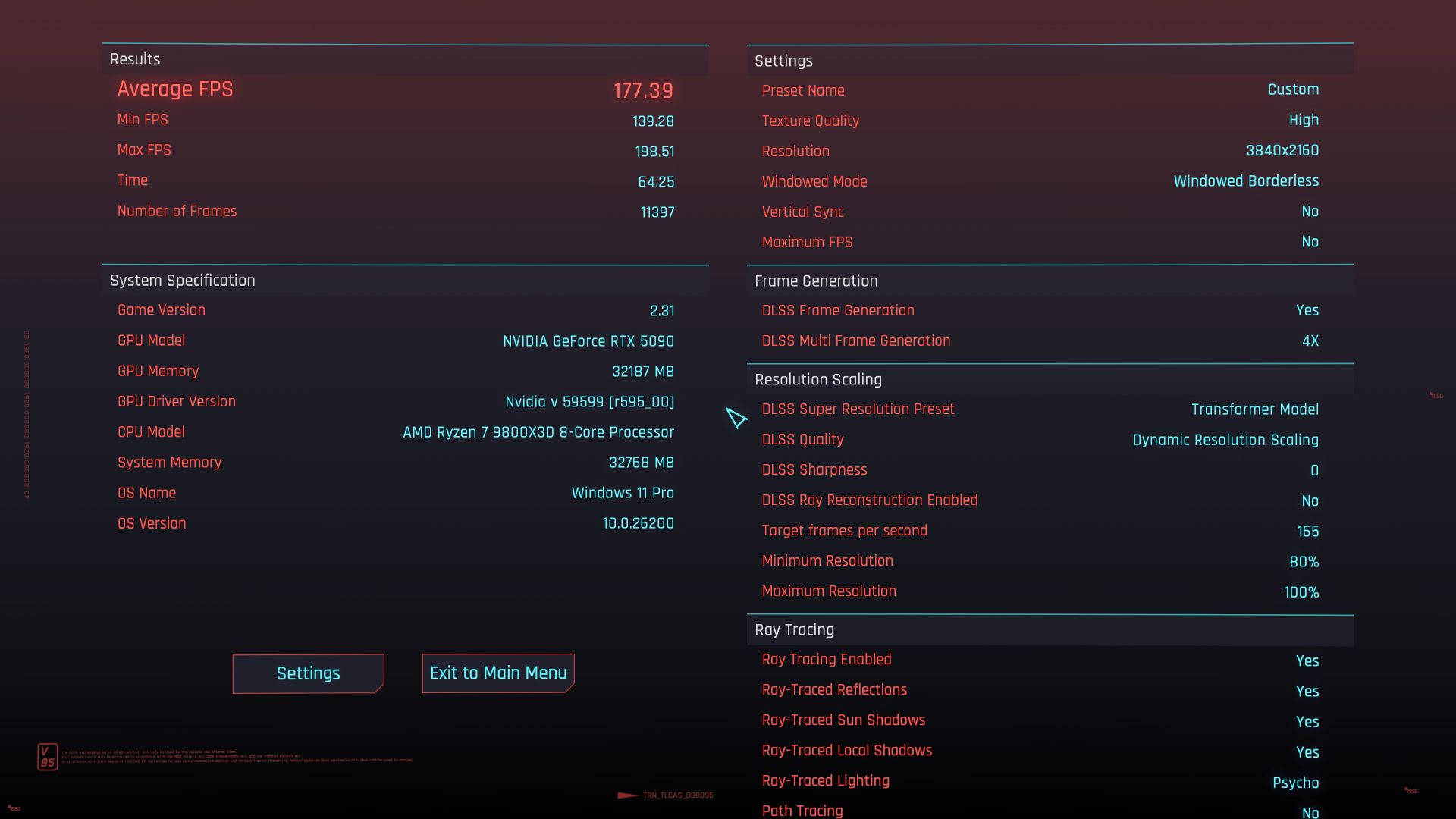
Result: 172.21 avg fps.
The system hit and held my monitor’s refresh rate almost exactly, while actively managing the multiplier behind the scenes. I wasn’t chasing a number, the number came to me. Being an enthusiast who always wants the best, I was thrilled knowing the fact that I was always getting the maximum visual fidelity my system could give me, at any given point of time, without the need of having to keep changing visual settings. That is a genuinely different experience compared to manually picking a static multiplier and hoping it works out across varied scenes.
The contrast with static 6X is worth spelling out. With a fixed 6X multiplier, the GPU is rendering roughly 28 real frames per second at Quality mode and filling the remaining slots with AI-generated frames. At that point you are asking a lot of the interpolation model. With Dynamic mode, the system pulls back the multiplier when it has headroom and only pushes higher when the scene demands it. The result is a more stable image in motion, and if you’ve read our ARC Raiders performance analysis, you’ll know that frame generation working on top of a consistent, well-managed base is the difference between it enhancing your experience and exposing weaknesses. Dynamic MFG is essentially NVIDIA solving that problem at the driver level, rather than leaving it to game developers to manage.
The Image Quality Story
With Ray Reconstruction on and Path Tracing active, Night City looks as good as Cyberpunk 2077 can possibly look right now. The wet asphalt on the highway reflects neon signs in a way that rasterised rendering cannot reproduce. Puddles show the actual geometry of the environment above them, not a pre-baked approximation. Moving through a crowded street at night, you are watching real-time light bounce calculation on every surface simultaneously.
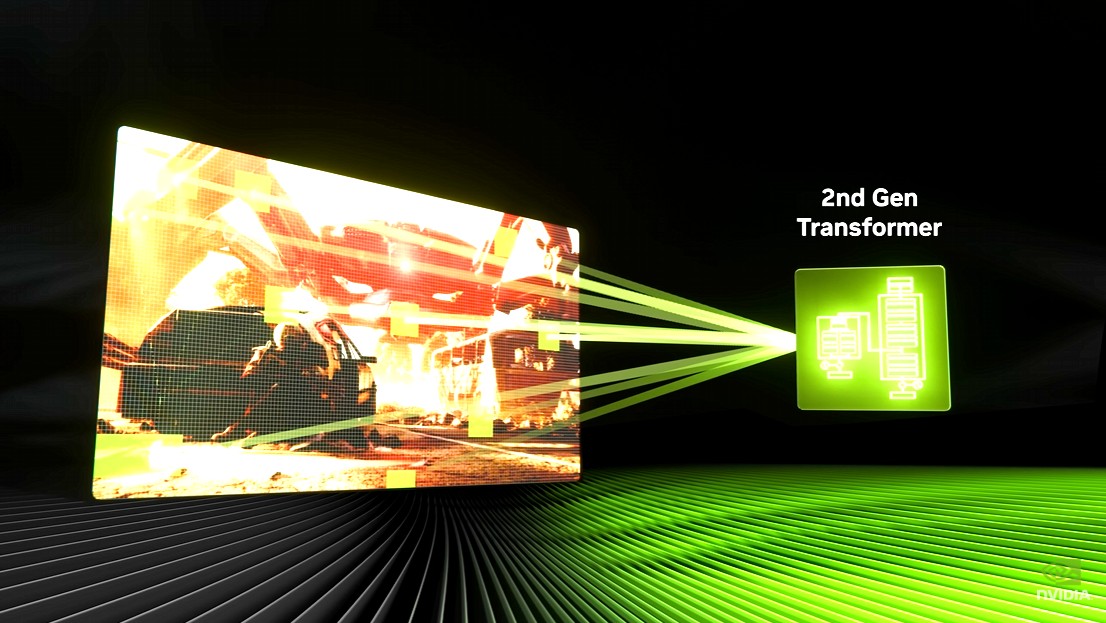
This is also where the second-gen transformer model in DLSS 4.5 Super Resolution earns its keep. In a blind test conducted by ComputerBase with thousands of participants, DLSS 4.5 Super Resolution beat native resolution in perceived image quality across all six games tested. In Cyberpunk specifically, the improvement over DLSS 4 is most visible in Performance and Ultra Performance modes, where the transformer has fewer rendered pixels to work with and has to do more reconstruction work. At Quality mode, where I was running, the difference versus DLSS 4 is subtle but present, particularly in fine detail on distant geometry and in how thin objects like railings and lamp posts hold together during camera movement.
In Cyberpunk specifically, the improvement over DLSS 4 is most visible in Performance and Ultra Performance modes, where the transformer has fewer rendered pixels to work with and has to do more reconstruction work.
It is also worth noting what Ray Reconstruction is actually doing in this context. RR is a dedicated AI denoiser specifically for path traced effects. It replaces the standard denoiser in the pipeline with a neural network model that produces cleaner, more stable results. In Cyberpunk with Path Tracing active, having it on is not optional if you care about image quality. The visual difference is significant enough that I would not run Path Tracing without it.
The Latency Question
Frame generation adds latency. This has been documented extensively, and anyone who has followed DLSS 4 already knows it. What is worth adding here, specifically for Dynamic MFG: because the multiplier is not fixed, the latency profile varies scene by scene rather than sitting at a constant elevated value. In a heavy scene where the system is pushing 5X or 6X generation, latency will be higher. In a lighter scene where it is running 2X, it is barely measurable with Reflex active.
For Cyberpunk specifically, a single-player open world game where no frame-perfect inputs are required, this is an acceptable trade in every configuration I tested. The smoothness improvement at 172 avg fps is real and immediate. For competitive gaming, the calculus is different, but that is not what Cyberpunk is. The key to low latency here is to have a high baseline, preferably over 60fps, with MFG disabled. As shared before, we had a baseline of about 56 fps, which is passable.
What This Means for the Broader RTX 5000 Stack
Our RE Requiem RTX 5000 benchmark analysis showed the RTX 5090 going from 37 fps DLAA native to 137 fps with MFG 4X in Path Tracing: a linear, predictable scaling curve. Cyberpunk’s numbers tell a similar story. The 5090 at 55 fps native, pushed to 172 fps average with Dynamic MFG targeting 165Hz, is that same principle playing out in a different game: AI rendering transforming an unplayable configuration into one that matches your display’s refresh rate precisely.
The more important implication is what this means for cards lower down the stack. Dynamic MFG’s target-fps approach is more forgiving of a lower base frame rate than static high-multiplier mode, because the system will not push a 4X or 6X multiplier if it already has enough headroom at 2X. A 5080 at roughly 35-40 fps native Path Tracing in Cyberpunk, running Dynamic MFG with a 120Hz target, should be a genuinely good experience. The system manages the multiplier to hit the target without overworking the interpolation model unnecessarily.
Path Tracing is no longer a 5090-exclusive experience. Dynamic MFG is the feature that makes it accessible down the RTX 50 lineup in a meaningful way, and Cyberpunk 2077 is still the best showcase for what that combination actually looks like.
Path Tracing is no longer a 5090-exclusive experience. Dynamic MFG is the feature that makes it accessible down the RTX 50 lineup in a meaningful way, and Cyberpunk 2077 is still the best showcase for what that combination actually looks like.
The Real Recommendation
After running this properly, here is where I land.
For a 165Hz 4K monitor, Dynamic MFG with the target set to your display’s refresh rate is the correct way to use DLSS 4.5 in Cyberpunk. Not static 6X, which produces higher peak benchmark numbers that look impressive in charts but puts more stress on the interpolation model than the image quality justifies. Dynamic mode is smarter, more stable, and locks to your display’s capability rather than exceeding it pointlessly. Like how the German’s would describe it: it’s efficient. It maximises results, reduces the use of rendering where it’s not required, so a win-win in all aspects. Keep in mind that this also translates to lower power consumption and less heat. And these things add up with time.
The 172 avg fps result at a 165Hz target, with Ray Reconstruction and Path Tracing both fully active, is what actually using DLSS 4.5 in Cyberpunk feels like in daily use. That is the number that matters, not the headline figure you will see everywhere else. Both are real. One is a benchmark curiosity; the other is what you actually run Night City on.
The 55 fps native baseline contextualises all of it. DLSS 4.5 Dynamic MFG takes the most visually demanding mode in gaming, one that brings the best GPU on the market to its knees, and makes it not just playable but locked to your monitor’s refresh rate with the best image quality the game can produce. That is not a workaround. That is the feature working exactly as designed.
Whether the cost of an RTX 5090 justifies it is a separate question. But if you own one and you are still running Cyberpunk without Dynamic MFG enabled, you are leaving the best version of this machine on the table.
Test System
MSI X870E Edge Ti WiFi | AMD Ryzen 7 9800X3D | AORUS Master RTX 5090 | Kingston Fury Beast DDR5 32GB | Antec 1300W PSU | CM Atmos 360 AIO
Game Settings
Cyberpunk 2077 | Built-in benchmark | 4K (3840×2160) | Path Tracing: Overdrive | All settings maxed | DLSS Quality | Ray Reconstruction: On | Dynamic MFG: Up to 6X | Target: 165fps





Ray Reconstruction its actually not working with Model M/L (DLSS4.5) yet, in some games activating it sends the DLSS back to model K (DLSS 4.0) or it does nothing. Update the test in august ;)
It does work, but with a special driver that I dont think is public yet. Should get public by Sep 25th
Ray Reconstruction its actually not working with Model M/L (DLSS4.5) yet, in some games activating it sends the DLSS back to model K (DLSS 4.0) or it does nothing. Update the test in august ;) (Last comment didn’t post?)