Your RTX 5000 Card
Is Running Pragmata
Wrong. Here’s the Fix.
Path tracing exclusive to Nvidia. DLSS 4.5 Dynamic MFG. A weird 8GB vs 16GB anomaly nobody warned you about. We tested every Blackwell card so you don’t waste fps you already paid for.
Pragmata is Capcom’s most technically ambitious PC release in years. Built on the RE Engine with full path tracing support, DLSS 4.5 with Dynamic Multi Frame Generation, and Ray Reconstruction baked in, it’s the kind of game that rewards knowing your hardware. This guide covers the entire RTX 5000 lineup, from the 5050 all the way up to the 5090, with specific settings recommendations for each card.
Before we get into per-GPU recommendations, two things you need to do regardless of which card you have. First, let the shader compilation step finish at first launch. It takes a few minutes but it’s the difference between a smooth experience and inexplicable hitches during combat. Second, update your GeForce drivers. Nvidia shipped a Game Ready Driver specifically for Pragmata, and path tracing performance in particular improves meaningfully with it.
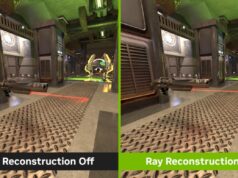
Path tracing in Pragmata is exclusive to Nvidia RTX GPUs. The option is completely greyed out on AMD hardware. If you’re on a GeForce card, this is your advantage — and this guide is built around making the most of it.
Understanding the Three Lighting Modes
Pragmata gives you three distinct rendering tiers, and which one you use defines the entire character of the image. Rasterisation with RT off is fast and clean, though the game’s lunar interiors lose a significant amount of atmosphere without reflections. Standard Ray Tracing adds RT Global Illumination and RT Reflections, and critically, the performance cost in this game is lower than you might expect from past RE Engine titles — there’s genuinely no reason to leave it off if you’re on a mid-range card or above. Path Tracing is the full simulation: every light bounce physically calculated, dramatically better shadows, and reflections that feel grounded in reality rather than approximated. The cost is severe at native resolution, but paired with DLSS upscaling and frame generation, it becomes a realistic everyday option on the right hardware.
One community note worth flagging: some players feel path tracing’s reflections look too glossy, giving metallic surfaces an overly polished “mirror spam” quality. It’s not wrong — PT reflections are physically accurate but can read as artificial in certain environments. If you find it distracting, standard RT is not a compromise, it’s a legitimate choice.
GPU-by-GPU Recommendations
In path tracing benchmarks, the 8GB model consistently outperforms the 16GB model by 25–28% across all resolutions. This appears to be a driver or VRAM allocation issue specific to Nvidia’s larger-VRAM Blackwell SKUs rather than a hardware limitation. The gap also shows up (at a smaller scale) in standard rasterisation. Check for driver updates — this is the kind of thing that often gets patched. In the meantime, 8GB owners have an unexpected advantage in PT scenarios.
Universal Tips for All RTX 5000 Cards
Quick Reference Summary Table
| GPU | Sweet Spot Res | Lighting Mode | DLSS Preset | Frame Gen |
|---|---|---|---|---|
| RTX 5090 | 4K | Path Tracing | Quality / DLAA | Dynamic MFG |
| RTX 5080 | 4K | Path Tracing | Performance | 2x |
| RTX 5070 Ti | 1440p / 4K | Path Tracing | Quality (1440p) / Balanced (4K) | 2x at 4K |
| RTX 5070 | 1440p | Path Tracing | Quality | 2x |
| RTX 5060 Ti 16GB | 1440p | Standard RT | Quality | Optional |
| RTX 5060 Ti 8GB | 1080p | Path Tracing* | Balanced | Optional |
| RTX 5060 | 1080p | Standard RT | Quality | Optional |
| RTX 5050 | 1080p | Standard RT | Balanced | Cautious |
* 5060 Ti 8GB anomaly — outperforms 16GB model in PT scenarios due to suspected driver bug. Verify with latest drivers.
Pragmata is genuinely well-optimised for a modern AAA title. The RE Engine doesn’t punish mid-range hardware the way Unreal Engine 5 does. Standard RT is so efficient that there’s no reason to leave it off on any RTX 5000 card. Path tracing is a true visual upgrade — particularly at 4K — but DLSS upscaling and frame generation are the tools that make it a daily driver rather than a benchmark screenshot. Use them without guilt.
FAQ
Q: Does Pragmata support path tracing on AMD GPUs? No. Path tracing in Pragmata is exclusive to Nvidia GeForce RTX GPUs. The option is completely greyed out on AMD hardware, including the RX 9000 series.
Q: What is the best DLSS setting for Pragmata? It depends on your GPU. RTX 5090 and 5080 users should use DLSS Quality or DLAA at 4K. RTX 5070 Ti and below benefit from DLSS Balanced at 4K, or DLSS Quality at 1440p, paired with frame generation.
Q: Is the RTX 5060 Ti 8GB better than the 16GB for Pragmata? In path tracing benchmarks specifically, yes — the 8GB model outperforms the 16GB by around 25–28%. This appears to be a driver or VRAM allocation bug rather than a hardware difference. In standard rasterisation, the 16GB model has a modest edge at higher resolutions.
Q: Do I need to enable path tracing in Pragmata? No, but it is the best-looking lighting mode by a significant margin. Standard ray tracing is efficient enough in Pragmata that every RTX 5000 card can run it comfortably at 60fps+ at 1080p. Path tracing is only worth enabling if you have an RTX 5060 Ti or above and are running DLSS with frame generation.
Q: What are the VRAM requirements for Pragmata path tracing at 4K? 4K path tracing uses approximately 17GB of VRAM. Adding 4x frame generation pushes this to around 18GB. This means the RTX 5070 Ti (16GB) is technically below the ceiling — monitor VRAM usage. The RTX 5080 and 5090 are safe.
Q: Should I turn on Chromatic Aberration in Pragmata? No. The community consensus is strongly against it — turn it off along with Lens Effects and Depth of Field for a cleaner, sharper image with no performance cost.